mirror of
https://github.com/ByteByteGoHq/system-design-101.git
synced 2026-04-23 09:17:24 -04:00
 ee4b7305a2
This PR adds all the guides from [Visual
Guides](https://bytebytego.com/guides/) section on bytebytego to the
repository with proper links.

- [x] Markdown files for guides and categories are placed inside
`data/guides` and `data/categories`
- [x] Guide links in readme are auto-generated using
`scripts/readme.ts`. Everytime you run the script `npm run
update-readme`, it reads the categories and guides from the above
mentioned folders, generate production links for guides and categories
and populate the table of content in the readme. This ensures that any
future guides and categories will automatically get added to the readme.
- [x] Sorting inside the readme matches the actual category and guides
sorting on production
39 lines
1.4 KiB
Markdown
39 lines
1.4 KiB
Markdown
---
|
||
title: "Designing a Chat Application"
|
||
description: "Explore the architecture of chat apps like WhatsApp and Messenger."
|
||
image: "https://assets.bytebytego.com/diagrams/0134-chat-app.jpeg"
|
||
createdAt: "2024-03-10"
|
||
draft: false
|
||
categories:
|
||
- how-it-works
|
||
tags:
|
||
- architecture
|
||
- messaging
|
||
---
|
||
|
||
|
||
|
||
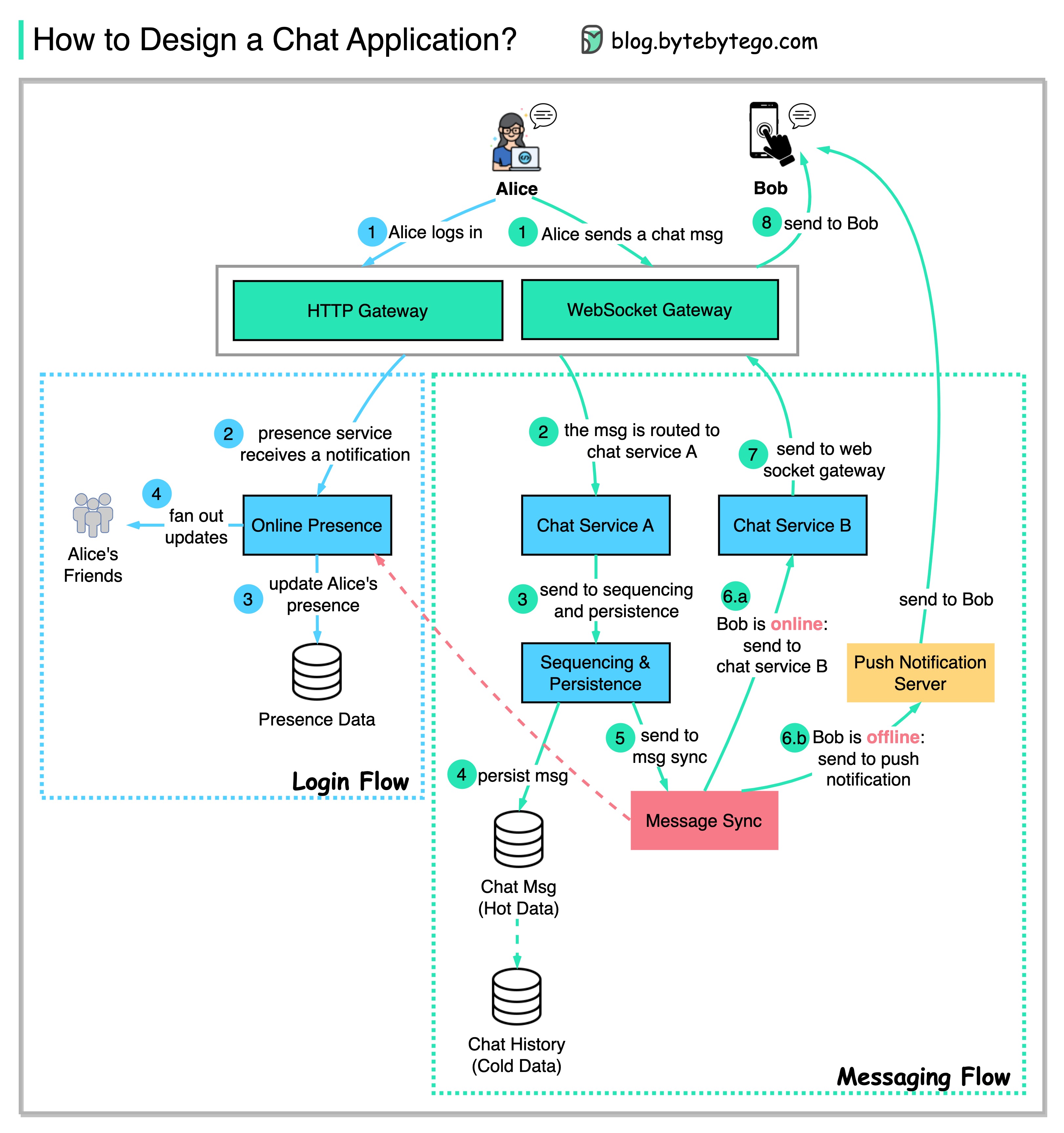
The diagram below shows a design for a simplified 1-to-1 chat application.
|
||
|
||
## User Login Flow
|
||
|
||
* Step 1: Alice logs in to the chat application and establishes a web socket connection with the server side.
|
||
|
||
* Steps 2-4: The presence service receives Alice's notification, updates her presence, and notifies Alice's friends about her presence.
|
||
|
||
## Messaging Flow
|
||
|
||
* Steps 1-2: Alice sends a chat message to Bob. The chat message is routed to Chat Service A.
|
||
|
||
* Steps 3-4: The chat message is sent to the sequencing service, which generates a unique ID, and is persisted in the message store.
|
||
|
||
* Step 5: The chat message is sent to the message sync queue to sync to Bob’s chat service.
|
||
|
||
* Step 6: Before forwarding the messaging, the message sync service checks Bob’s presence:
|
||
|
||
* If Bob is online, the chat message is sent to chat service B.
|
||
|
||
* If Bob is offline, the message is sent to the push server and pushed to Bob’s device.
|
||
|
||
* Steps 7-8: If Bob is online, the chat message is pushed to Bob via the web socket.
|