mirror of
https://github.com/ByteByteGoHq/system-design-101.git
synced 2026-04-24 09:47:24 -04:00
 ee4b7305a2
This PR adds all the guides from [Visual
Guides](https://bytebytego.com/guides/) section on bytebytego to the
repository with proper links.

- [x] Markdown files for guides and categories are placed inside
`data/guides` and `data/categories`
- [x] Guide links in readme are auto-generated using
`scripts/readme.ts`. Everytime you run the script `npm run
update-readme`, it reads the categories and guides from the above
mentioned folders, generate production links for guides and categories
and populate the table of content in the readme. This ensures that any
future guides and categories will automatically get added to the readme.
- [x] Sorting inside the readme matches the actual category and guides
sorting on production
39 lines
1.4 KiB
Markdown
39 lines
1.4 KiB
Markdown
---
|
|
title: "How Google/Apple Maps Blur License Plates and Faces"
|
|
description: "Explore how Google/Apple Maps blur sensitive data on Street View."
|
|
image: "https://assets.bytebytego.com/diagrams/0347-street-view-blurring-system.png"
|
|
createdAt: "2024-03-02"
|
|
draft: false
|
|
categories:
|
|
- how-it-works
|
|
tags:
|
|
- "Machine Learning"
|
|
- "Image Processing"
|
|
---
|
|
|
|
|
|
|
|
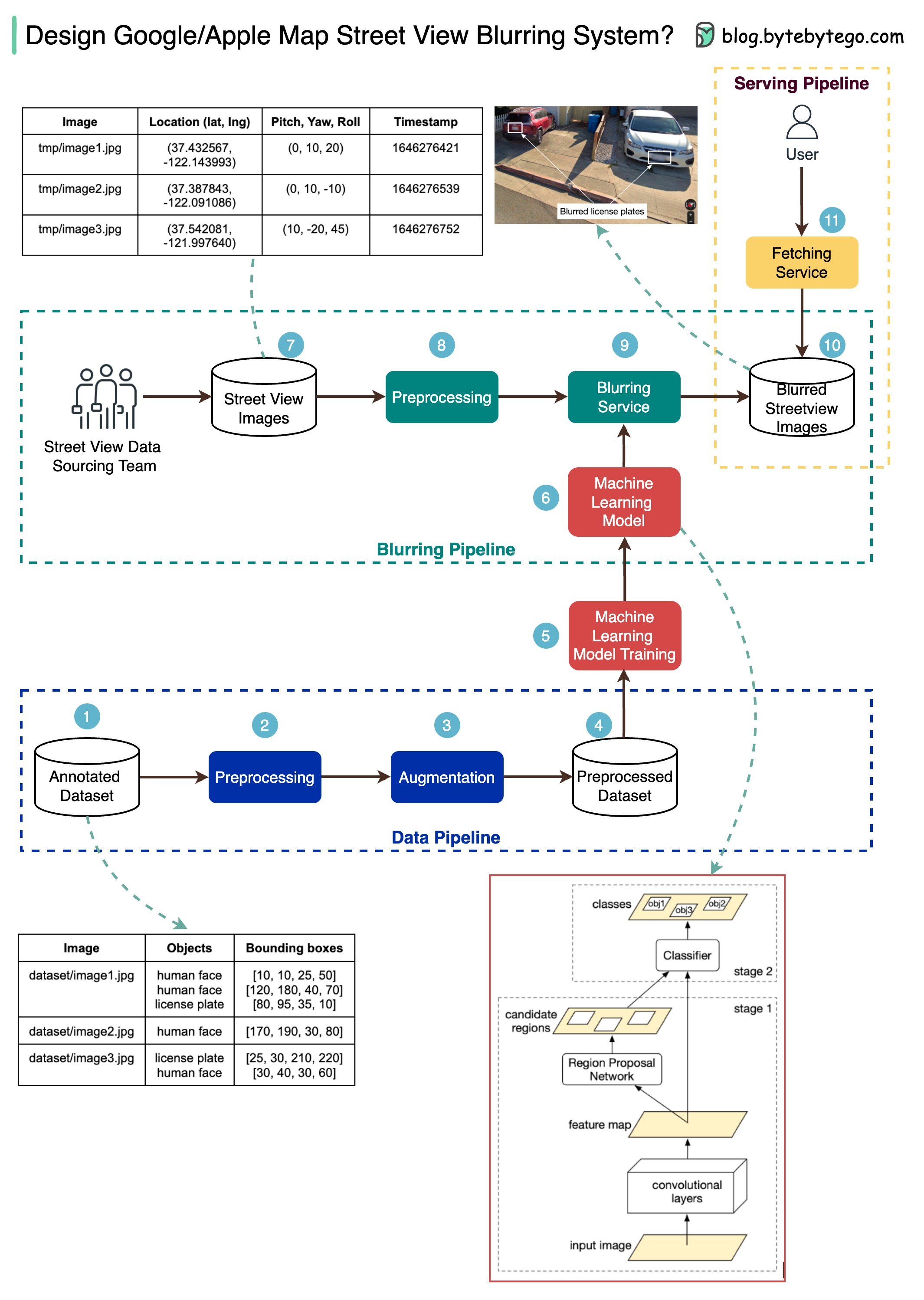
The diagram below presents a possible solution that might work in an interview setting.
|
|
|
|
The high-level architecture is broken down into three stages:
|
|
|
|
* Data pipeline - prepare the training data set
|
|
* Blurring pipeline - extract and classify objects and blur relevant objects, for example, license plates and faces.
|
|
* Serving pipeline - serve blurred street view images to users.
|
|
|
|
## Data Pipeline
|
|
|
|
Step 1: We get the annotated dataset for training. The objects are marked in bounding boxes.
|
|
|
|
Steps 2-4: The dataset goes through preprocessing and augmentation to be normalized and scaled.
|
|
|
|
Steps 5-6: The annotated dataset is then used to train the machine learning model, which is a 2-stage network.
|
|
|
|
## Blurring Pipeline
|
|
|
|
Steps 7-10: The street view images go through preprocessing, and object boundaries are detected in the images. Then sensitive objects are blurred, and the images are stored in an object store.
|
|
|
|
## Serving Pipeline
|
|
|
|
Step 11: The blurred images can now be retrieved by users.
|