mirror of
https://github.com/ByteByteGoHq/system-design-101.git
synced 2026-04-07 10:47:25 -04:00
 ee4b7305a2
This PR adds all the guides from [Visual
Guides](https://bytebytego.com/guides/) section on bytebytego to the
repository with proper links.

- [x] Markdown files for guides and categories are placed inside
`data/guides` and `data/categories`
- [x] Guide links in readme are auto-generated using
`scripts/readme.ts`. Everytime you run the script `npm run
update-readme`, it reads the categories and guides from the above
mentioned folders, generate production links for guides and categories
and populate the table of content in the readme. This ensures that any
future guides and categories will automatically get added to the readme.
- [x] Sorting inside the readme matches the actual category and guides
sorting on production
67 lines
2.2 KiB
Markdown
67 lines
2.2 KiB
Markdown
---
|
|
title: "The 12-Factor App"
|
|
description: "Best practices for building modern, scalable, and reliable applications."
|
|
image: "https://assets.bytebytego.com/diagrams/0028-12-factor-app.png"
|
|
createdAt: "2024-02-21"
|
|
draft: false
|
|
categories:
|
|
- cloud-distributed-systems
|
|
tags:
|
|
- "Application Architecture"
|
|
- "Best Practices"
|
|
---
|
|
|
|
|
|
|
|
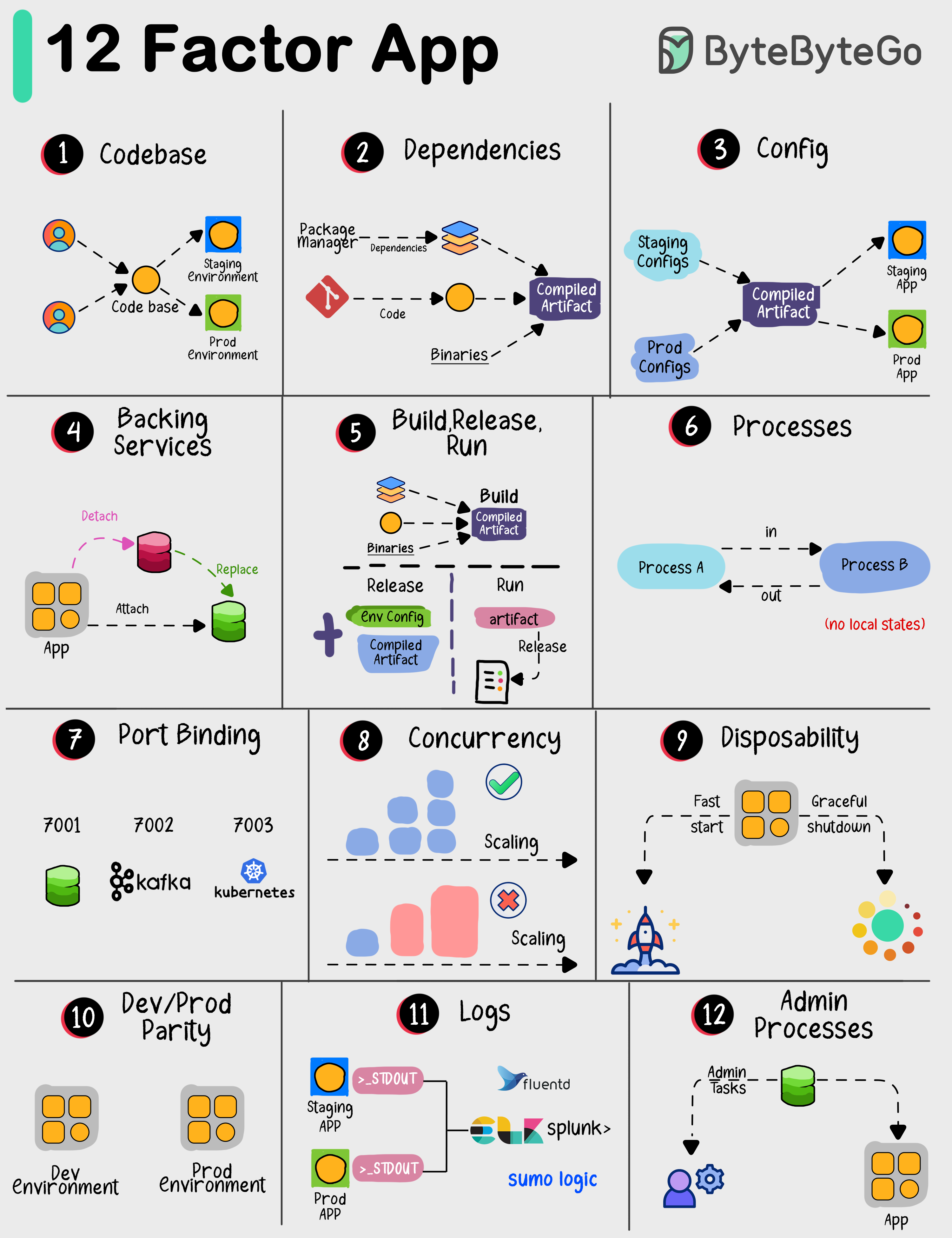
The "12 Factor App" offers a set of best practices for building modern software applications. Following these 12 principles can help developers and teams in building reliable, scalable, and manageable applications.
|
|
|
|
Here's a brief overview of each principle:
|
|
|
|
## I. Codebase
|
|
|
|
Have one place to keep all your code, and manage it using version control like Git.
|
|
|
|
## II. Dependencies
|
|
|
|
List all the things your app needs to work properly, and make sure they're easy to install.
|
|
|
|
## III. Config
|
|
|
|
Keep important settings like database credentials separate from your code, so you can change them without rewriting code.
|
|
|
|
## IV. Backing Services
|
|
|
|
Use other services (like databases or payment processors) as separate components that your app connects to.
|
|
|
|
## V. Build, Release, Run
|
|
|
|
Make a clear distinction between preparing your app, releasing it, and running it in production.
|
|
|
|
## VI. Processes
|
|
|
|
Design your app so that each part doesn't rely on a specific computer or memory. It's like making LEGO blocks that fit together.
|
|
|
|
## VII. Port Binding
|
|
|
|
Let your app be accessible through a network port, and make sure it doesn't store critical information on a single computer.
|
|
|
|
## VIII. Concurrency
|
|
|
|
Make your app able to handle more work by adding more copies of the same thing, like hiring more workers for a busy restaurant.
|
|
|
|
## IX. Disposability
|
|
|
|
Your app should start quickly and shut down gracefully, like turning off a light switch instead of yanking out the power cord.
|
|
|
|
## X. Dev/Prod Parity
|
|
|
|
Ensure that what you use for developing your app is very similar to what you use in production, to avoid surprises.
|
|
|
|
## XI. Logs
|
|
|
|
Keep a record of what happens in your app so you can understand and fix issues, like a diary for your software.
|
|
|
|
## XII. Admin Processes
|
|
|
|
Run special tasks separately from your app, like doing maintenance work in a workshop instead of on the factory floor.
|