 ee4b7305a2
This PR adds all the guides from [Visual
Guides](https://bytebytego.com/guides/) section on bytebytego to the
repository with proper links.

- [x] Markdown files for guides and categories are placed inside
`data/guides` and `data/categories`
- [x] Guide links in readme are auto-generated using
`scripts/readme.ts`. Everytime you run the script `npm run
update-readme`, it reads the categories and guides from the above
mentioned folders, generate production links for guides and categories
and populate the table of content in the readme. This ensures that any
future guides and categories will automatically get added to the readme.
- [x] Sorting inside the readme matches the actual category and guides
sorting on production
1.8 KiB
title, description, image, createdAt, draft, categories, tags
| title | description | image | createdAt | draft | categories | tags | |||
|---|---|---|---|---|---|---|---|---|---|
| SQL Statement Execution in Database | Explore the steps of SQL statement execution within a database system. | https://assets.bytebytego.com/diagrams/0340-sql-execution-order-in-db.jpeg | 2024-02-23 | false |
|
|
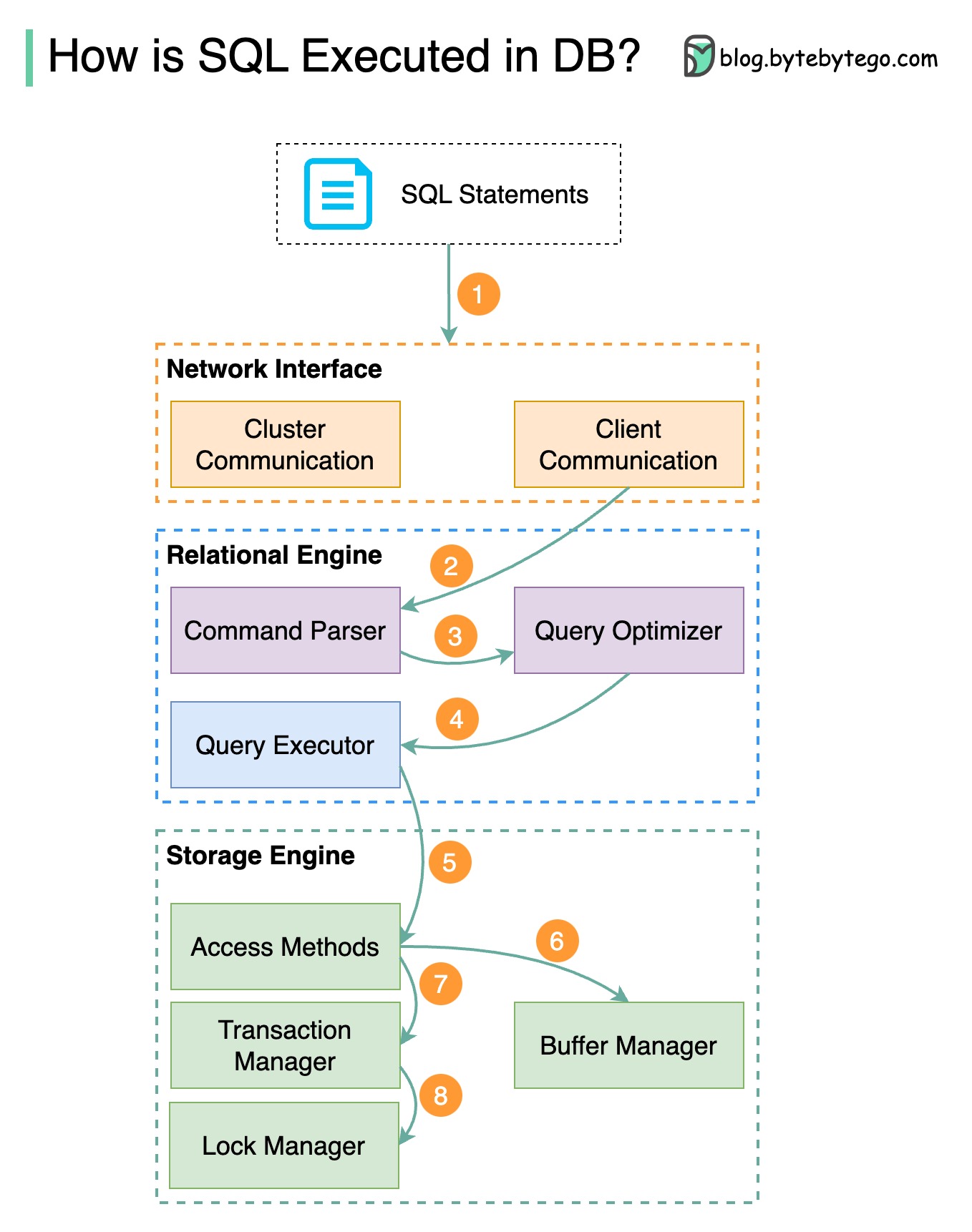
The diagram above shows the process. Note that the architectures for different databases are different, the diagram demonstrates some common designs.
Step 1 - Transport Layer
A SQL statement is sent to the database via a transport layer protocol (e.g. TCP).
Step 2 - Command Parser
The SQL statement is sent to the command parser, where it goes through syntactic and semantic analysis, and a query tree is generated afterward.
Step 3 - Optimizer
The query tree is sent to the optimizer. The optimizer creates an execution plan.
Step 4 - Executor
The execution plan is sent to the executor. The executor retrieves data from the execution.
Step 5 - Access Methods
Access methods provide the data fetching logic required for execution, retrieving data from the storage engine.
Step 6 - Buffer Manager (Read-Only Queries)
Access methods decide whether the SQL statement is read-only. If the query is read-only (SELECT statement), it is passed to the buffer manager for further processing. The buffer manager looks for the data in the cache or data files.
Step 7 - Transaction Manager (Update/Insert)
If the statement is an UPDATE or INSERT, it is passed to the transaction manager for further processing.
Step 8 - Lock Manager
During a transaction, the data is in lock mode. This is guaranteed by the lock manager. It also ensures the transaction’s ACID properties.