mirror of
https://github.com/ByteByteGoHq/system-design-101.git
synced 2026-04-01 16:57:23 -04:00
 ee4b7305a2
This PR adds all the guides from [Visual
Guides](https://bytebytego.com/guides/) section on bytebytego to the
repository with proper links.

- [x] Markdown files for guides and categories are placed inside
`data/guides` and `data/categories`
- [x] Guide links in readme are auto-generated using
`scripts/readme.ts`. Everytime you run the script `npm run
update-readme`, it reads the categories and guides from the above
mentioned folders, generate production links for guides and categories
and populate the table of content in the readme. This ensures that any
future guides and categories will automatically get added to the readme.
- [x] Sorting inside the readme matches the actual category and guides
sorting on production
45 lines
1.5 KiB
Markdown
45 lines
1.5 KiB
Markdown
---
|
|
title: "How does Terraform turn Code into Cloud?"
|
|
description: "Explore how Terraform transforms code into cloud infrastructure."
|
|
image: "https://assets.bytebytego.com/diagrams/0225-how-terraform-creates-infra-at-scale.png"
|
|
createdAt: "2024-03-08"
|
|
draft: false
|
|
categories:
|
|
- devops-cicd
|
|
tags:
|
|
- "Terraform"
|
|
- "Infrastructure as Code"
|
|
---
|
|
|
|
|
|
|
|
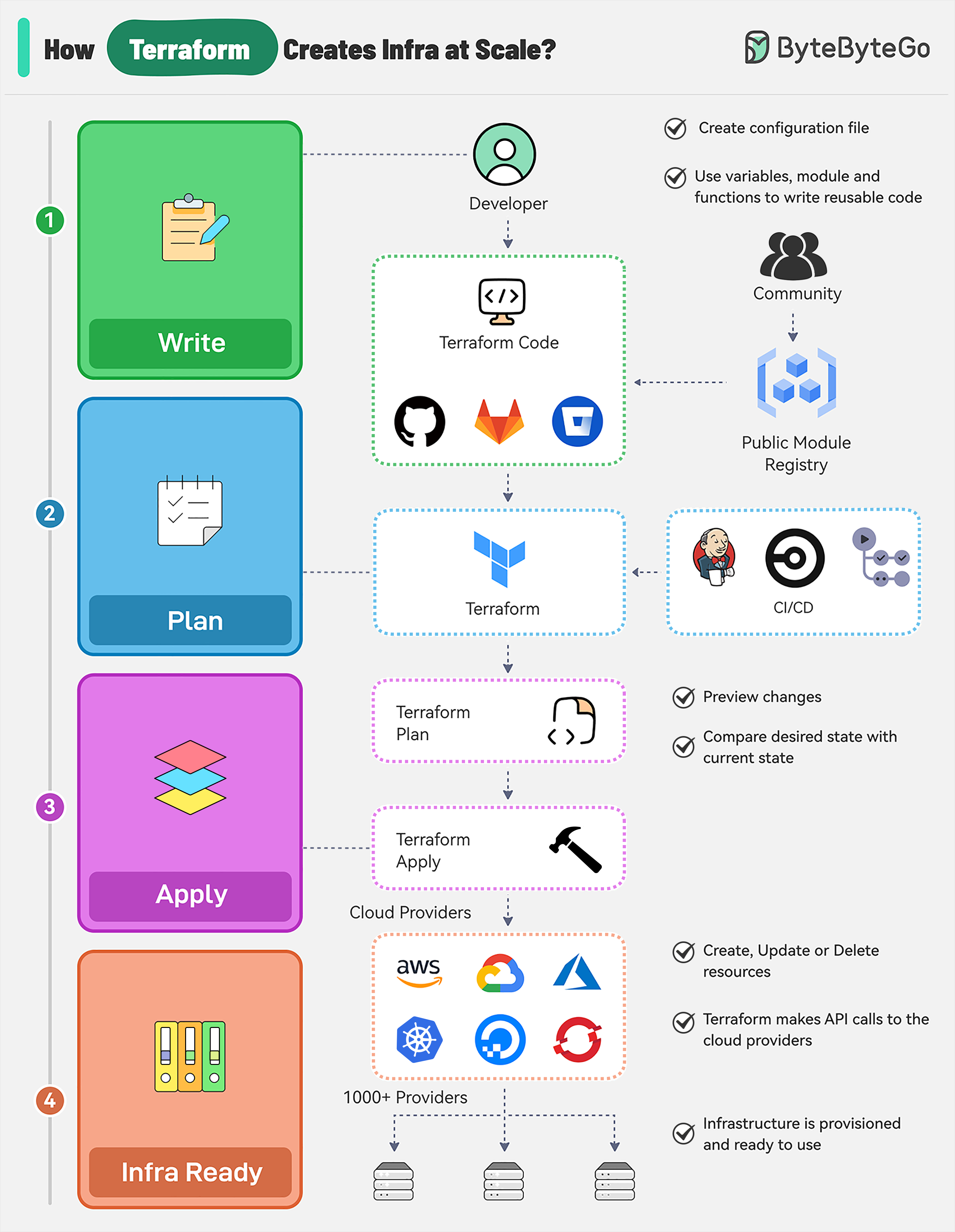
There are multiple stages in a Terraform workflow:
|
|
|
|
## Write Infrastructure as Code
|
|
|
|
* Define resources, providers, and configurations in Terraform configuration files.
|
|
|
|
* Use variables, modules, and functions to make the code reusable and maintainable.
|
|
|
|
* Integrate with Terraform community registries for ready-to-use modules.
|
|
|
|
## Terraform Plan
|
|
|
|
Preview the changes Terraform will make to the infrastructure by running “terraform plan”. It can be triggered as part of a CI/CD pipeline.
|
|
|
|
Terraform compares the desired state defined in the configuration file with the current state in the state file.
|
|
|
|
## Terraform Apply
|
|
|
|
Run “terraform apply” to create, update, or delete resources based on the plan.
|
|
|
|
Terraform makes API calls to the specified providers (AWS, Azure, GCP, Kubernetes, etc) to provision the resources.
|
|
|
|
The state file is updated to reflect the new state of the infrastructure.
|
|
|
|
## Infrastructure Ready
|
|
|
|
Terraform state file acts as a single source of truth for the current state of the infrastructure.
|
|
|
|
State file enables version control and collaboration between team members for future changes.
|