mirror of
https://github.com/ByteByteGoHq/system-design-101.git
synced 2026-04-13 21:37:23 -04:00
 ee4b7305a2
This PR adds all the guides from [Visual
Guides](https://bytebytego.com/guides/) section on bytebytego to the
repository with proper links.

- [x] Markdown files for guides and categories are placed inside
`data/guides` and `data/categories`
- [x] Guide links in readme are auto-generated using
`scripts/readme.ts`. Everytime you run the script `npm run
update-readme`, it reads the categories and guides from the above
mentioned folders, generate production links for guides and categories
and populate the table of content in the readme. This ensures that any
future guides and categories will automatically get added to the readme.
- [x] Sorting inside the readme matches the actual category and guides
sorting on production
53 lines
1.3 KiB
Markdown
53 lines
1.3 KiB
Markdown
---
|
|
title: "9 Docker Best Practices You Must Know"
|
|
description: "Learn 9 essential Docker best practices for efficient containerization."
|
|
image: "https://assets.bytebytego.com/diagrams/0016-9-docker-best-practices-you-must-know.png"
|
|
createdAt: "2024-03-02"
|
|
draft: false
|
|
categories:
|
|
- devops-cicd
|
|
tags:
|
|
- Docker
|
|
- Containerization
|
|
---
|
|
|
|
|
|
|
|
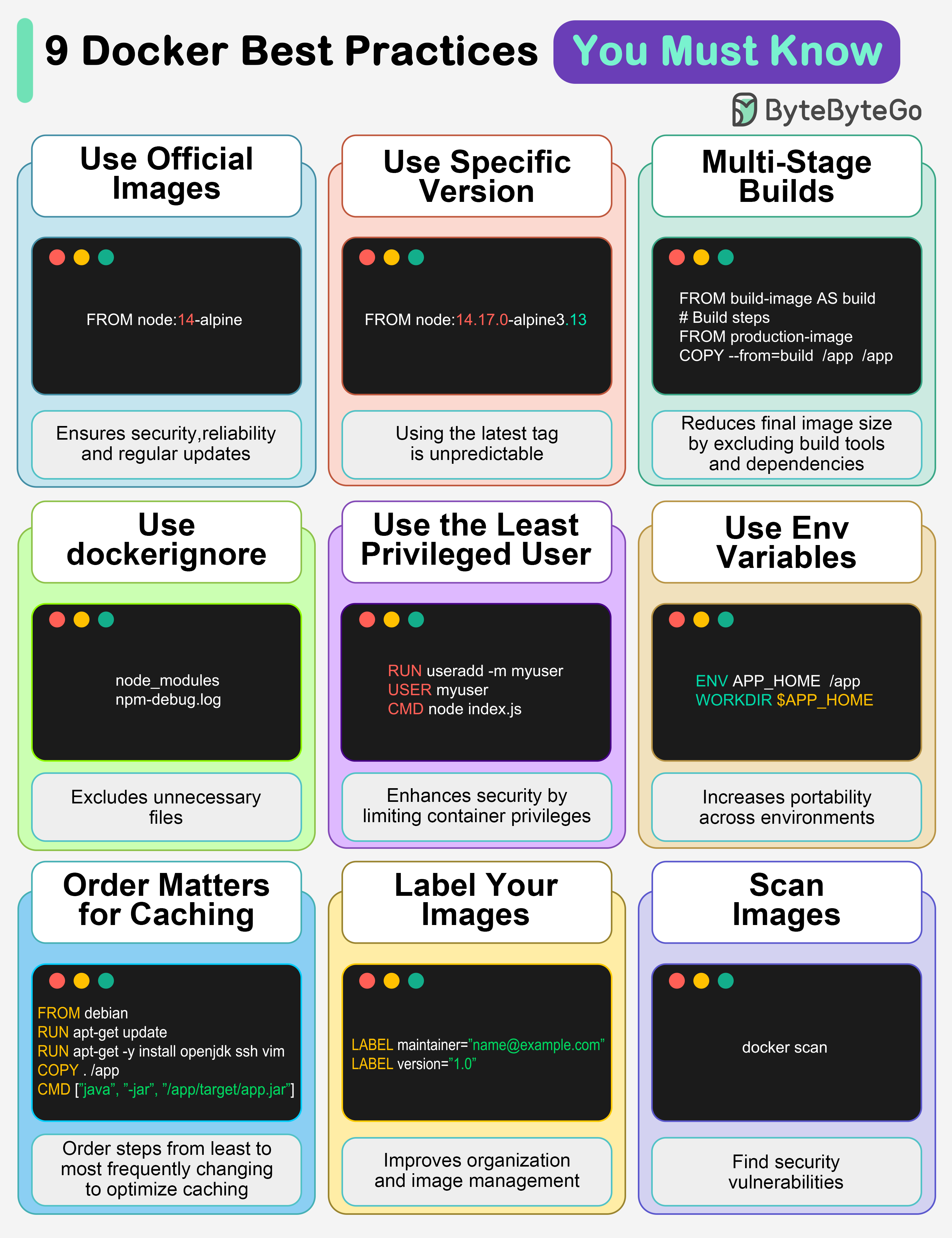
## 1. Use official images
|
|
|
|
This ensures security, reliability, and regular updates.
|
|
|
|
## 2. Use a specific image version
|
|
|
|
The default latest tag is unpredictable and causes unexpected behavior.
|
|
|
|
## 3. Multi-Stage builds
|
|
|
|
Reduces final image size by excluding build tools and dependencies.
|
|
|
|
## 4. Use .dockerignore
|
|
|
|
Excludes unnecessary files, speeds up builds, and reduces image size.
|
|
|
|
## 5. Use the least privileged user
|
|
|
|
Enhances security by limiting container privileges.
|
|
|
|
## 6. Use environment variables
|
|
|
|
Increases flexibility and portability across different environments.
|
|
|
|
## 7. Order matters for caching
|
|
|
|
Order your steps from least to most frequently changing to optimize caching.
|
|
|
|
## 8. Label your images
|
|
|
|
It improves organization and helps with image management.
|
|
|
|
## 9. Scan images
|
|
|
|
Find security vulnerabilities before they become bigger problems.
|
|
|
|
Over to you: Which other Docker best practices will you add to the list?
|