mirror of
https://github.com/ByteByteGoHq/system-design-101.git
synced 2026-04-01 16:57:23 -04:00
 ee4b7305a2
This PR adds all the guides from [Visual
Guides](https://bytebytego.com/guides/) section on bytebytego to the
repository with proper links.

- [x] Markdown files for guides and categories are placed inside
`data/guides` and `data/categories`
- [x] Guide links in readme are auto-generated using
`scripts/readme.ts`. Everytime you run the script `npm run
update-readme`, it reads the categories and guides from the above
mentioned folders, generate production links for guides and categories
and populate the table of content in the readme. This ensures that any
future guides and categories will automatically get added to the readme.
- [x] Sorting inside the readme matches the actual category and guides
sorting on production
1.1 KiB
1.1 KiB
title, description, image, createdAt, draft, categories, tags
| title | description | image | createdAt | draft | categories | tags | |||
|---|---|---|---|---|---|---|---|---|---|
| CI/CD Simplified Visual Guide | A visual guide to understanding and improving CI/CD pipelines. | https://assets.bytebytego.com/diagrams/0141-ci-cd-workflow.png | 2024-03-04 | false |
|
|
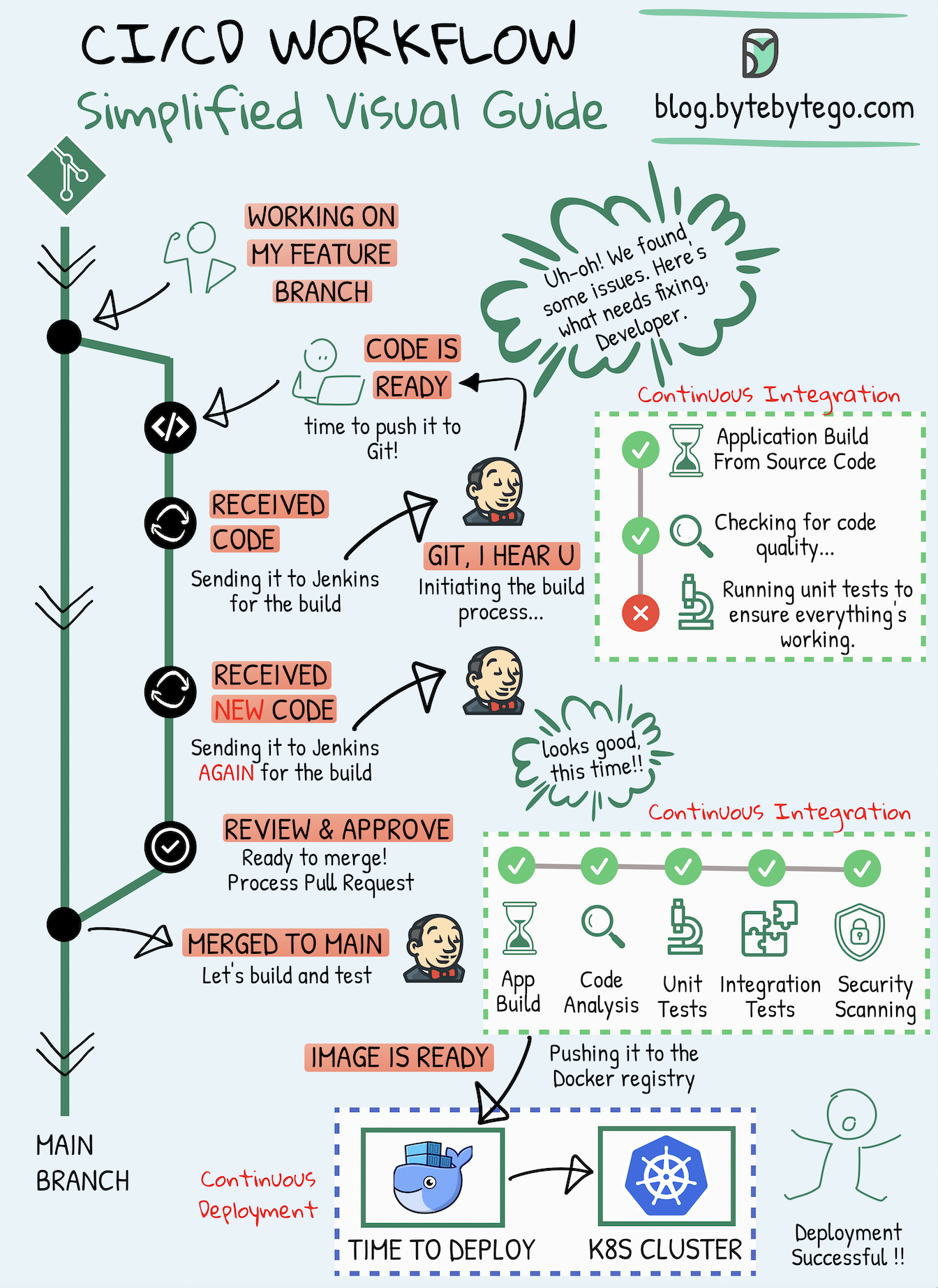
Whether you're a developer, a DevOps specialist, a tester, or involved in any modern IT role, CI/CD pipelines have become an integral part of the software development process.
Continuous Integration (CI)
Continuous Integration (CI) is a practice where code changes are frequently combined into a shared repository. This process includes automatic checks to ensure the new code works well with the existing code.
Continuous Deployment (CD)
Continuous Deployment (CD) takes care of automatically putting these code changes into real-world use. It makes sure that the process of moving new code to production is smooth and reliable.
This visual guide is designed to help you grasp and enhance your methods for creating and delivering software more effectively.