 ee4b7305a2
This PR adds all the guides from [Visual
Guides](https://bytebytego.com/guides/) section on bytebytego to the
repository with proper links.

- [x] Markdown files for guides and categories are placed inside
`data/guides` and `data/categories`
- [x] Guide links in readme are auto-generated using
`scripts/readme.ts`. Everytime you run the script `npm run
update-readme`, it reads the categories and guides from the above
mentioned folders, generate production links for guides and categories
and populate the table of content in the readme. This ensures that any
future guides and categories will automatically get added to the readme.
- [x] Sorting inside the readme matches the actual category and guides
sorting on production
1.7 KiB
title, description, image, createdAt, draft, categories, tags
| title | description | image | createdAt | draft | categories | tags | |||
|---|---|---|---|---|---|---|---|---|---|
| Build a Simple Chat Application with Redis | Learn to build a simple chat application using Redis pub/sub. | https://assets.bytebytego.com/diagrams/0314-redis-chat.jpg | 2024-03-04 | false |
|
|
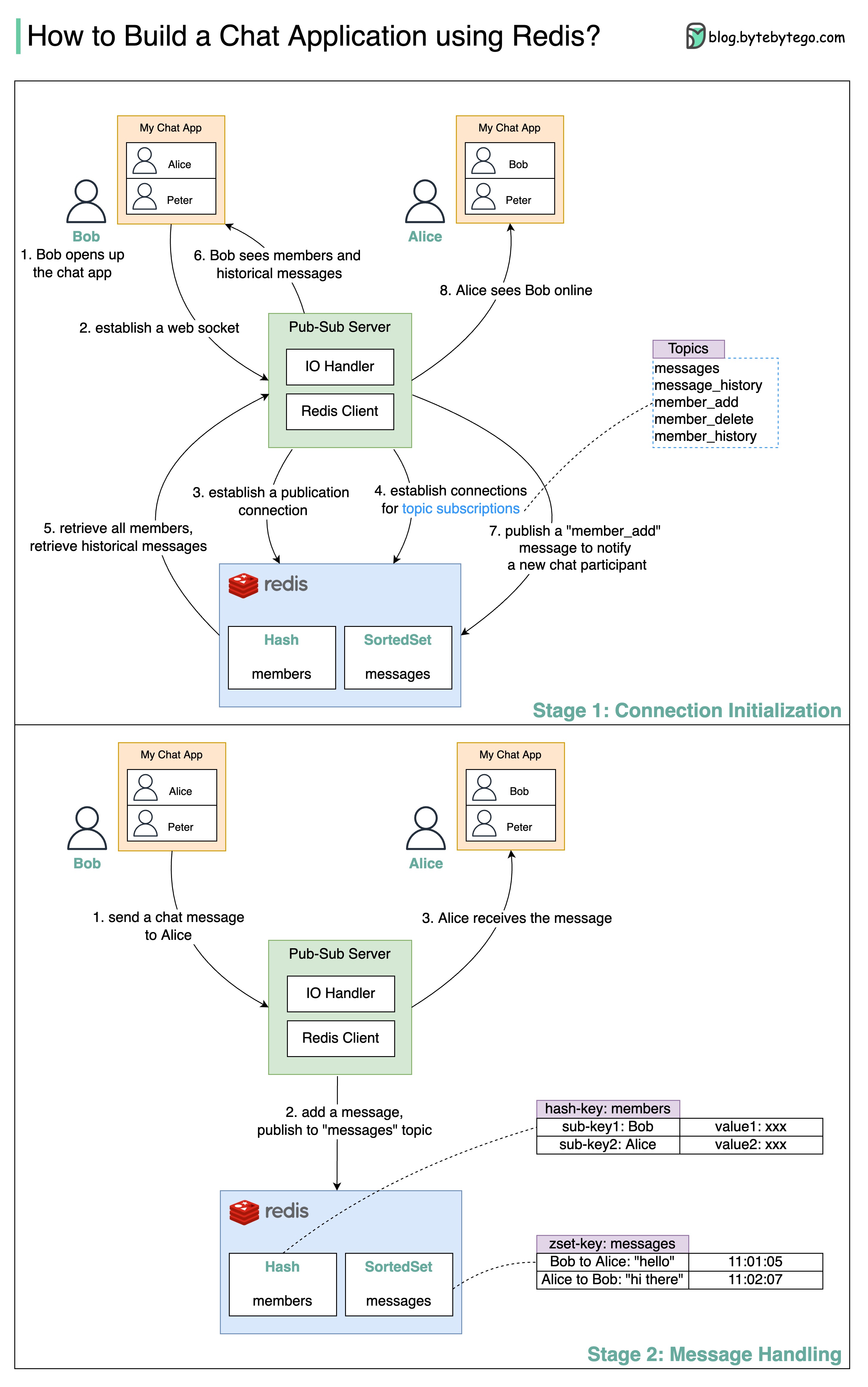
How do we build a simple chat application using Redis?
The diagram below shows how we can leverage the pub-sub functionality of Redis to develop a chat application.
Stage 1: Connection Initialization
-
Steps 1 and 2: Bob opens the chat application. A web socket is established between the client and the server.
-
Steps 3 and 4: The pub-sub server establishes several connections to Redis. One connection is used to update the Redis data models and publish messages to a topic. Other connections are used to subscribe and listen to updates for topics.
-
Steps 5 and 6: Bob’s client application requires the chat member list and the historical message list. The information is retrieved from Redis and sent to the client application.
-
Steps 7 and 8: Since Bob is a new member joining the chat application, a message is published to the “member_add” topic, and as a result, other participants of the chat application can see Bob.
Stage 2: Message Handling
-
Step 1: Bob sends a message to Alice in the chat application.
-
Step 2: The new chat message is added to Redis SortedSet by calling ‘zadd.’ The chat messages are sorted based on arrival time. The pub-sub server then publishes the chat message to the “messages” topic so subscribers can pick it up.
-
Step 3: Alice’s client application receives the chat message from Bob.