 ee4b7305a2
This PR adds all the guides from [Visual
Guides](https://bytebytego.com/guides/) section on bytebytego to the
repository with proper links.

- [x] Markdown files for guides and categories are placed inside
`data/guides` and `data/categories`
- [x] Guide links in readme are auto-generated using
`scripts/readme.ts`. Everytime you run the script `npm run
update-readme`, it reads the categories and guides from the above
mentioned folders, generate production links for guides and categories
and populate the table of content in the readme. This ensures that any
future guides and categories will automatically get added to the readme.
- [x] Sorting inside the readme matches the actual category and guides
sorting on production
1.6 KiB
title, description, image, createdAt, draft, categories, tags
| title | description | image | createdAt | draft | categories | tags | ||||
|---|---|---|---|---|---|---|---|---|---|---|
| Linux Boot Process Explained | Explore the Linux boot process, from BIOS/UEFI to user login. | https://assets.bytebytego.com/diagrams/0213-linux-boot-process-explained.png | 2024-03-11 | false |
|
|
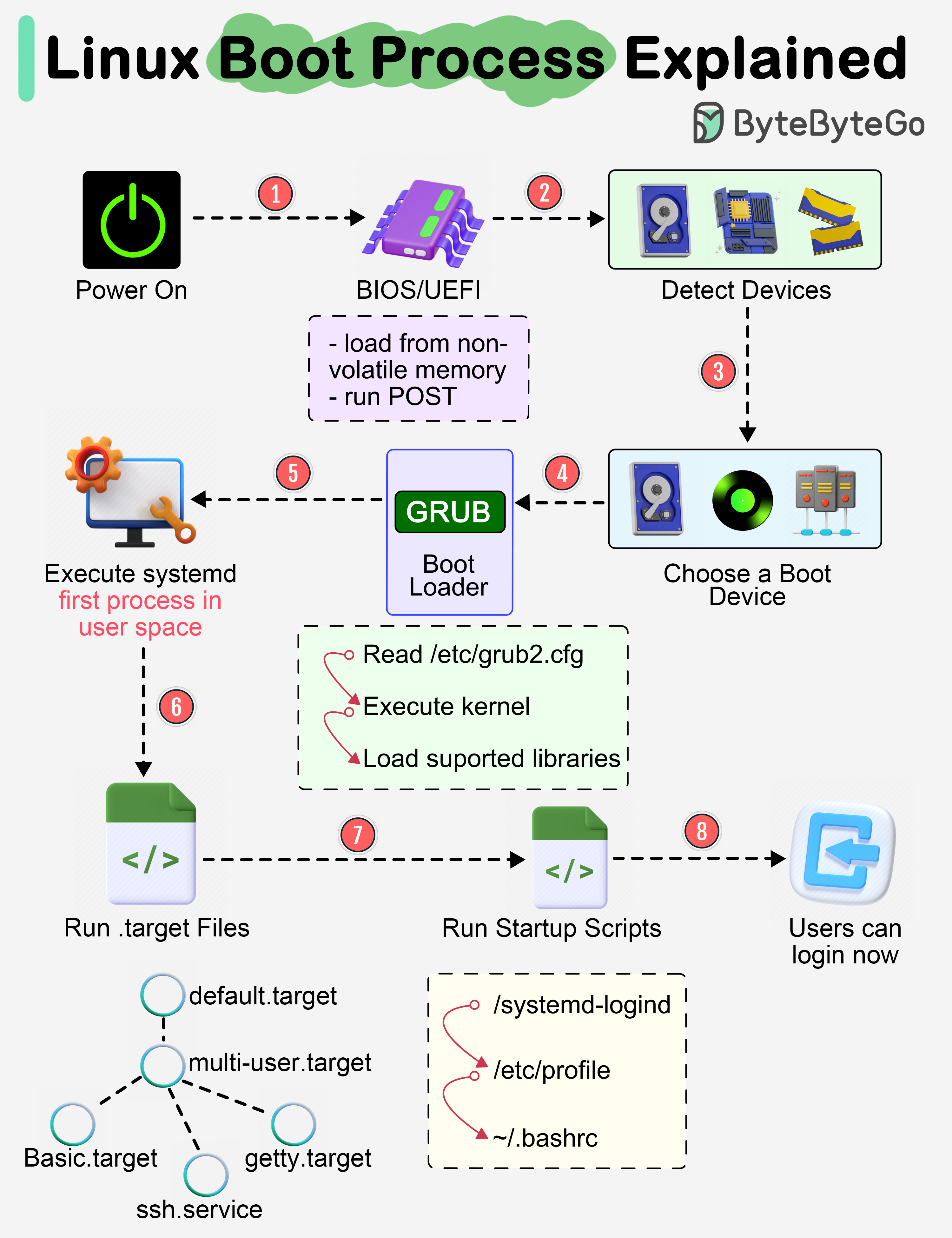
Almost every software engineer has used Linux before, but only a handful know how its Boot Process works. Let's dive in.
Step 1
When we turn on the power, BIOS (Basic Input/Output System) or UEFI (Unified Extensible Firmware Interface) firmware is loaded from non-volatile memory and executes POST (Power On Self Test).
Step 2
BIOS/UEFI detects the devices connected to the system, including CPU, RAM, and storage.
Step 3
Choose a booting device to boot the OS from. This can be the hard drive, the network server, or CD ROM.
Step 4
BIOS/UEFI runs the boot loader (GRUB), which provides a menu to choose the OS or the kernel functions.
Step 5
After the kernel is ready, we now switch to the user space. The kernel starts up systemd as the first user-space process, which manages the processes and services, probes all remaining hardware, mounts filesystems, and runs a desktop environment.
Step 6
systemd activates the default. target unit by default when the system boots. Other analysis units are executed as well.
Step 7
The system runs a set of startup scripts and configure the environment.
Step 8
The users are presented with a login window. The system is now ready.