mirror of
https://github.com/ByteByteGoHq/system-design-101.git
synced 2026-04-07 02:37:24 -04:00
 ee4b7305a2
This PR adds all the guides from [Visual
Guides](https://bytebytego.com/guides/) section on bytebytego to the
repository with proper links.

- [x] Markdown files for guides and categories are placed inside
`data/guides` and `data/categories`
- [x] Guide links in readme are auto-generated using
`scripts/readme.ts`. Everytime you run the script `npm run
update-readme`, it reads the categories and guides from the above
mentioned folders, generate production links for guides and categories
and populate the table of content in the readme. This ensures that any
future guides and categories will automatically get added to the readme.
- [x] Sorting inside the readme matches the actual category and guides
sorting on production
1.6 KiB
1.6 KiB
title, description, image, createdAt, draft, categories, tags
| title | description | image | createdAt | draft | categories | tags | |||
|---|---|---|---|---|---|---|---|---|---|
| Why is Kafka Fast? | Explore the key design choices behind Kafka's high performance. | https://assets.bytebytego.com/diagrams/0424-why-is-kafka-fast.jpg | 2024-02-05 | false |
|
|
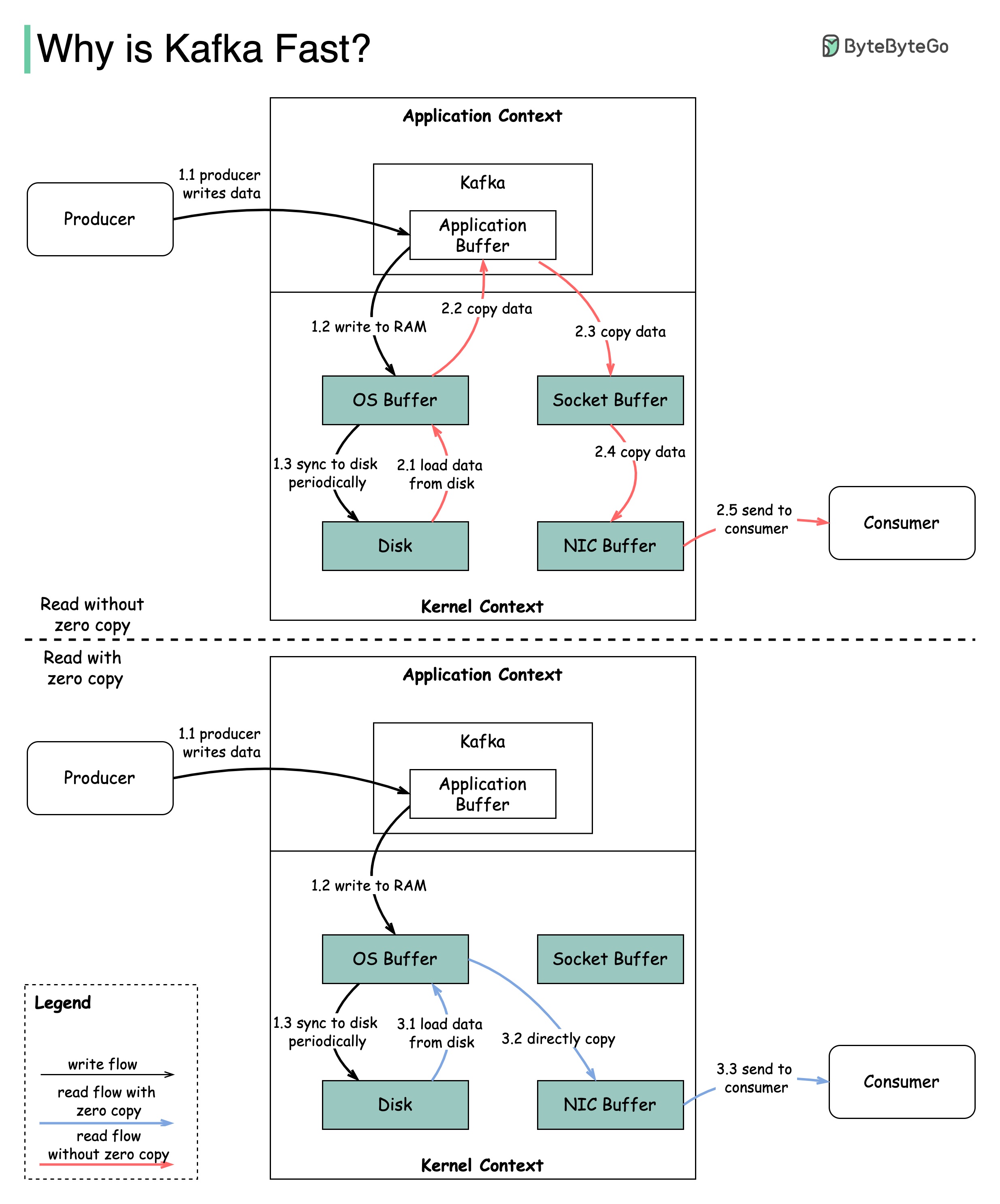
There are many design decisions that contributed to Kafka’s performance. In this post, we’ll focus on two. We think these two carried the most weight.
Sequential I/O
The first one is Kafka’s reliance on Sequential I/O.
Zero Copy
The second design choice that gives Kafka its performance advantage is its focus on efficiency: zero copy principle.
The diagram above illustrates how the data is transmitted between producer and consumer, and what zero-copy means.
- Step 1.1 - 1.3: Producer writes data to the disk
- Step 2: Consumer reads data without zero-copy
- 2.1: The data is loaded from disk to OS cache
- 2.2 The data is copied from OS cache to Kafka application
- 2.3 Kafka application copies the data into the socket buffer
- 2.4 The data is copied from socket buffer to network card
- 2.5 The network card sends data out to the consumer
- Step 3: Consumer reads data with zero-copy
- 3.1: The data is loaded from disk to OS cache
- 3.2 OS cache directly copies the data to the network card via sendfile() command
- 3.3 The network card sends data out to the consumer
Zero copy is a shortcut to save multiple data copies between the application context and kernel context.