 ee4b7305a2
This PR adds all the guides from [Visual
Guides](https://bytebytego.com/guides/) section on bytebytego to the
repository with proper links.

- [x] Markdown files for guides and categories are placed inside
`data/guides` and `data/categories`
- [x] Guide links in readme are auto-generated using
`scripts/readme.ts`. Everytime you run the script `npm run
update-readme`, it reads the categories and guides from the above
mentioned folders, generate production links for guides and categories
and populate the table of content in the readme. This ensures that any
future guides and categories will automatically get added to the readme.
- [x] Sorting inside the readme matches the actual category and guides
sorting on production
1.5 KiB
title, description, image, createdAt, draft, categories, tags
| title | description | image | createdAt | draft | categories | tags | |||
|---|---|---|---|---|---|---|---|---|---|
| What Happens When You Type google.com Into a Browser? | Explore the journey of typing google.com into a browser. | https://assets.bytebytego.com/diagrams/0410-what-happens-when-you-type-google-in-your-browser.png | 2024-03-12 | false |
|
|
-
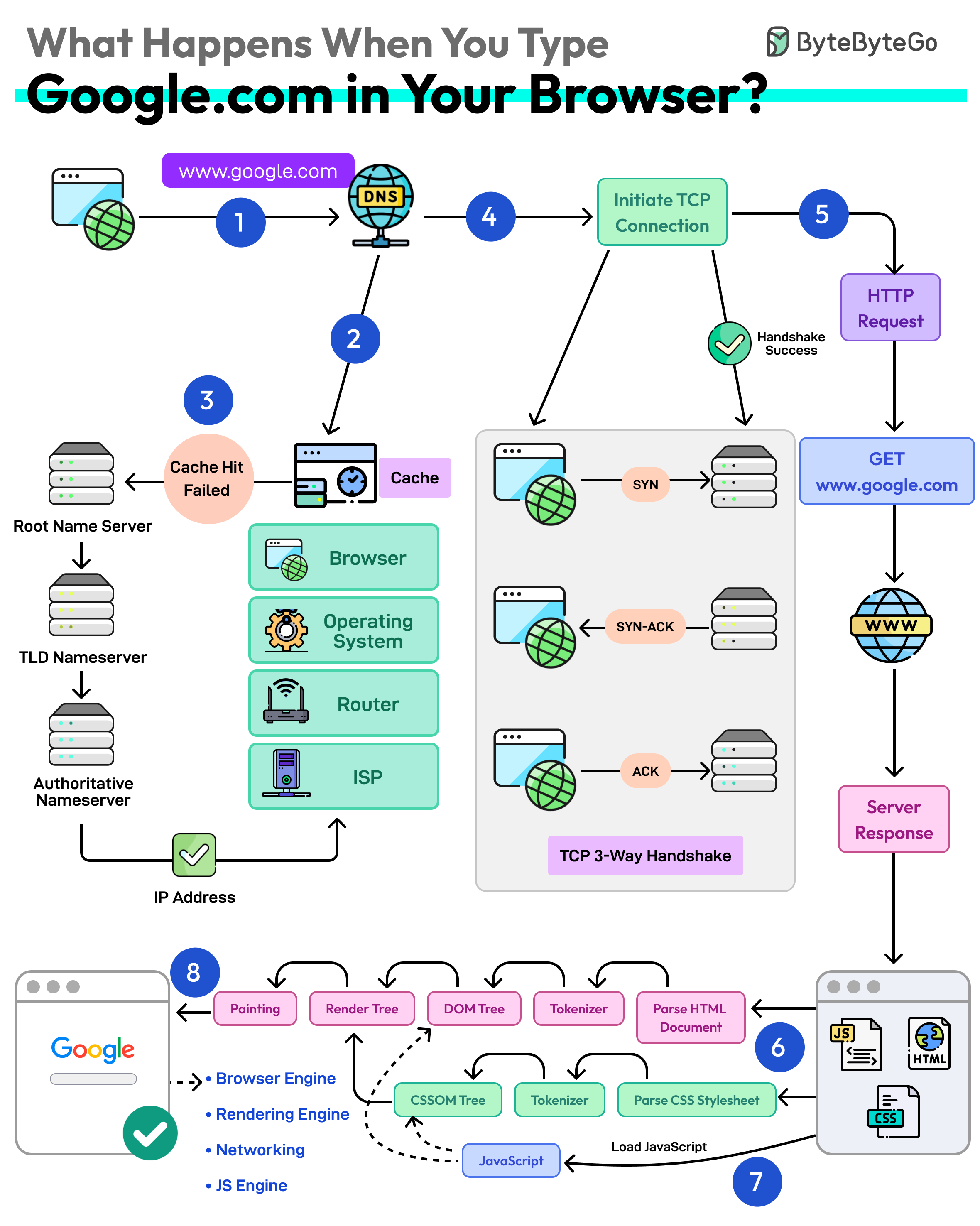
First up, you type the website address in the browser’s address bar.
-
The browser checks its cache first. If there’s a cache miss, it must find the IP address.
-
DNS lookup begins (think of it as looking up a phone number). The request goes through different DNS servers (root, TLD, and authoritative). Finally, the IP address is retrieved.
-
Next, your browser initiates a TCP connection like a handshake. For example, in the case of HTTP 1.1, the client and server perform a TCP three-way handshake with SYN, SYN-ACK, and ACK messages.
-
Once the handshake is successful, the browser makes an HTTP request to the server and the server responds with HTML, CSS, and JS files.
-
Finally, the browser processes everything. It parses the HTML document and creates DOM and CSSOM trees.
-
The browser executes the JavaScript and renders the page through various steps (tokenizer, parser, render tree, layout, and painting).
-
Finally, the webpage appears on your screen.