 ee4b7305a2
This PR adds all the guides from [Visual
Guides](https://bytebytego.com/guides/) section on bytebytego to the
repository with proper links.

- [x] Markdown files for guides and categories are placed inside
`data/guides` and `data/categories`
- [x] Guide links in readme are auto-generated using
`scripts/readme.ts`. Everytime you run the script `npm run
update-readme`, it reads the categories and guides from the above
mentioned folders, generate production links for guides and categories
and populate the table of content in the readme. This ensures that any
future guides and categories will automatically get added to the readme.
- [x] Sorting inside the readme matches the actual category and guides
sorting on production
1.4 KiB
title, description, image, createdAt, draft, categories, tags
| title | description | image | createdAt | draft | categories | tags | |||
|---|---|---|---|---|---|---|---|---|---|
| Typical Microservice Architecture | Explore a typical microservice architecture with key components. | https://assets.bytebytego.com/diagrams/0396-typical-microservice-architecture.png | 2024-03-14 | false |
|
|
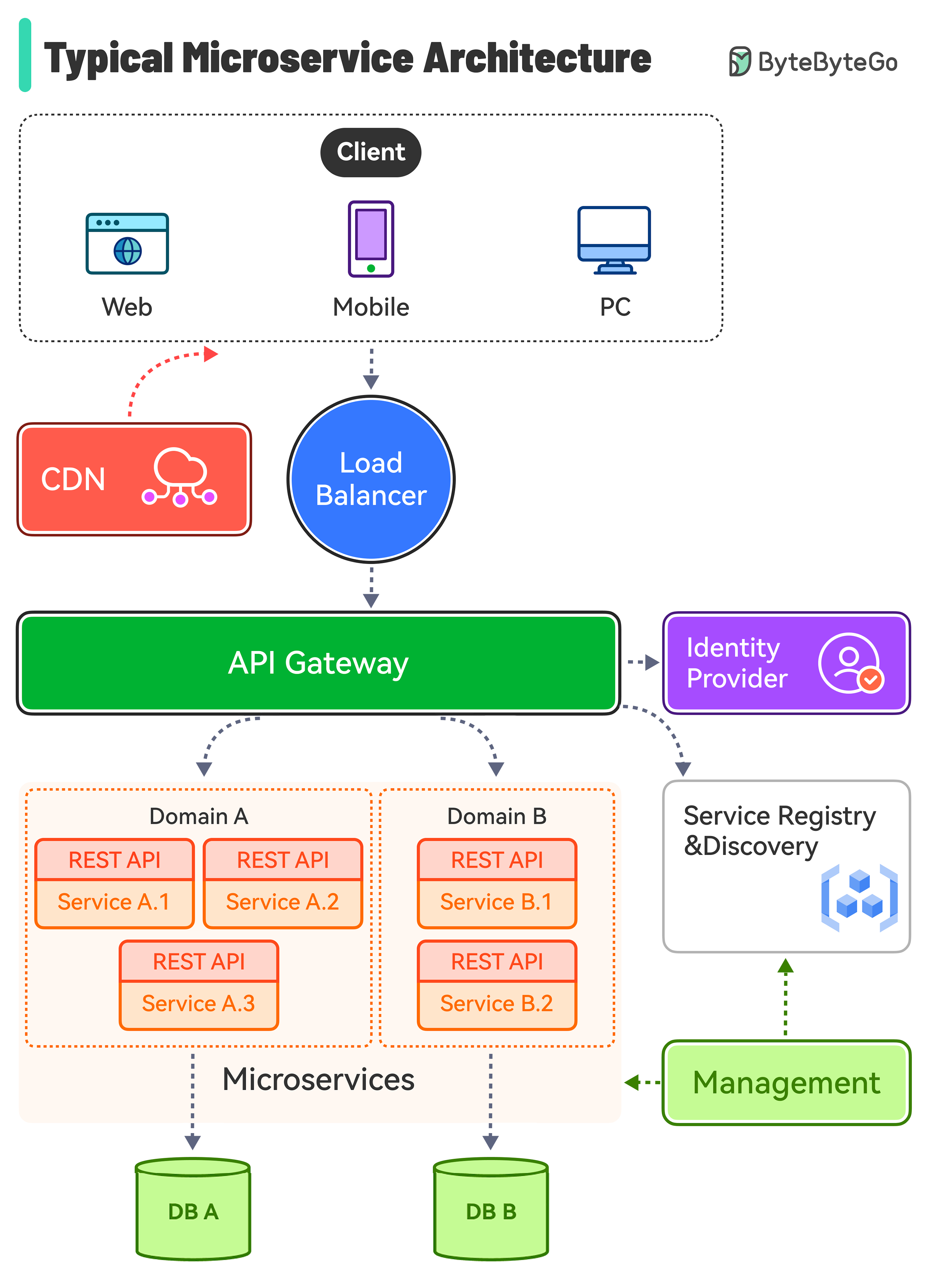
The diagram above shows a typical microservice architecture.
Key Components
-
Load Balancer: This distributes incoming traffic across multiple backend services.
-
CDN (Content Delivery Network): CDN is a group of geographically distributed servers that hold static content for faster delivery. The clients look for content in CDN first, then progress to backend services.
-
API Gateway: This handles incoming requests and routes them to the relevant services. It talks to the identity provider and service discovery.
-
Identity Provider: This handles authentication and authorization for users.
-
Service Registry & Discovery: Microservice registration and discovery happen in this component, and the API gateway looks for relevant services in this component to talk to.
-
Management: This component is responsible for monitoring the services.
-
Microservices: Microservices are designed and deployed in different domains. Each domain has its database.