 ee4b7305a2
This PR adds all the guides from [Visual
Guides](https://bytebytego.com/guides/) section on bytebytego to the
repository with proper links.

- [x] Markdown files for guides and categories are placed inside
`data/guides` and `data/categories`
- [x] Guide links in readme are auto-generated using
`scripts/readme.ts`. Everytime you run the script `npm run
update-readme`, it reads the categories and guides from the above
mentioned folders, generate production links for guides and categories
and populate the table of content in the readme. This ensures that any
future guides and categories will automatically get added to the readme.
- [x] Sorting inside the readme matches the actual category and guides
sorting on production
1.8 KiB
title, description, image, createdAt, draft, categories, tags
| title | description | image | createdAt | draft | categories | tags | |||
|---|---|---|---|---|---|---|---|---|---|
| Database Locks Explained | Explore the different types of database locks and their functionalities. | https://assets.bytebytego.com/diagrams/0022-9-types-of-database-locks.png | 2024-03-10 | false |
|
|
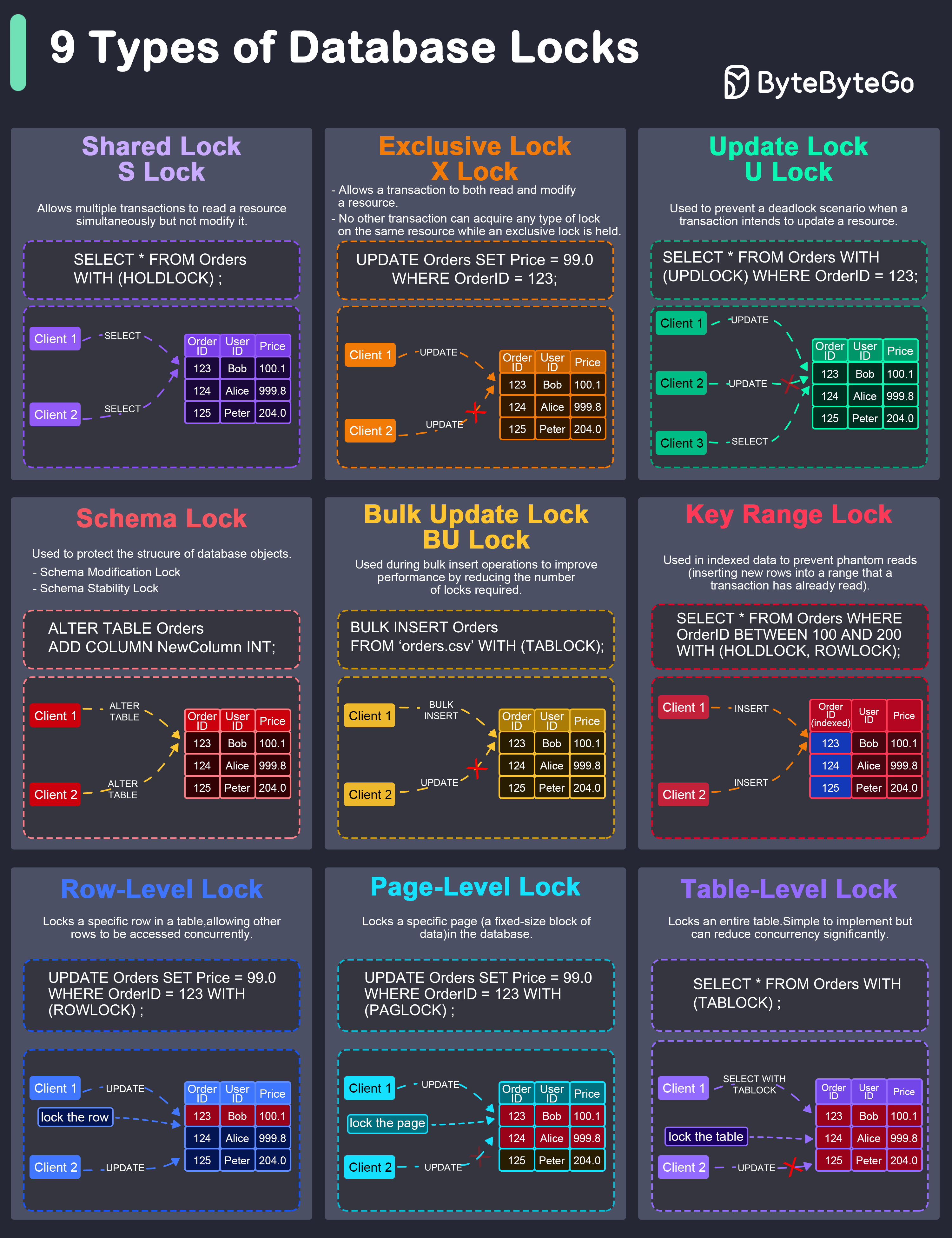
In database management, locks are mechanisms that prevent concurrent access to data to ensure data integrity and consistency.
Common Types of Locks
Here are the common types of locks used in databases:
-
Shared Lock (S Lock)
It allows multiple transactions to read a resource simultaneously but not modify it. Other transactions can also acquire a shared lock on the same resource.
-
Exclusive Lock (X Lock)
It allows a transaction to both read and modify a resource. No other transaction can acquire any type of lock on the same resource while an exclusive lock is held.
-
Update Lock (U Lock)
It is used to prevent a deadlock scenario when a transaction intends to update a resource.
-
Schema Lock
It is used to protect the structure of database objects.
-
Bulk Update Lock (BU Lock)
It is used during bulk insert operations to improve performance by reducing the number of locks required.
-
Key-Range Lock
It is used in indexed data to prevent phantom reads (inserting new rows into a range that a transaction has already read).
-
Row-Level Lock
It locks a specific row in a table, allowing other rows to be accessed concurrently.
-
Page-Level Lock
It locks a specific page (a fixed-size block of data) in the database.
-
Table-Level Lock
It locks an entire table. This is simple to implement but can reduce concurrency significantly.