 ee4b7305a2
This PR adds all the guides from [Visual
Guides](https://bytebytego.com/guides/) section on bytebytego to the
repository with proper links.

- [x] Markdown files for guides and categories are placed inside
`data/guides` and `data/categories`
- [x] Guide links in readme are auto-generated using
`scripts/readme.ts`. Everytime you run the script `npm run
update-readme`, it reads the categories and guides from the above
mentioned folders, generate production links for guides and categories
and populate the table of content in the readme. This ensures that any
future guides and categories will automatically get added to the readme.
- [x] Sorting inside the readme matches the actual category and guides
sorting on production
1.9 KiB
title, description, image, createdAt, draft, categories, tags
| title | description | image | createdAt | draft | categories | tags | |||
|---|---|---|---|---|---|---|---|---|---|
| Database Isolation Levels | Explore database isolation levels and their impact on transaction concurrency. | https://assets.bytebytego.com/diagrams/0239-isolation-level.png | 2024-02-03 | false |
|
|
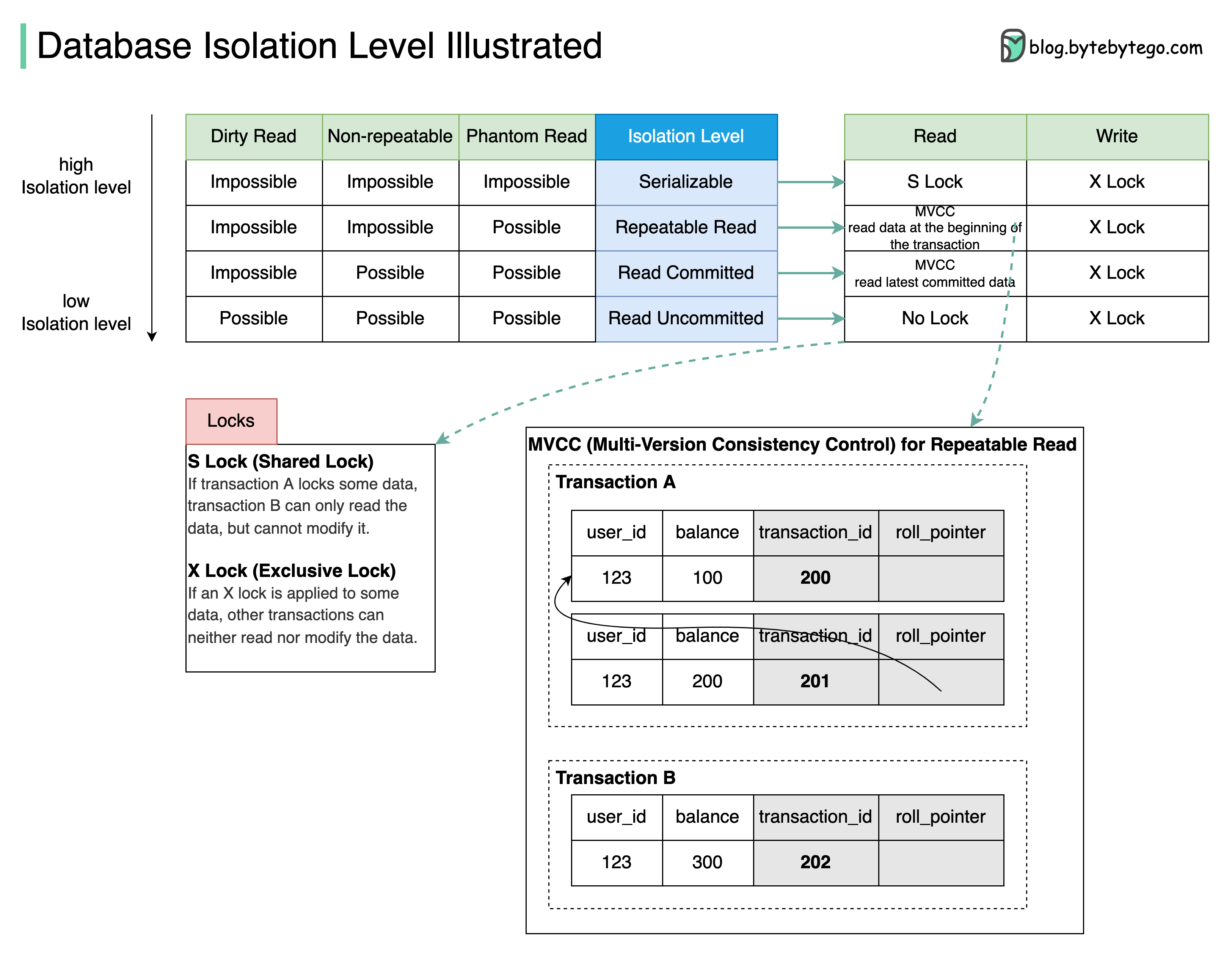
What are they used for?
Database isolation allows a transaction to execute as if there are no other concurrently running transactions.
The diagram above illustrates four isolation levels.
Isolation Levels
-
Serializable: This is the highest isolation level. Concurrent transactions are guaranteed to be executed in sequence.
-
Repeatable Read: Data read during the transaction stays the same as the transaction starts.
-
Read Committed: Data modification can only be read after the transaction is committed.
-
Read Uncommitted: The data modification can be read by other transactions before a transaction is committed.
The isolation is guaranteed by MVCC (Multi-Version Consistency Control) and locks.
MVCC Example
The diagram takes Repeatable Read as an example to demonstrate how MVCC works:
There are two hidden columns for each row: transaction_id and roll_pointer. When transaction A starts, a new Read View with transaction_id=201 is created. Shortly afterward, transaction B starts, and a new Read View with transaction_id=202 is created.
Now transaction A modifies the balance to 200, a new row of the log is created, and the roll_pointer points to the old row. Before transaction A commits, transaction B reads the balance data. Transaction B finds that transaction_id 201 is not committed, it reads the next committed record(transaction_id=200).
Even when transaction A commits, transaction B still reads data based on the Read View created when transaction B starts. So transaction B always reads the data with balance=100.