mirror of
https://github.com/ByteByteGoHq/system-design-101.git
synced 2026-04-08 03:07:24 -04:00
 ee4b7305a2
This PR adds all the guides from [Visual
Guides](https://bytebytego.com/guides/) section on bytebytego to the
repository with proper links.

- [x] Markdown files for guides and categories are placed inside
`data/guides` and `data/categories`
- [x] Guide links in readme are auto-generated using
`scripts/readme.ts`. Everytime you run the script `npm run
update-readme`, it reads the categories and guides from the above
mentioned folders, generate production links for guides and categories
and populate the table of content in the readme. This ensures that any
future guides and categories will automatically get added to the readme.
- [x] Sorting inside the readme matches the actual category and guides
sorting on production
1.1 KiB
1.1 KiB
title, description, image, createdAt, draft, categories, tags
| title | description | image | createdAt | draft | categories | tags | |||
|---|---|---|---|---|---|---|---|---|---|
| URL, URI, URN - Differences Explained | Understand the differences between URL, URI, and URN with clear examples. | https://assets.bytebytego.com/diagrams/0401-url-uri-urn.png | 2024-02-21 | false |
|
|
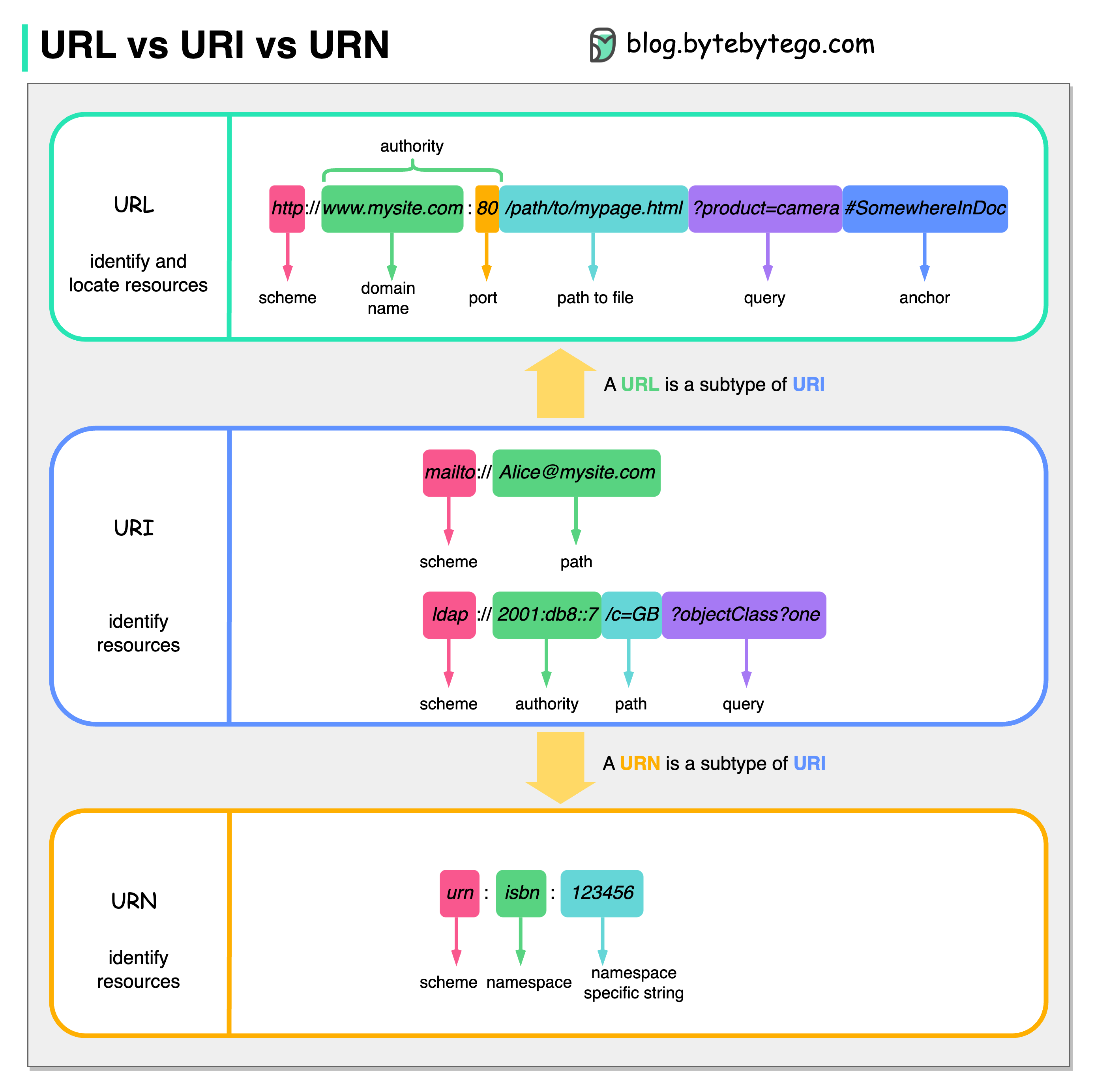
The diagram above shows a comparison of URL, URI, and URN.
-
URI
URI stands for Uniform Resource Identifier. It identifies a logical or physical resource on the web. URL and URN are subtypes of URI. URL locates a resource, while URN names a resource.
A URI is composed of the following parts:
scheme:[//authority]path[?query][#fragment]
-
URL
URL stands for Uniform Resource Locator, the key concept of HTTP. It is the address of a unique resource on the web. It can be used with other protocols like FTP and JDBC.
-
URN
URN stands for Uniform Resource Name. It uses the urn scheme. URNs cannot be used to locate a resource. A simple example given in the diagram is composed of a namespace and a namespace-specific string.