 ee4b7305a2
This PR adds all the guides from [Visual
Guides](https://bytebytego.com/guides/) section on bytebytego to the
repository with proper links.

- [x] Markdown files for guides and categories are placed inside
`data/guides` and `data/categories`
- [x] Guide links in readme are auto-generated using
`scripts/readme.ts`. Everytime you run the script `npm run
update-readme`, it reads the categories and guides from the above
mentioned folders, generate production links for guides and categories
and populate the table of content in the readme. This ensures that any
future guides and categories will automatically get added to the readme.
- [x] Sorting inside the readme matches the actual category and guides
sorting on production
2.9 KiB
title, description, image, createdAt, draft, categories, tags
| title | description | image | createdAt | draft | categories | tags | |||
|---|---|---|---|---|---|---|---|---|---|
| Typical AWS Network Architecture | Explore a typical AWS network architecture with key components. | https://assets.bytebytego.com/diagrams/0123-typical-aws-network-architecture.png | 2024-02-15 | false |
|
|
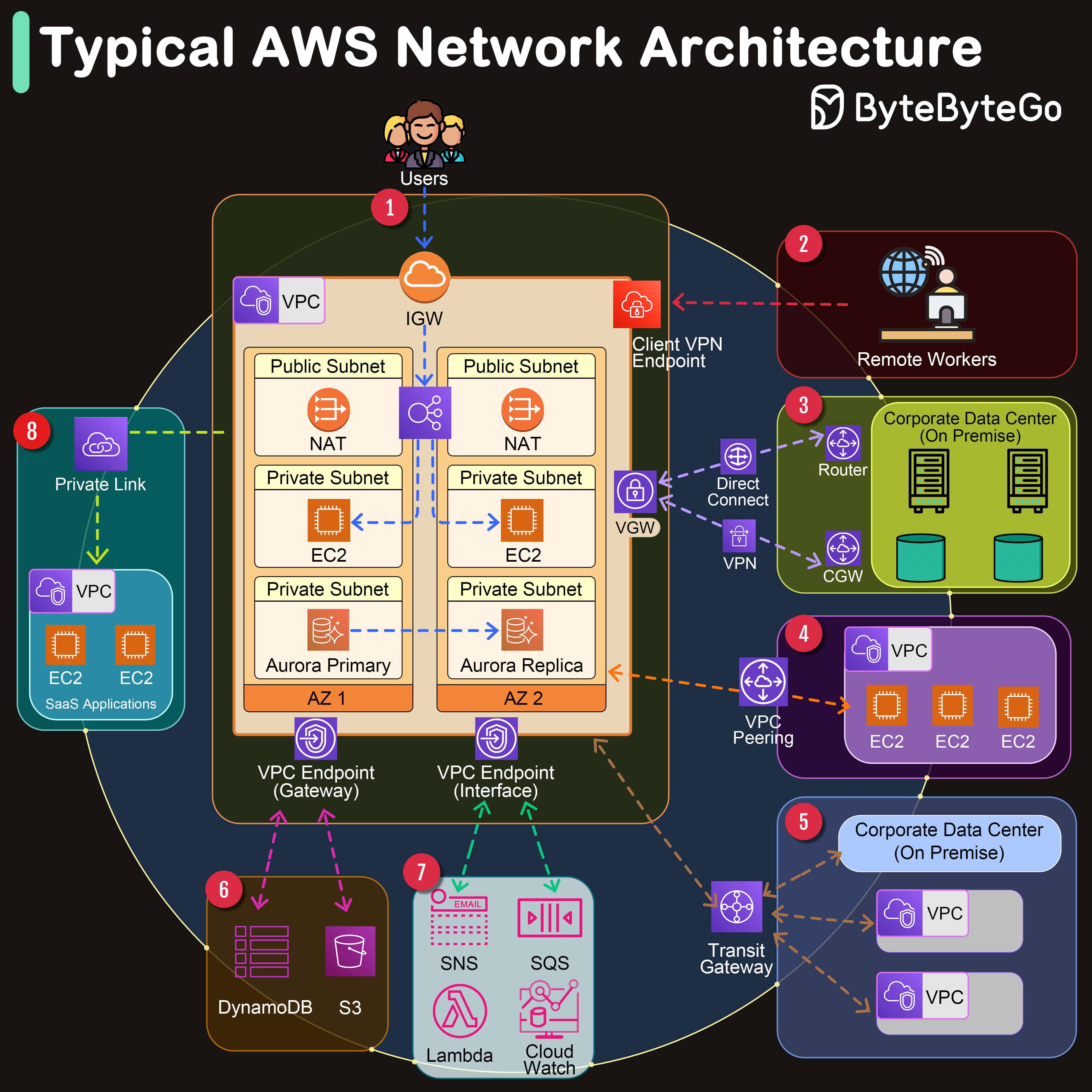
Amazon Web Services (AWS) offers a comprehensive suite of networking services designed to provide businesses with secure, scalable, and highly available network infrastructure. AWS's network architecture components enable seamless connectivity between the internet, remote workers, corporate data centers, and within the AWS ecosystem itself.
Key Components
-
VPC (Virtual Private Cloud)
At the heart of AWS's networking services is the Amazon VPC, which allows users to provision a logically isolated section of the AWS Cloud. Within this isolated environment, users can launch AWS resources in a virtual network that they define.
-
AZ (Availability Zone)
An AZ in AWS refers to one or more discrete data centers with redundant power, networking, and connectivity in an AWS Region.
Now let’s go through the network connectivity one by one:
Network Connectivity
1. Connect to the Internet - Internet Gateway (IGW)
An IGW serves as the doorway between your AWS VPC and the internet, facilitating bidirectional communication.
2. Remote Workers - Client VPN Endpoint
AWS offers a Client VPN service that enables remote workers to access AWS resources or an on-premises network securely over the internet. It provides a secure and easy-to-manage VPN solution.
3. Corporate Data Center Connection - Virtual Gateway (VGW)
A VGW is the VPN concentrator on the Amazon side of the Site-to-Site VPN connection between your network and your VPC.
4. VPC Peering
VPC Peering allows you to connect two VPCs, enabling you to route traffic between them using private IPv4 or IPv6 addresses.
5. Transit Gateway
AWS Transit Gateway acts as a network transit hub, enabling you to connect multiple VPCs, VPNs, and AWS accounts together.
6. VPC Endpoint (Gateway)
A VPC Endpoint (Gateway type) allows you to privately connect your VPC to supported AWS services and VPC endpoint services powered by PrivateLink without requiring an internet gateway, VPN.
7. VPC Endpoint (Interface)
An Interface VPC Endpoint (powered by AWS PrivateLink) enables private connections between your VPC and supported AWS services, other VPCs, or AWS Marketplace services, without requiring an IGW, VGW, or NAT device.
8. SaaS Private Link Connection
AWS PrivateLink provides private connectivity between VPCs and services hosted on AWS or on-premises, ideal for accessing SaaS applications securely.