mirror of
https://github.com/ByteByteGoHq/system-design-101.git
synced 2026-04-08 03:07:24 -04:00
 ee4b7305a2
This PR adds all the guides from [Visual
Guides](https://bytebytego.com/guides/) section on bytebytego to the
repository with proper links.

- [x] Markdown files for guides and categories are placed inside
`data/guides` and `data/categories`
- [x] Guide links in readme are auto-generated using
`scripts/readme.ts`. Everytime you run the script `npm run
update-readme`, it reads the categories and guides from the above
mentioned folders, generate production links for guides and categories
and populate the table of content in the readme. This ensures that any
future guides and categories will automatically get added to the readme.
- [x] Sorting inside the readme matches the actual category and guides
sorting on production
1.1 KiB
1.1 KiB
title, description, image, createdAt, draft, categories, tags
| title | description | image | createdAt | draft | categories | tags | |||
|---|---|---|---|---|---|---|---|---|---|
| Top 6 Most Commonly Used Server Types | Explore the top 6 most commonly used server types in modern infrastructure. | https://assets.bytebytego.com/diagrams/0327-server-types.png | 2024-02-16 | false |
|
|
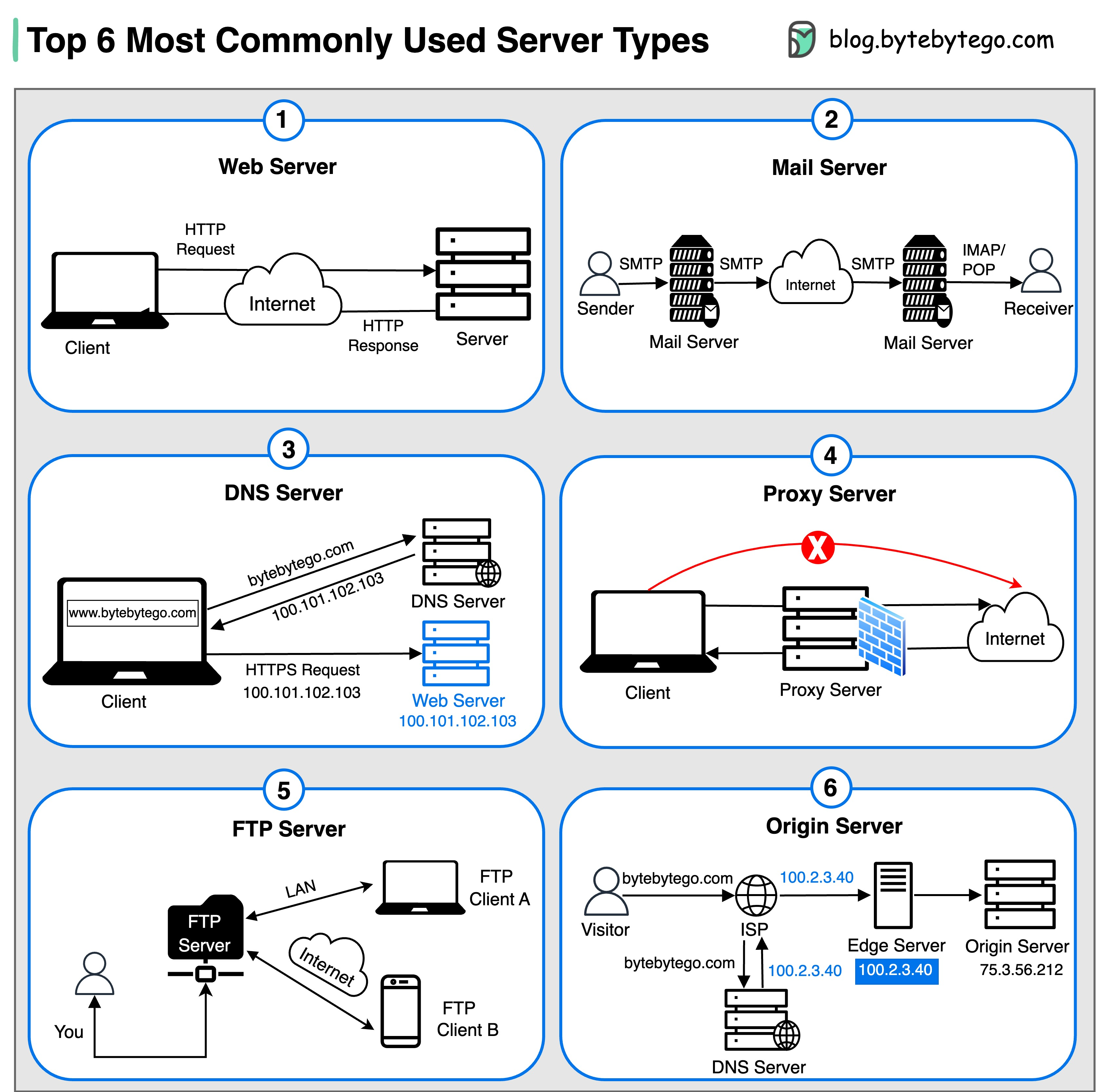
1. Web Server
Hosts websites and delivers web content to clients over the internet.
2. Mail Server
Handles the sending, receiving, and routing of emails across networks.
3. DNS Server
Translates domain names (like bytebytego.com) into IP addresses, enabling users to access websites by their human-readable names.
4. Proxy Server
An intermediary server that acts as a gateway between clients and other servers, providing additional security, performance optimization, and anonymity.
5. FTP Server
Facilitates the transfer of files between clients and servers over a network.
6. Origin Server
Hosts central source of content that is cached and distributed to edge servers for faster delivery to end users.