 ee4b7305a2
This PR adds all the guides from [Visual
Guides](https://bytebytego.com/guides/) section on bytebytego to the
repository with proper links.

- [x] Markdown files for guides and categories are placed inside
`data/guides` and `data/categories`
- [x] Guide links in readme are auto-generated using
`scripts/readme.ts`. Everytime you run the script `npm run
update-readme`, it reads the categories and guides from the above
mentioned folders, generate production links for guides and categories
and populate the table of content in the readme. This ensures that any
future guides and categories will automatically get added to the readme.
- [x] Sorting inside the readme matches the actual category and guides
sorting on production
1.6 KiB
title, description, image, createdAt, draft, categories, tags
| title | description | image | createdAt | draft | categories | tags | |||
|---|---|---|---|---|---|---|---|---|---|
| Top 6 Firewall Use Cases | Explore the top 6 firewall use cases for enhanced network security. | https://assets.bytebytego.com/diagrams/0047-top-6-firewall-use-cases.png | 2024-02-22 | false |
|
|
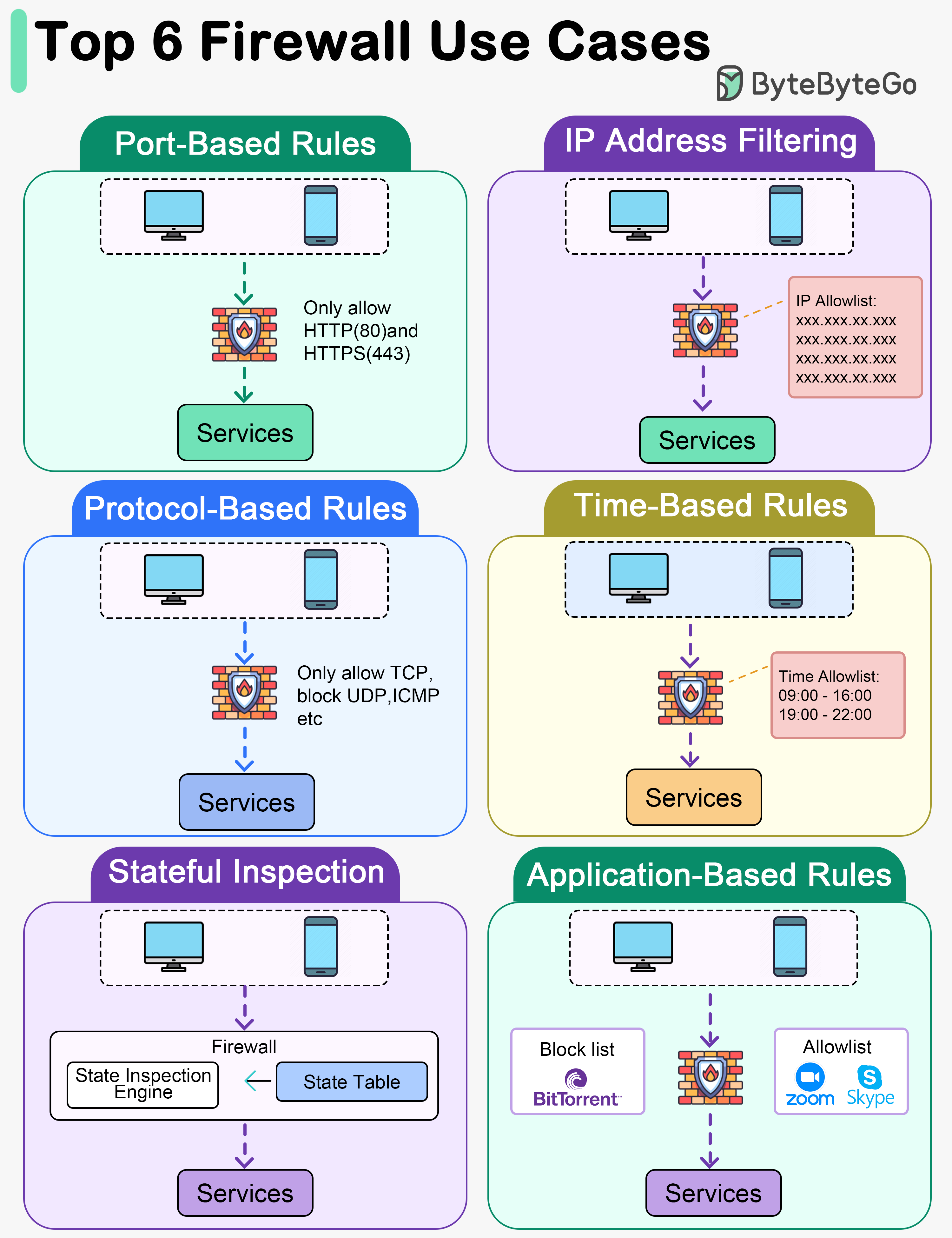
Port-Based Rules
Firewall rules can be set to allow or block traffic based on specific ports. For example, allowing only traffic on ports 80 (HTTP) and 443 (HTTPS) for web browsing.
IP Address Filtering
Rules can be configured to allow or deny traffic based on source or destination IP addresses. This can include whitelisting trusted IP addresses or blacklisting known malicious ones.
Protocol-Based Rules
Firewalls can be configured to allow or block traffic based on specific network protocols such as TCP, UDP, ICMP, etc. For instance, allowing only TCP traffic on port 22 (SSH).
Time-Based Rules
Firewalls can be configured to enforce rules based on specific times or schedules. This can be useful for setting different access rules during business hours versus after-hours.
Stateful Inspection
Stateful Inspection: Stateful firewalls monitor the state of active connections and allow traffic only if it matches an established connection, preventing unauthorized access from the outside.
Application-Based Rules
Some firewalls offer application-level control by allowing or blocking traffic based on specific applications or services. For instance, allowing or restricting access to certain applications like Skype, BitTorrent, etc.