mirror of
https://github.com/ByteByteGoHq/system-design-101.git
synced 2026-04-14 13:47:25 -04:00
 ee4b7305a2
This PR adds all the guides from [Visual
Guides](https://bytebytego.com/guides/) section on bytebytego to the
repository with proper links.

- [x] Markdown files for guides and categories are placed inside
`data/guides` and `data/categories`
- [x] Guide links in readme are auto-generated using
`scripts/readme.ts`. Everytime you run the script `npm run
update-readme`, it reads the categories and guides from the above
mentioned folders, generate production links for guides and categories
and populate the table of content in the readme. This ensures that any
future guides and categories will automatically get added to the readme.
- [x] Sorting inside the readme matches the actual category and guides
sorting on production
1.1 KiB
1.1 KiB
title, description, image, createdAt, draft, categories, tags
| title | description | image | createdAt | draft | categories | tags | |||
|---|---|---|---|---|---|---|---|---|---|
| Top 4 Authentication Mechanisms | Explore the top 4 authentication mechanisms for secure access. | https://assets.bytebytego.com/diagrams/0078-authentication-mechanisms.png | 2024-02-23 | false |
|
|
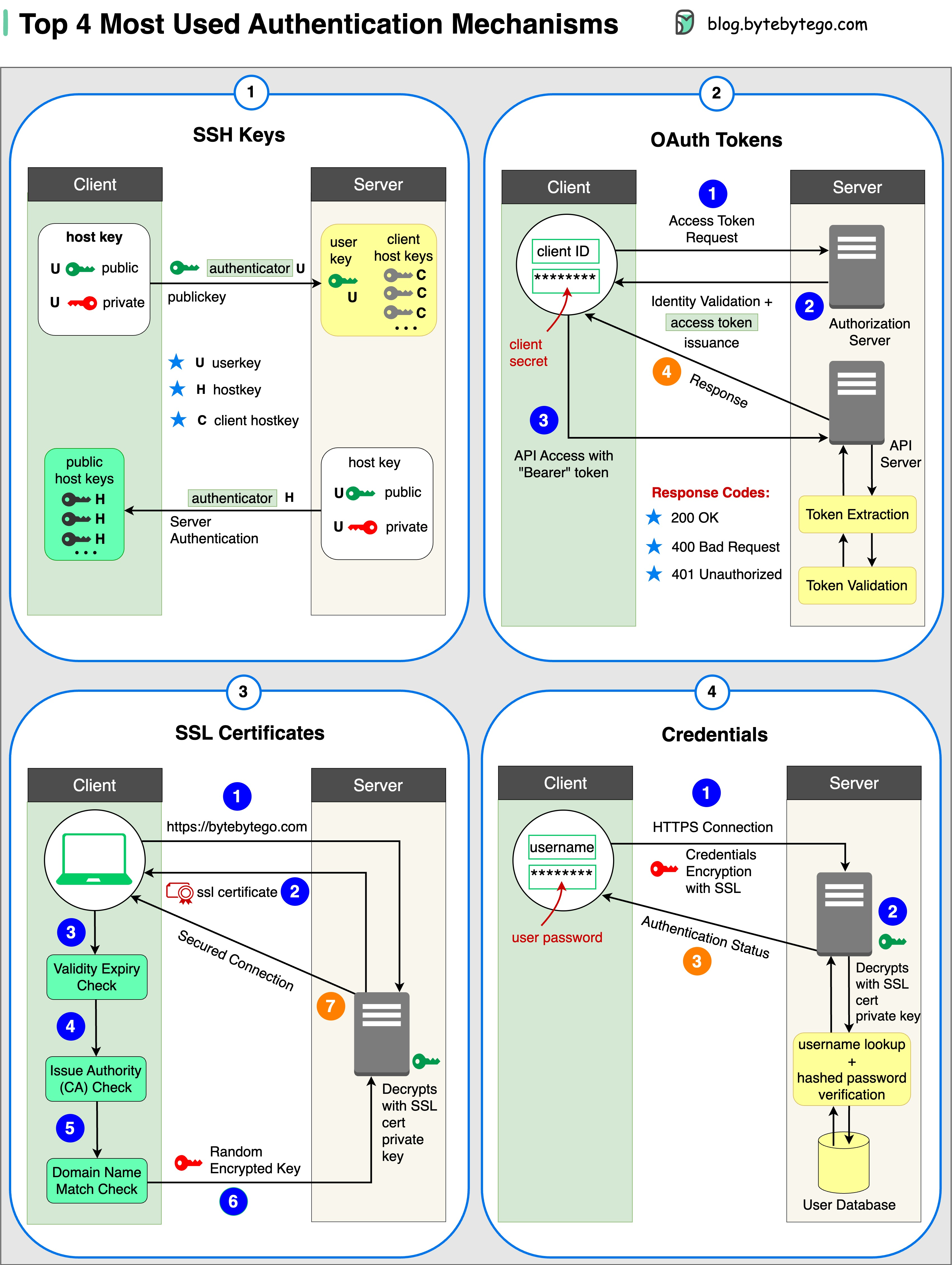
1. SSH Keys
Cryptographic keys are used to access remote systems and servers securely.
2. OAuth Tokens
Tokens that provide limited access to user data on third-party applications.
3. SSL Certificates
Digital certificates ensure secure and encrypted communication between servers and clients.
4. Credentials
User authentication information is used to verify and grant access to various systems and services.
Over to you: How do you manage those security keys? Is it a good idea to put them in a GitHub repository?
Guest post by Govardhana Miriyala Kannaiah.