mirror of
https://github.com/ByteByteGoHq/system-design-101.git
synced 2026-04-13 05:17:25 -04:00
 ee4b7305a2
This PR adds all the guides from [Visual
Guides](https://bytebytego.com/guides/) section on bytebytego to the
repository with proper links.

- [x] Markdown files for guides and categories are placed inside
`data/guides` and `data/categories`
- [x] Guide links in readme are auto-generated using
`scripts/readme.ts`. Everytime you run the script `npm run
update-readme`, it reads the categories and guides from the above
mentioned folders, generate production links for guides and categories
and populate the table of content in the readme. This ensures that any
future guides and categories will automatically get added to the readme.
- [x] Sorting inside the readme matches the actual category and guides
sorting on production
1.1 KiB
1.1 KiB
title, description, image, createdAt, draft, categories, tags
| title | description | image | createdAt | draft | categories | tags | |||
|---|---|---|---|---|---|---|---|---|---|
| Time Series DB (TSDB) in 20 Lines | Learn about Time Series Databases (TSDB) and their applications. | https://assets.bytebytego.com/diagrams/0364-time-series-db-tsdb-in-20-lines.jpeg | 2024-02-07 | false |
|
|
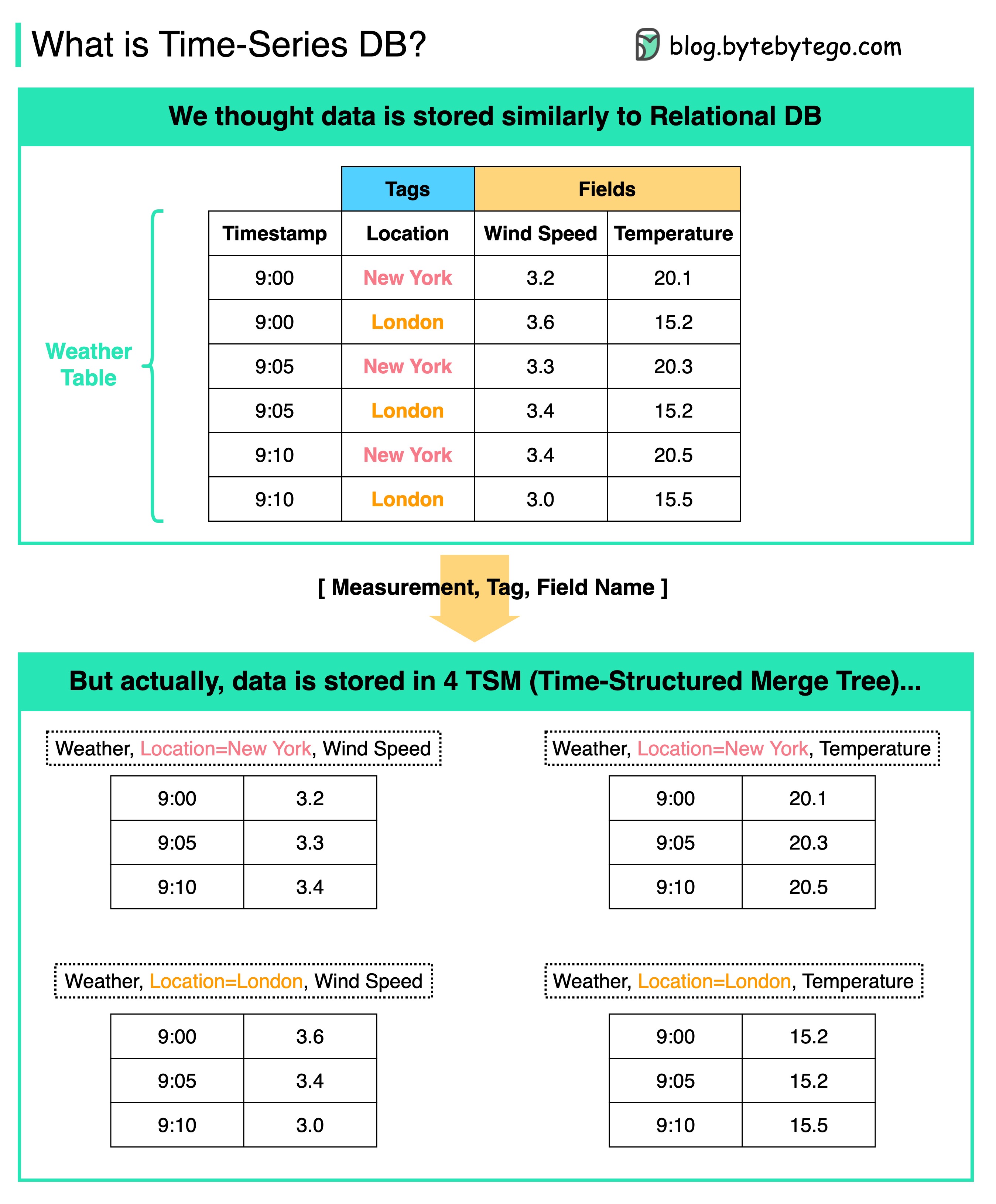
What is Time-Series DB (TSDB)? How is it different from Relational DB?
The diagram above shows the internal data model of a typical Time-Series DB.
A TSDB is a database optimized for time series data.
-
From the users’ perspective, the data looks similar to the relational DB table. But behind the scenes, the weather table is stored in 4 TSMs (Time-Structured Merge Trees) in the format of [Measurement, Tag, Field Name].
-
In this way, we can quickly aggregate and analyze data based on time and tags.
-
Typical usage:
- Trades and market data updates in a market
- Server metrics
- Application performance monitoring
- Network data
- Sensor data
- Events
- Clicks streams