 ee4b7305a2
This PR adds all the guides from [Visual
Guides](https://bytebytego.com/guides/) section on bytebytego to the
repository with proper links.

- [x] Markdown files for guides and categories are placed inside
`data/guides` and `data/categories`
- [x] Guide links in readme are auto-generated using
`scripts/readme.ts`. Everytime you run the script `npm run
update-readme`, it reads the categories and guides from the above
mentioned folders, generate production links for guides and categories
and populate the table of content in the readme. This ensures that any
future guides and categories will automatically get added to the readme.
- [x] Sorting inside the readme matches the actual category and guides
sorting on production
1.8 KiB
title, description, image, createdAt, draft, categories, tags
| title | description | image | createdAt | draft | categories | tags | |||
|---|---|---|---|---|---|---|---|---|---|
| The Ultimate Kafka 101 You Cannot Miss | Learn the fundamentals of Kafka in 8 simple steps. | https://assets.bytebytego.com/diagrams/0246-kafka-101-8-steps-to-learn-the-fundamentals-of-kafka.png | 2024-02-02 | false |
|
|
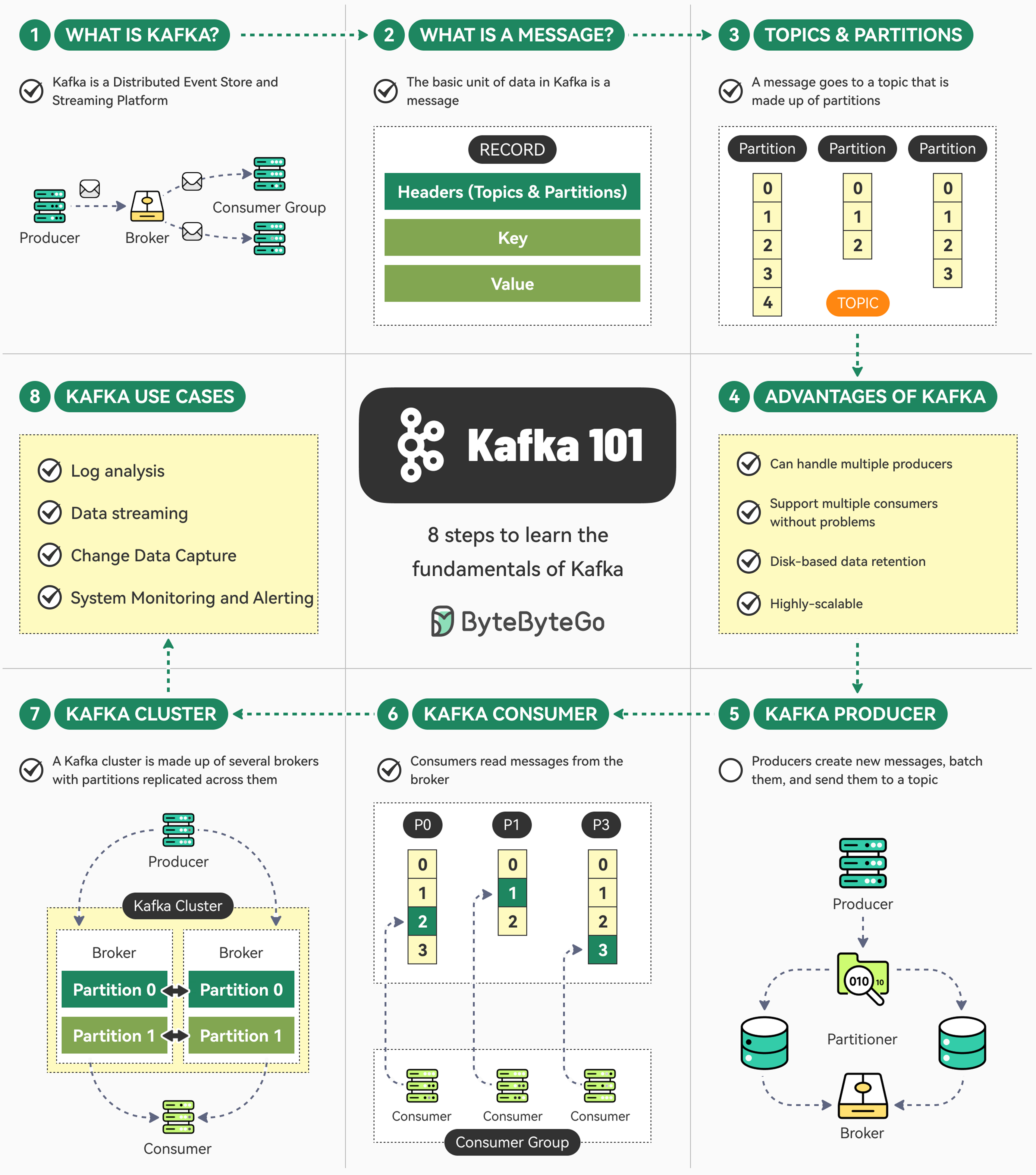
Kafka is super-popular but can be overwhelming in the beginning.
Here are 8 simple steps that can help you understand the fundamentals of Kafka.
What is Kafka?
Kafka is a distributed event store and a streaming platform. It began as an internal project at LinkedIn and now powers some of the largest data pipelines in the world in orgs like Netflix, Uber, etc.
Kafka Messages
Message is the basic unit of data in Kafka. It’s like a record in a table consisting of headers, key, and value.
Kafka Topics and Partitions
Every message goes to a particular Topic. Think of the topic as a folder on your computer. Topics also have multiple partitions.
Advantages of Kafka
Kafka can handle multiple producers and consumers, while providing disk-based data retention and high scalability.
Kafka Producer
Producers in Kafka create new messages, batch them, and send them to a Kafka topic. They also take care of balancing messages across different partitions.
Kafka Consumer
Kafka consumers work together as a consumer group to read messages from the broker.
Kafka Cluster
A Kafka cluster consists of several brokers where each partition is replicated across multiple brokers to ensure high availability and redundancy.
Use Cases of Kafka
Kafka can be used for log analysis, data streaming, change data capture, and system monitoring.