 ee4b7305a2
This PR adds all the guides from [Visual
Guides](https://bytebytego.com/guides/) section on bytebytego to the
repository with proper links.

- [x] Markdown files for guides and categories are placed inside
`data/guides` and `data/categories`
- [x] Guide links in readme are auto-generated using
`scripts/readme.ts`. Everytime you run the script `npm run
update-readme`, it reads the categories and guides from the above
mentioned folders, generate production links for guides and categories
and populate the table of content in the readme. This ensures that any
future guides and categories will automatically get added to the readme.
- [x] Sorting inside the readme matches the actual category and guides
sorting on production
1.3 KiB
title, description, image, createdAt, draft, categories, tags
| title | description | image | createdAt | draft | categories | tags | |||
|---|---|---|---|---|---|---|---|---|---|
| Smooth Data Migration with Avro | Learn how Apache Avro facilitates smooth data migration with schema evolution. | https://assets.bytebytego.com/diagrams/0080-avro.png | 2024-02-01 | false |
|
|
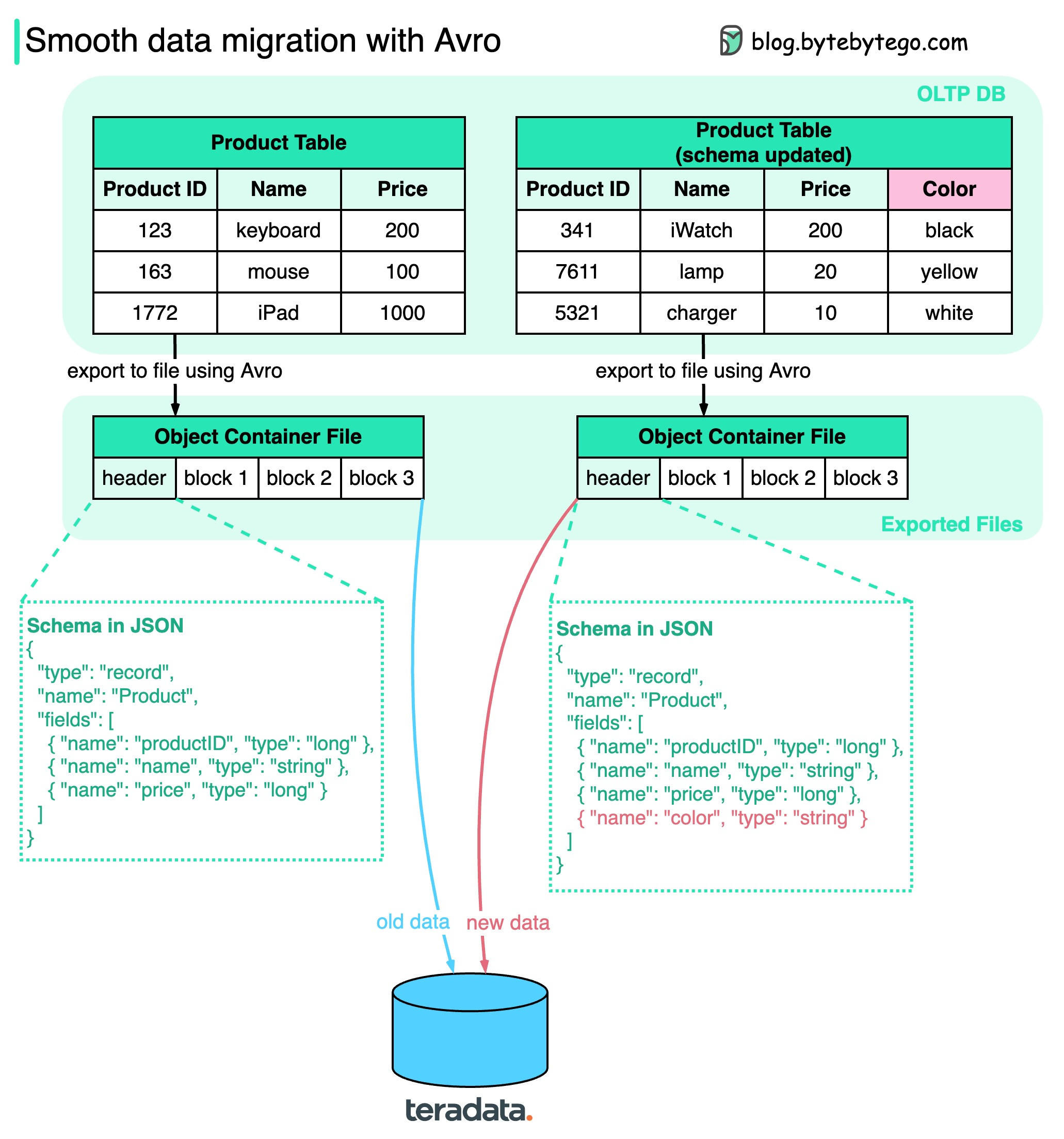
How do we ensure when performing data migration? The diagram above shows how Apache Avro manages the schema evolution during data migration.
Avro was started in 2009, initially as a subproject of Apache Hadoop to address Thrift’s limitation in Hadoop use cases. Avro is mainly used for two things: Data serialization and RPC.
Key points in the diagram:
-
We can export the data to object container files, where schema sits together with the data blocks. Avro dynamically generates the schemas based on the columns, so if the schema is changed, a new schema is generated and stored with new data.
-
When the exported files are loaded into another data storage (for example, teradata), anyone can read the schema and know how to read the data. The old data and new data can be successfully migrated to the new database. Unlike gRPC or Thrift, which statically generate schemas, Avro makes the data migration process easier.