 ee4b7305a2
This PR adds all the guides from [Visual
Guides](https://bytebytego.com/guides/) section on bytebytego to the
repository with proper links.

- [x] Markdown files for guides and categories are placed inside
`data/guides` and `data/categories`
- [x] Guide links in readme are auto-generated using
`scripts/readme.ts`. Everytime you run the script `npm run
update-readme`, it reads the categories and guides from the above
mentioned folders, generate production links for guides and categories
and populate the table of content in the readme. This ensures that any
future guides and categories will automatically get added to the readme.
- [x] Sorting inside the readme matches the actual category and guides
sorting on production
1.4 KiB
title, description, image, createdAt, draft, categories, tags
| title | description | image | createdAt | draft | categories | tags | |||
|---|---|---|---|---|---|---|---|---|---|
| Session, Cookie, JWT, Token, SSO, and OAuth 2.0 Explained | Understanding sessions, cookies, JWT, SSO, and OAuth 2.0 in one diagram. | https://assets.bytebytego.com/diagrams/0152-cookies-session-jwt.png | 2024-03-14 | false |
|
|
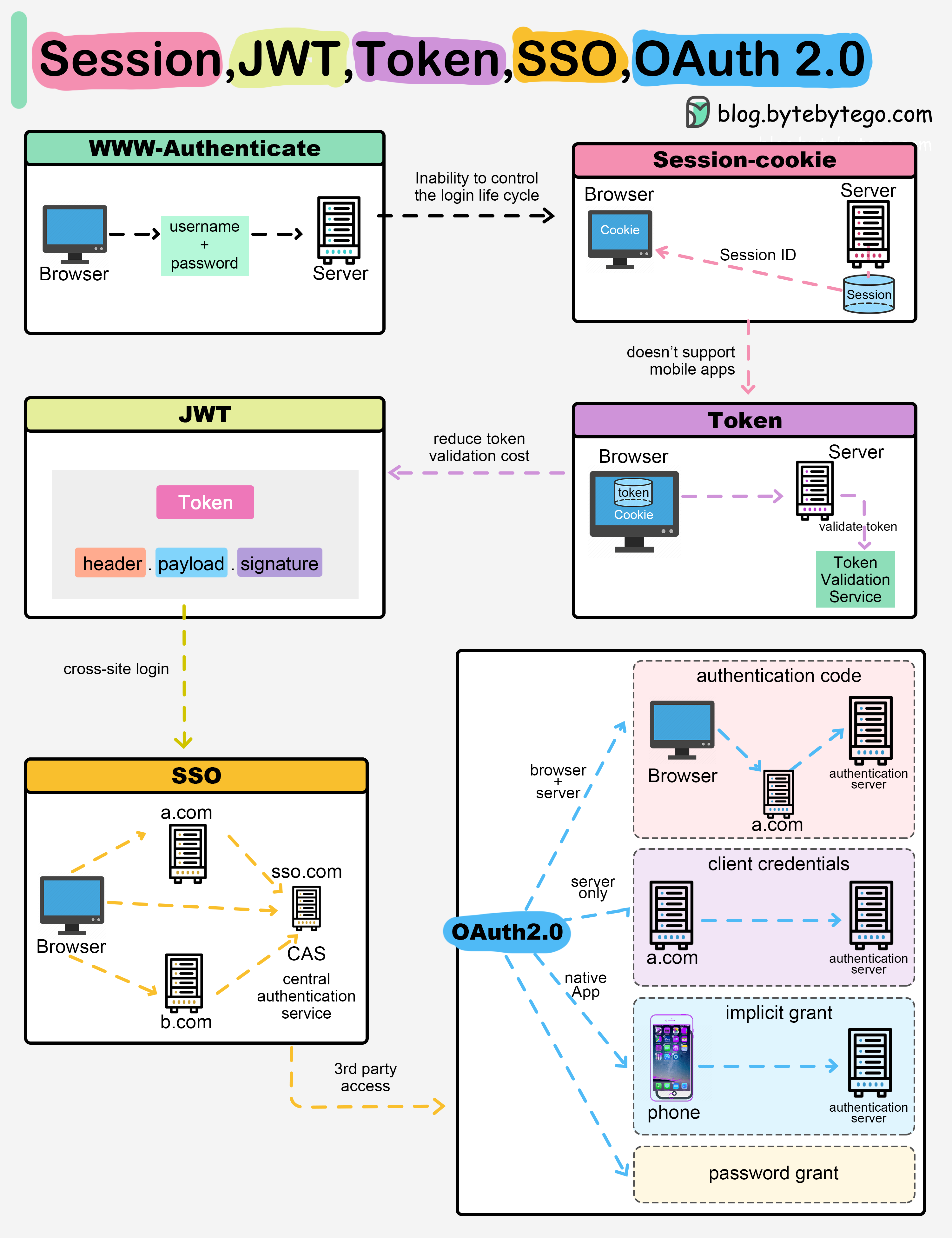
When you login to a website, your identity needs to be managed. Here is how different solutions work:
-
Session - The server stores your identity and gives the browser a session ID cookie. This allows the server to track login state. But cookies don't work well across devices.
-
Token - Your identity is encoded into a token sent to the browser. The browser sends this token on future requests for authentication. No server session storage is required. But tokens need encryption/decryption.
-
JWT - JSON Web Tokens standardize identity tokens using digital signatures for trust. The signature is contained in the token so no server session is needed.
-
SSO - Single Sign On uses a central authentication service. This allows a single login to work across multiple sites.
-
OAuth2 - Allows limited access to your data on one site by another site, without giving away passwords.
-
QR Code - Encodes a random token into a QR code for mobile login. Scanning the code logs you in without typing a password.