 ee4b7305a2
This PR adds all the guides from [Visual
Guides](https://bytebytego.com/guides/) section on bytebytego to the
repository with proper links.

- [x] Markdown files for guides and categories are placed inside
`data/guides` and `data/categories`
- [x] Guide links in readme are auto-generated using
`scripts/readme.ts`. Everytime you run the script `npm run
update-readme`, it reads the categories and guides from the above
mentioned folders, generate production links for guides and categories
and populate the table of content in the readme. This ensures that any
future guides and categories will automatically get added to the readme.
- [x] Sorting inside the readme matches the actual category and guides
sorting on production
1.2 KiB
title, description, image, createdAt, draft, categories, tags
| title | description | image | createdAt | draft | categories | tags | |||
|---|---|---|---|---|---|---|---|---|---|
| MVC, MVP, MVVM, VIPER Patterns | Comparing MVC, MVP, MVVM, and VIPER architectural patterns. | https://assets.bytebytego.com/diagrams/0143-client-arch-patterns.png | 2024-03-12 | false |
|
|
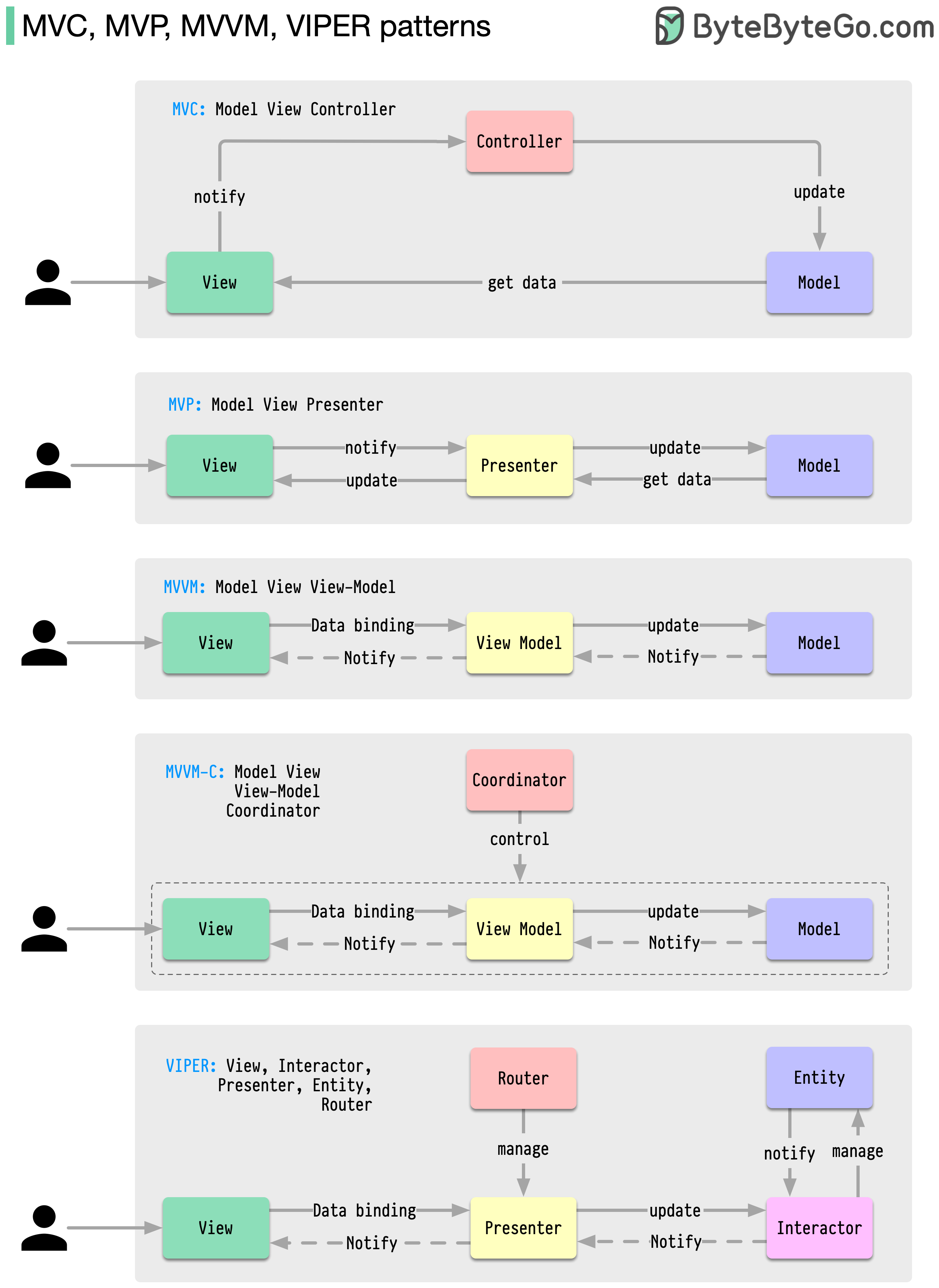
What distinguishes MVC, MVP, MVVM, MVVM-C, and VIPER architecture patterns from each other?
These architecture patterns are among the most commonly used in app development, whether on iOS or Android platforms. Developers have introduced them to overcome the limitations of earlier patterns. So, how do they differ?
-
MVC, the oldest pattern, dates back almost 50 years
-
Every pattern has a "view" (V) responsible for displaying content and receiving user input
-
Most patterns include a "model" (M) to manage business data
-
"Controller," "presenter," and "view-model" are translators that mediate between the view and the model ("entity" in the VIPER pattern)
-
These translators can be quite complex to write, so various patterns have been proposed to make them more maintainable