 ee4b7305a2
This PR adds all the guides from [Visual
Guides](https://bytebytego.com/guides/) section on bytebytego to the
repository with proper links.

- [x] Markdown files for guides and categories are placed inside
`data/guides` and `data/categories`
- [x] Guide links in readme are auto-generated using
`scripts/readme.ts`. Everytime you run the script `npm run
update-readme`, it reads the categories and guides from the above
mentioned folders, generate production links for guides and categories
and populate the table of content in the readme. This ensures that any
future guides and categories will automatically get added to the readme.
- [x] Sorting inside the readme matches the actual category and guides
sorting on production
1.3 KiB
title, description, image, createdAt, draft, categories, tags
| title | description | image | createdAt | draft | categories | tags | |||
|---|---|---|---|---|---|---|---|---|---|
| Log Parsing Cheat Sheet | A handy guide to log parsing commands for efficient log analysis. | https://assets.bytebytego.com/diagrams/0263-log-parsing.png | 2024-03-12 | false |
|
|
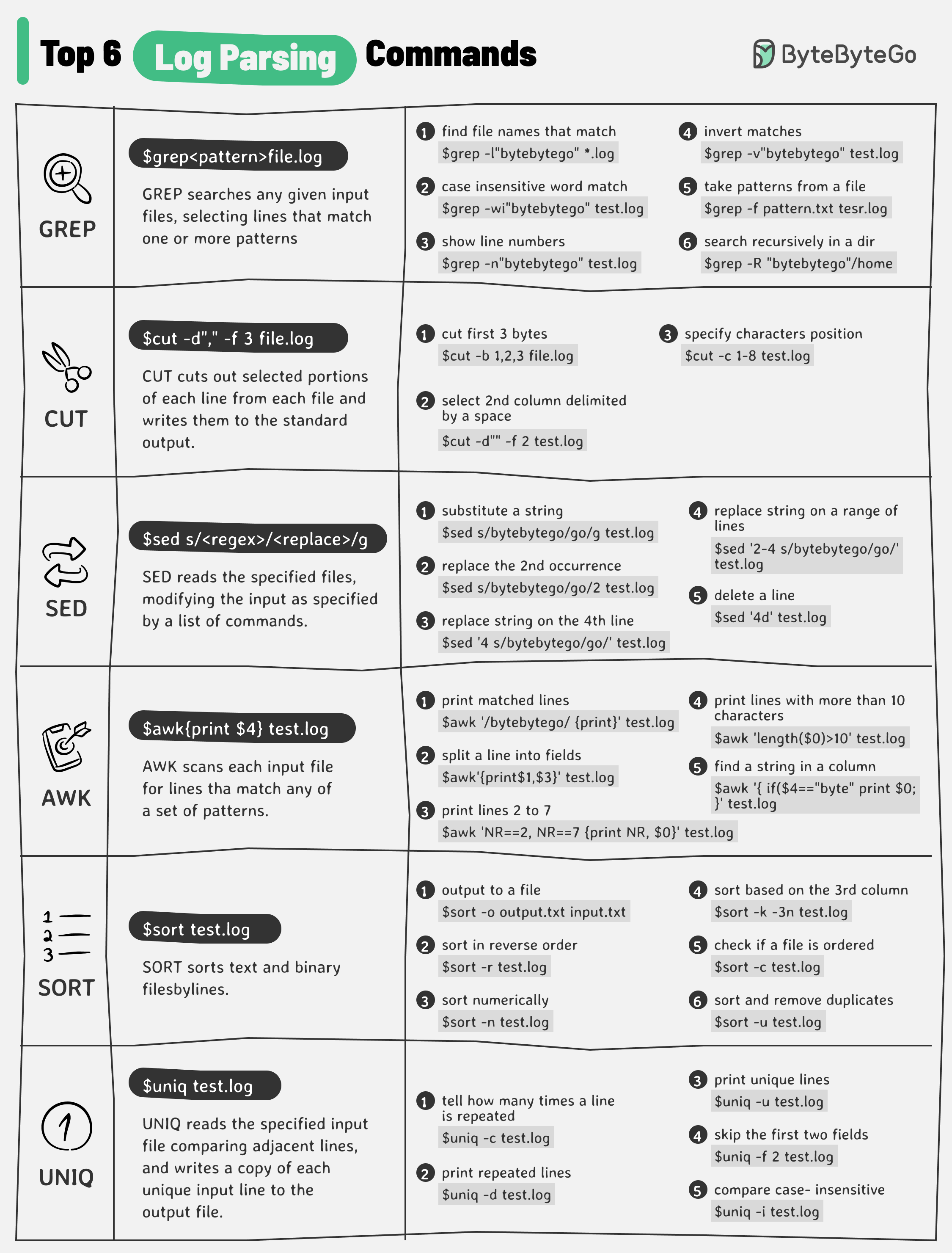
The diagram below lists the top 6 log parsing commands.
Log Parsing Commands
-
GREP
GREP searches any given input files, selecting lines that match one or more patterns.
-
CUT
CUT cuts out selected portions of each line from each file and writes them to the standard output.
-
SED
SED reads the specified files, modifying the input as specified by a list of commands.
-
AWK
AWK scans each input file for lines that match any of a set of patterns.
-
SORT
SORT sorts text and binary files by lines.
-
UNIQ
UNIQ reads the specified input file comparing adjacent lines and writes a copy of each unique input line to the output file.
These commands are often used in combination to quickly find useful information from the log files. For example, the below commands list the timestamps (column 2) when there is an exception happening for xxService.
grep “xxService” service.log | grep “Exception” | cut -d” “ -f 2