 ee4b7305a2
This PR adds all the guides from [Visual
Guides](https://bytebytego.com/guides/) section on bytebytego to the
repository with proper links.

- [x] Markdown files for guides and categories are placed inside
`data/guides` and `data/categories`
- [x] Guide links in readme are auto-generated using
`scripts/readme.ts`. Everytime you run the script `npm run
update-readme`, it reads the categories and guides from the above
mentioned folders, generate production links for guides and categories
and populate the table of content in the readme. This ensures that any
future guides and categories will automatically get added to the readme.
- [x] Sorting inside the readme matches the actual category and guides
sorting on production
1.4 KiB
title, description, image, createdAt, draft, categories, tags
| title | description | image | createdAt | draft | categories | tags | |||
|---|---|---|---|---|---|---|---|---|---|
| Is PassKey Shaping a Passwordless Future? | Exploring PassKey's potential to revolutionize online security. | https://assets.bytebytego.com/diagrams/0296-is-passkey-shaping-a-passwordless-future.png | 2024-02-15 | false |
|
|
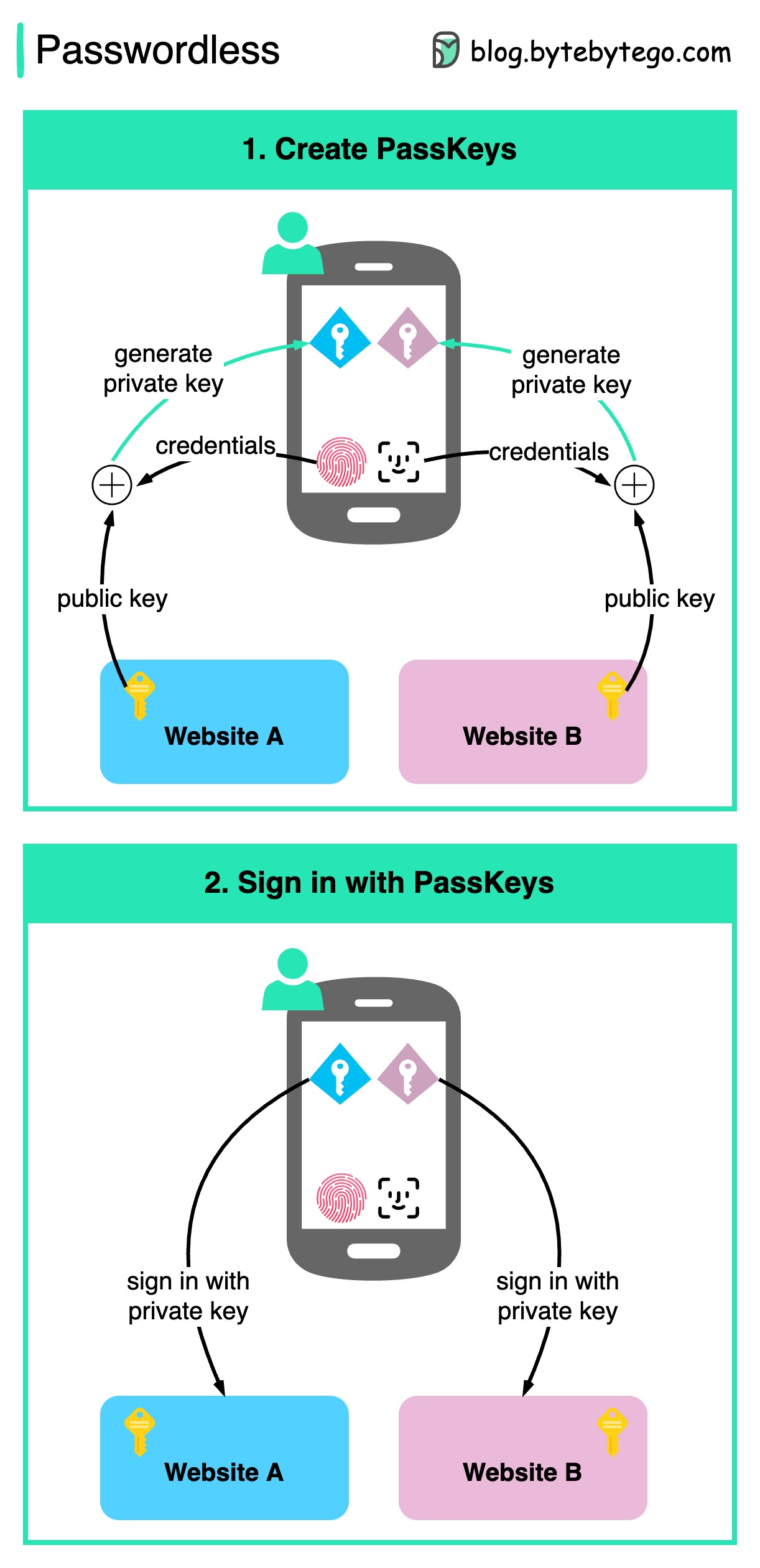
Google recently announced PassKey support for both Android and Chrome.
Passkey, also backed by Apple and Microsoft, is claimed to be a significantly safer replacement for passwords.
How PassKeys Work
-
Step 1 - Create PassKeys
The end-user needs to confirm the account information and present their credentials (face ID, touch ID, etc.).
A private key is generated based on the public key provided by the website. The private key is stored on the device.
-
Step 2 - Sign in with PassKeys on devices
When the user tries to sign in to a website, they use the generated private key. Just select the account information and present the credentials to unlock the private key.
Consequently, there is no risk of password leakage since no passwords are stored in the websites' databases.
Passkeys are built on industry standards, and it works across different platforms and browsers - including Windows, macOS and iOS, and ChromeOS, with a uniform user experience.