mirror of
https://github.com/ByteByteGoHq/system-design-101.git
synced 2026-04-07 18:57:24 -04:00
 ee4b7305a2
This PR adds all the guides from [Visual
Guides](https://bytebytego.com/guides/) section on bytebytego to the
repository with proper links.

- [x] Markdown files for guides and categories are placed inside
`data/guides` and `data/categories`
- [x] Guide links in readme are auto-generated using
`scripts/readme.ts`. Everytime you run the script `npm run
update-readme`, it reads the categories and guides from the above
mentioned folders, generate production links for guides and categories
and populate the table of content in the readme. This ensures that any
future guides and categories will automatically get added to the readme.
- [x] Sorting inside the readme matches the actual category and guides
sorting on production
1.9 KiB
1.9 KiB
title, description, image, createdAt, draft, categories, tags
| title | description | image | createdAt | draft | categories | tags | |||
|---|---|---|---|---|---|---|---|---|---|
| How To Release A Mobile App | A simplified guide to the mobile app release process. | https://assets.bytebytego.com/diagrams/0228-how-to-release-a-mobile-app.png | 2024-03-09 | false |
|
|
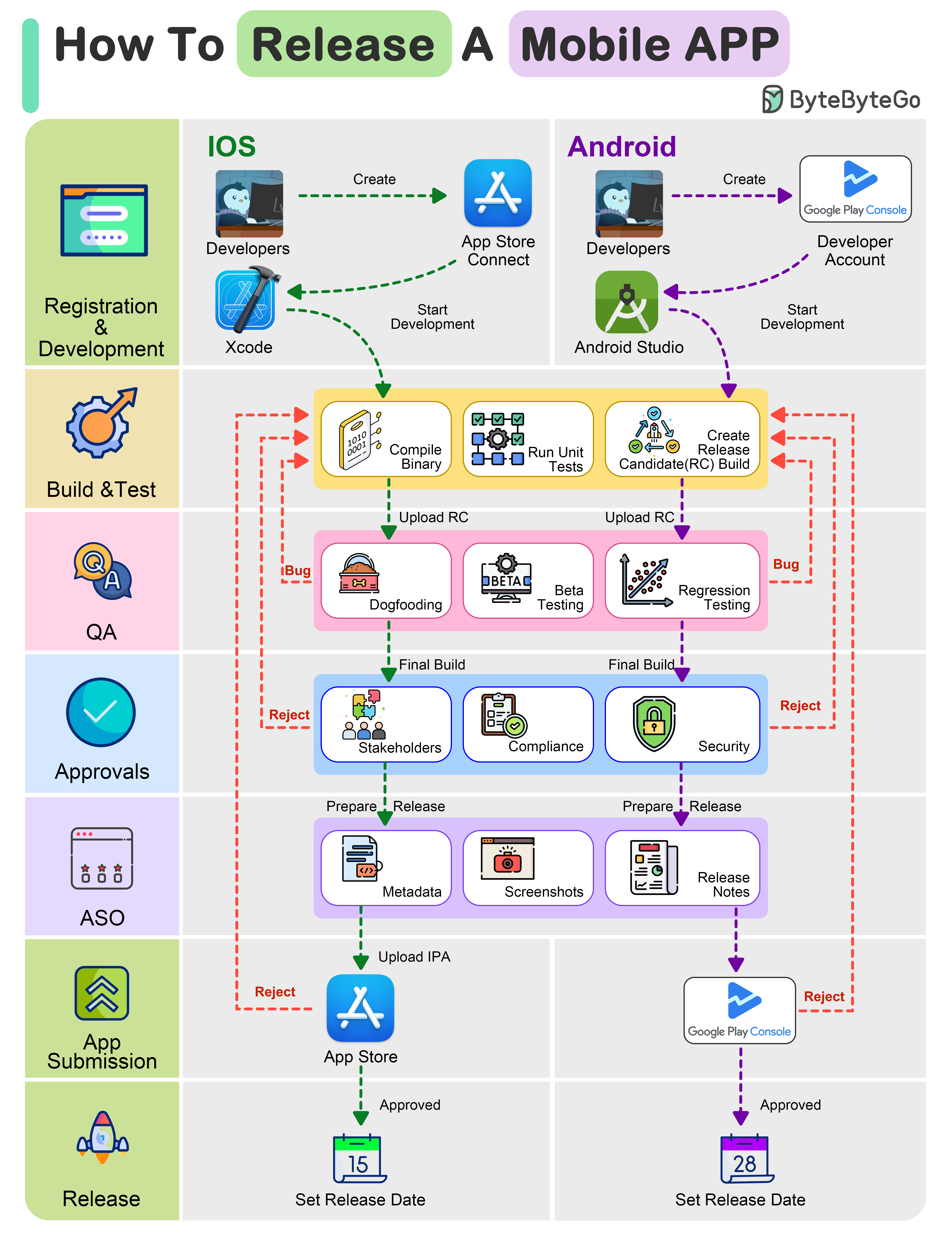
The mobile app release process differs from conventional methods. This illustration simplifies the journey to help you understand.
1. Registration & Development (iOS & Android):
- Enroll in Apple's Developer Program and Google Play Console as iOS and Android developer
- Code using platform-specific tools: Swift/Obj-C for iOS, and Java/Kotlin for Android
2. Build & Test (iOS & Android):
Compile the app's binary, run extensive tests on both platforms to ensure functionality and performance. Create a release candidate build.
3. QA:
- Internally test the app for issue identification (dogfooding)
- Beta test with external users to collect feedback
- Conduct regression testing to maintain feature stability
4. Internal Approvals:
- Obtain approval from stakeholders and key team members.
- Comply with app store guidelines and industry regulations
- Obtain security approvals to safeguard user data and privacy
5. App Store Optimization (ASO):
- Optimize metadata, including titles, descriptions, and keywords, for better search visibility
- Design captivating screenshots and icons to entice users
- Prepare engaging release notes to inform users about new features and updates
6. App Submission To Store:
- Submit the iOS app via App Store Connect following Apple's guidelines
- Submit the Android app via Google Play Console, adhering to Google's policies
- Both platforms may request issues resolution for approval
7. Release:
- Upon approval, set a release date to coordinate the launch on both iOS and Android platforms