mirror of
https://github.com/ByteByteGoHq/system-design-101.git
synced 2026-04-01 16:57:23 -04:00
 ee4b7305a2
This PR adds all the guides from [Visual
Guides](https://bytebytego.com/guides/) section on bytebytego to the
repository with proper links.

- [x] Markdown files for guides and categories are placed inside
`data/guides` and `data/categories`
- [x] Guide links in readme are auto-generated using
`scripts/readme.ts`. Everytime you run the script `npm run
update-readme`, it reads the categories and guides from the above
mentioned folders, generate production links for guides and categories
and populate the table of content in the readme. This ensures that any
future guides and categories will automatically get added to the readme.
- [x] Sorting inside the readme matches the actual category and guides
sorting on production
1.1 KiB
1.1 KiB
title, description, image, createdAt, draft, categories, tags
| title | description | image | createdAt | draft | categories | tags | |||
|---|---|---|---|---|---|---|---|---|---|
| How to Design Google Docs | Learn how to design Google Docs with this detailed guide. | https://assets.bytebytego.com/diagrams/0206-google-doc.png | 2024-03-07 | false |
|
|
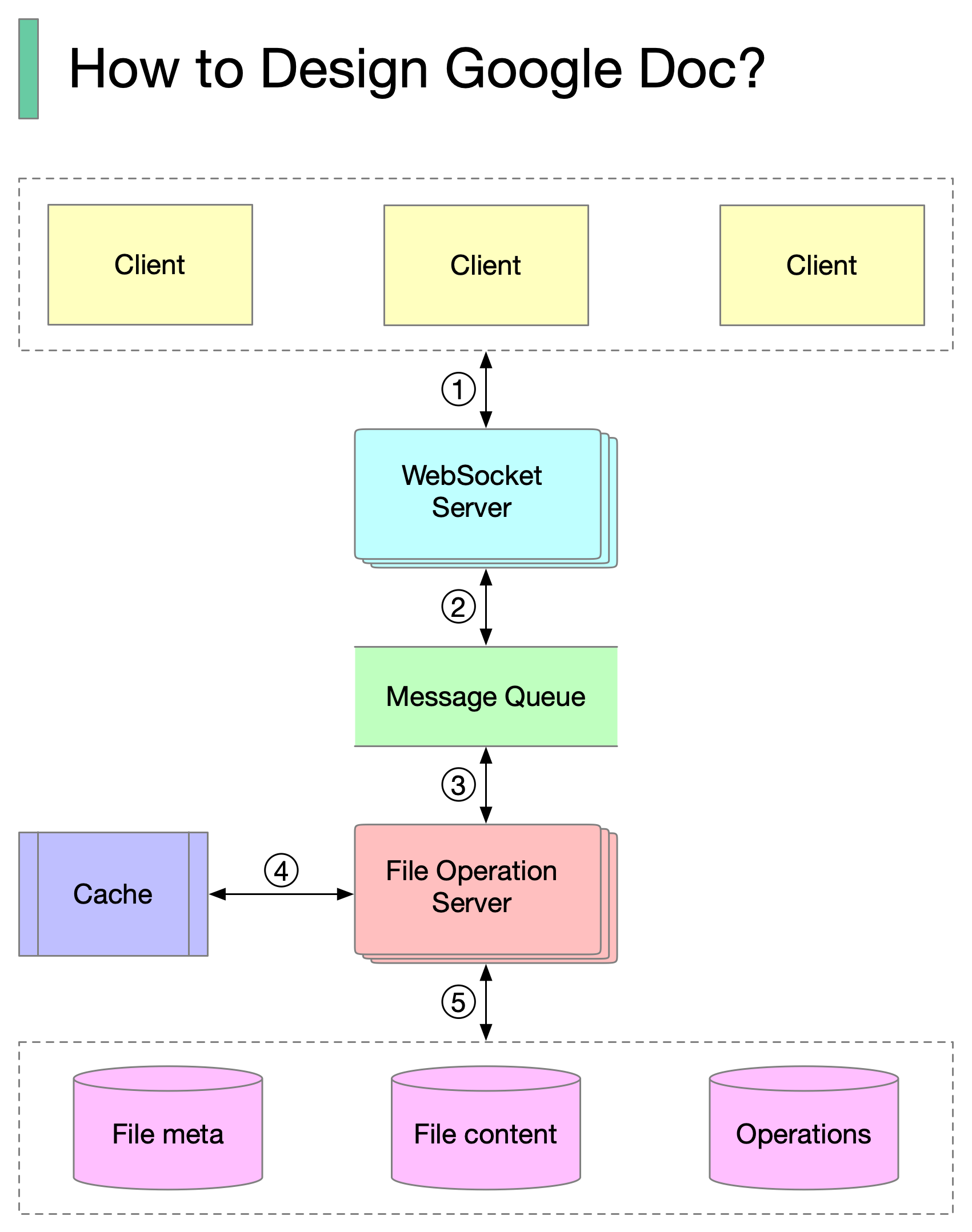
-
Clients send document editing operations to the WebSocket Server.
-
The real-time communication is handled by the WebSocket Server.
-
Documents operations are persisted in the Message Queue.
-
The File Operation Server consumes operations produced by clients and generates transformed operations using collaboration algorithms.
-
Three types of data are stored: file metadata, file content, and operations.
One of the biggest challenges is real-time conflict resolution. Common algorithms include:
- Operational transformation (OT)
- Differential Synchronization (DS)
- Conflict-free replicated data type (CRDT)
Google Doc uses OT according to its Wikipedia page and CRDT is an active area of research for real-time concurrent editing.