mirror of
https://github.com/ByteByteGoHq/system-design-101.git
synced 2026-04-01 16:57:23 -04:00
 ee4b7305a2
This PR adds all the guides from [Visual
Guides](https://bytebytego.com/guides/) section on bytebytego to the
repository with proper links.

- [x] Markdown files for guides and categories are placed inside
`data/guides` and `data/categories`
- [x] Guide links in readme are auto-generated using
`scripts/readme.ts`. Everytime you run the script `npm run
update-readme`, it reads the categories and guides from the above
mentioned folders, generate production links for guides and categories
and populate the table of content in the readme. This ensures that any
future guides and categories will automatically get added to the readme.
- [x] Sorting inside the readme matches the actual category and guides
sorting on production
1.1 KiB
1.1 KiB
title, description, image, createdAt, draft, categories, tags
| title | description | image | createdAt | draft | categories | tags | |||
|---|---|---|---|---|---|---|---|---|---|
| How Levelsfyi Scaled to Millions of Users with Google Sheets | Learn how Levelsfyi scaled to millions of users using Google Sheets. | https://assets.bytebytego.com/diagrams/0255-levels-fyi.jpg | 2024-02-17 | false |
|
|
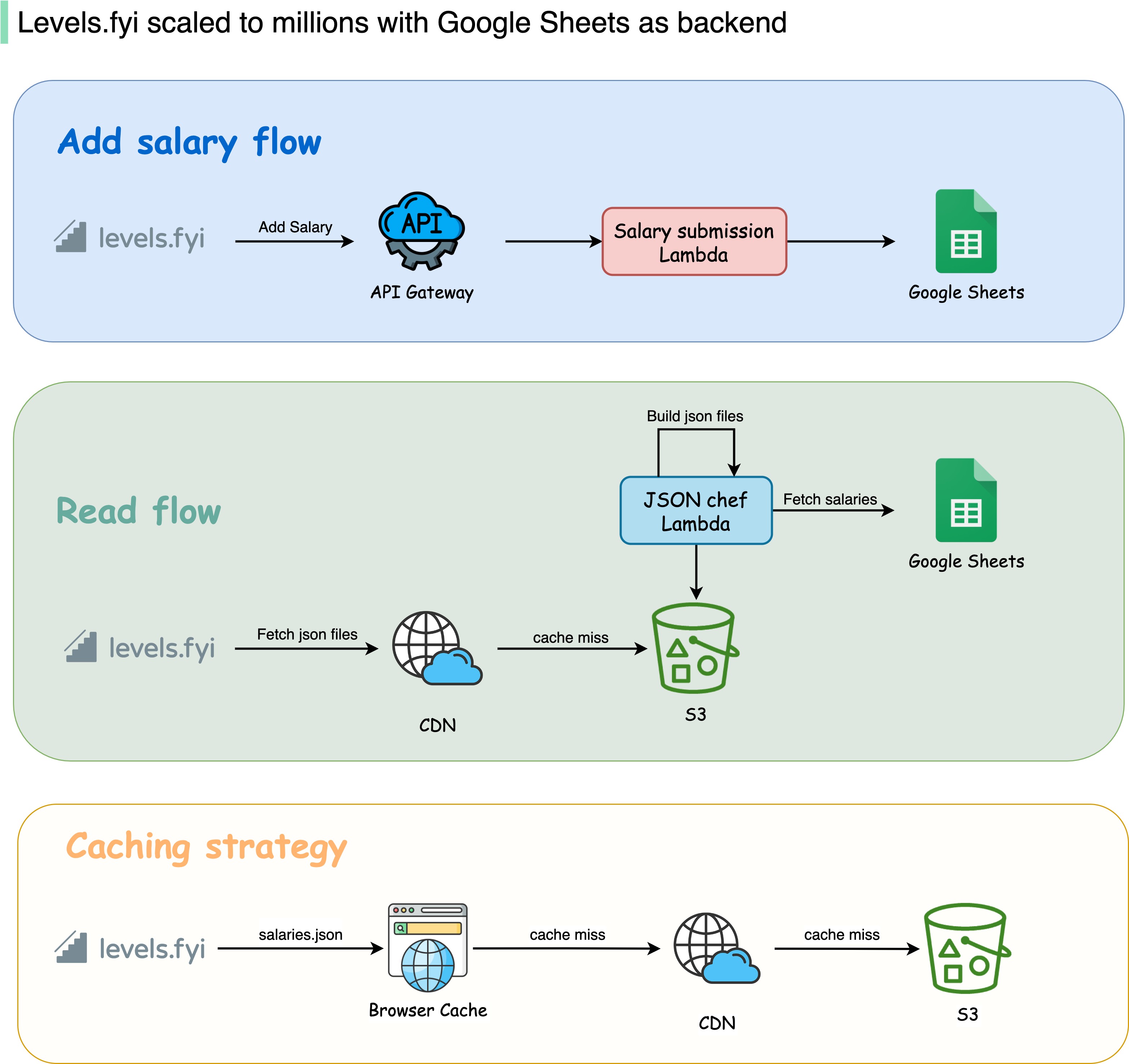
I read something unbelievable today: Levelsfyi scaled to millions of users using Google Sheets as a backend!
They started off on Google Forms and Sheets, which helped them reach millions of monthly active users before switching to a proper backend.
To be fair, they do use serverless computing, but using Google Sheets as the database is an interesting choice.
Why do they use Google Sheets as a backend? Using their own words: "It seems like a pretty counterintuitive idea for a site with our traffic volume to not have a backend or any fancy infrastructure, but our philosophy to building products has always been, start simple and iterate. This allows us to move fast and focus on what’s important".