 ee4b7305a2
This PR adds all the guides from [Visual
Guides](https://bytebytego.com/guides/) section on bytebytego to the
repository with proper links.

- [x] Markdown files for guides and categories are placed inside
`data/guides` and `data/categories`
- [x] Guide links in readme are auto-generated using
`scripts/readme.ts`. Everytime you run the script `npm run
update-readme`, it reads the categories and guides from the above
mentioned folders, generate production links for guides and categories
and populate the table of content in the readme. This ensures that any
future guides and categories will automatically get added to the readme.
- [x] Sorting inside the readme matches the actual category and guides
sorting on production
1.4 KiB
title, description, image, createdAt, draft, categories, tags
| title | description | image | createdAt | draft | categories | tags | |||
|---|---|---|---|---|---|---|---|---|---|
| Data Transmission Between Applications | Explore how data travels between applications in detail. | https://assets.bytebytego.com/diagrams/0159-data-transfer-between-apps.png | 2024-02-24 | false |
|
|
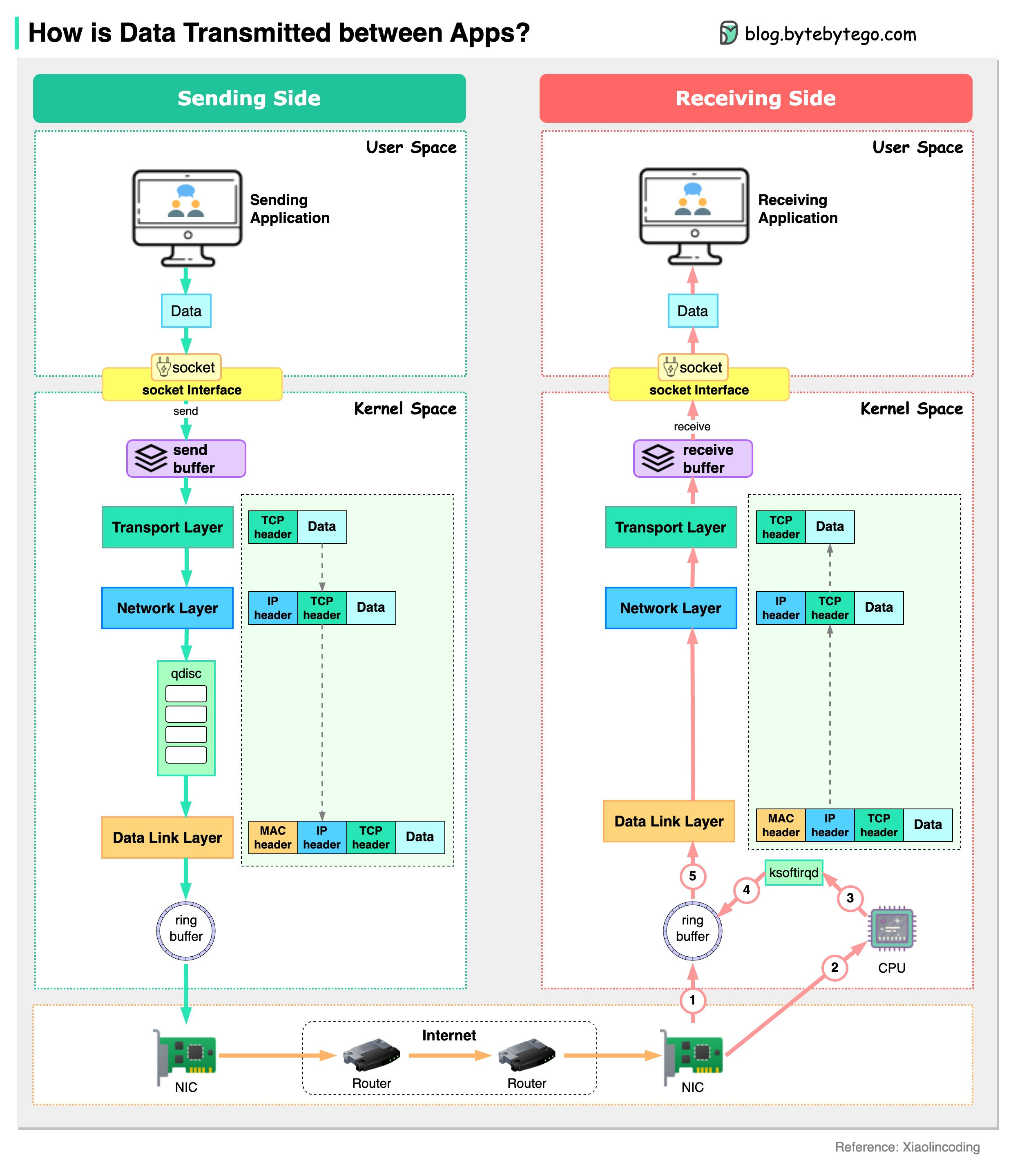
The diagram below shows how a server sends data to another server.
Assume a chat application running in the user space sends out a chat message. The message is sent to the send buffer in the kernel space. The data then goes through the network stack and is wrapped with a TCP header, an IP header, and a MAC header. The data also goes through qdisc (Queueing Disciplines) for flow control. Then the data is sent to the NIC (Network Interface Card) via a ring buffer.
The data is sent to the internet via NIC. After many hops among routers and switches, the data arrives at the NIC of the receiving server.
The NIC of the receiving server puts the data in the ring buffer and sends a hard interrupt to the CPU. The CPU sends a soft interrupt so that ksoftirqd receives data from the ring buffer. Then the data is unwrapped through the data link layer, network layer and transport layer. Eventually, the data (chat message) is copied to the user space and reaches the chat application on the receiving side.