 ee4b7305a2
This PR adds all the guides from [Visual
Guides](https://bytebytego.com/guides/) section on bytebytego to the
repository with proper links.

- [x] Markdown files for guides and categories are placed inside
`data/guides` and `data/categories`
- [x] Guide links in readme are auto-generated using
`scripts/readme.ts`. Everytime you run the script `npm run
update-readme`, it reads the categories and guides from the above
mentioned folders, generate production links for guides and categories
and populate the table of content in the readme. This ensures that any
future guides and categories will automatically get added to the readme.
- [x] Sorting inside the readme matches the actual category and guides
sorting on production
2.2 KiB
title, description, image, createdAt, draft, categories, tags
| title | description | image | createdAt | draft | categories | tags | |||
|---|---|---|---|---|---|---|---|---|---|
| How Does the Domain Name System (DNS) Lookup Work? | Learn how DNS translates domain names to IP addresses for web access. | https://assets.bytebytego.com/diagrams/0176-dns-look-up.png | 2024-03-08 | false |
|
|
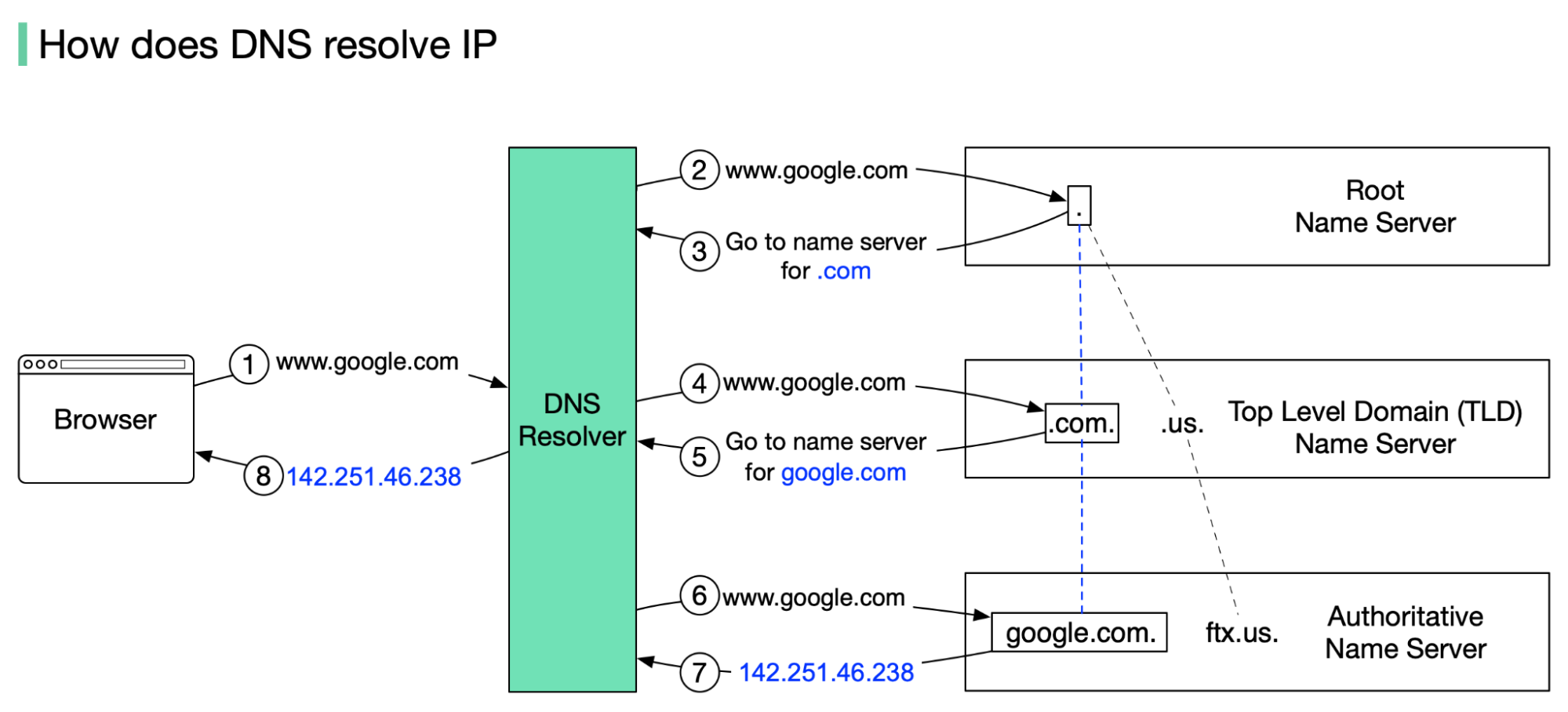
DNS acts as an address book. It translates human-readable domain names (google.com) to machine-readable IP addresses (142.251.46.238).
To achieve better scalability, the DNS servers are organized in a hierarchical tree structure.
There are 3 basic levels of DNS servers:
-
Root name server (.). It stores the IP addresses of Top Level Domain (TLD) name servers. There are 13 logical root name servers globally.
-
TLD name server. It stores the IP addresses of authoritative name servers. There are several types of TLD names. For example, generic TLD (.com, .org), country code TLD (.us), test TLD (.test).
-
Authoritative name server. It provides actual answers to the DNS query. You can register authoritative name servers with domain name registrar such as GoDaddy, Namecheap, etc.
The diagram below illustrates how DNS lookup works under the hood:
-
google.com is typed into the browser, and the browser sends the domain name to the DNS resolver.
-
The resolver queries a DNS root name server.
-
The root server responds to the resolver with the address of a TLD DNS server. In this case, it is .com.
-
The resolver then makes a request to the .com TLD.
-
The TLD server responds with the IP address of the domain’s name server, google.com (authoritative name server).
-
The DNS resolver sends a query to the domain’s nameserver.
-
The IP address for google.com is then returned to the resolver from the nameserver.
-
The DNS resolver responds to the web browser with the IP address (142.251.46.238) of the domain requested initially.
DNS lookups on average take between 20-120 milliseconds to complete (according to YSlow).