mirror of
https://github.com/ByteByteGoHq/system-design-101.git
synced 2026-04-03 09:17:23 -04:00
 ee4b7305a2
This PR adds all the guides from [Visual
Guides](https://bytebytego.com/guides/) section on bytebytego to the
repository with proper links.

- [x] Markdown files for guides and categories are placed inside
`data/guides` and `data/categories`
- [x] Guide links in readme are auto-generated using
`scripts/readme.ts`. Everytime you run the script `npm run
update-readme`, it reads the categories and guides from the above
mentioned folders, generate production links for guides and categories
and populate the table of content in the readme. This ensures that any
future guides and categories will automatically get added to the readme.
- [x] Sorting inside the readme matches the actual category and guides
sorting on production
1.9 KiB
1.9 KiB
title, description, image, createdAt, draft, categories, tags
| title | description | image | createdAt | draft | categories | tags | |||
|---|---|---|---|---|---|---|---|---|---|
| How Scan to Pay Works | Explore the mechanics behind scan-to-pay systems and digital wallets. | https://assets.bytebytego.com/diagrams/0323-scan-to-pay.png | 2024-03-05 | false |
|
|
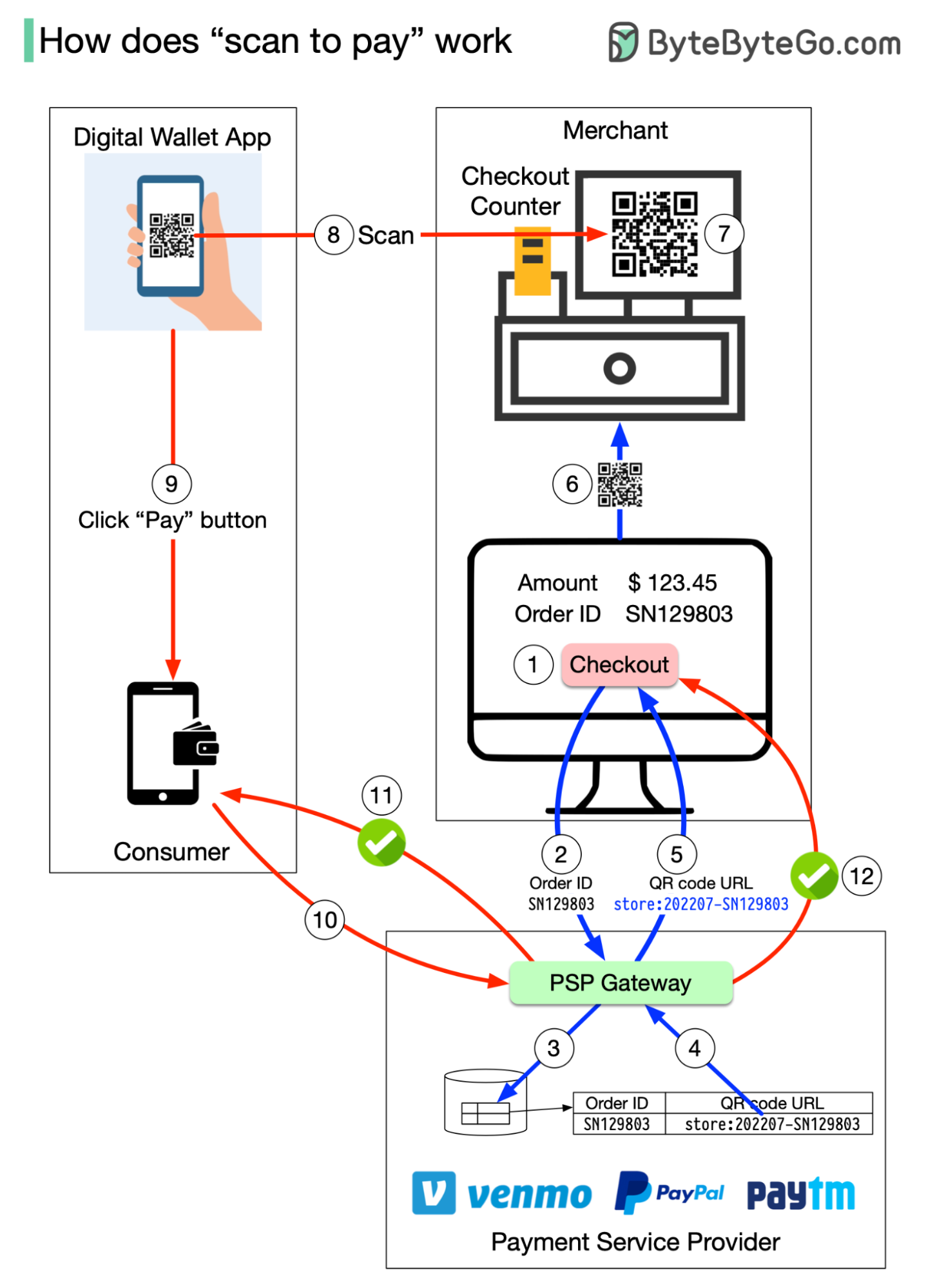
How do you pay from your digital wallet, such as Paypal, Paytm and Venmo, by scanning the QR code?
To understand the process involved, we need to divide the “scan to pay” process into two sub-processes:
- Merchant generates a QR code and displays it on the screen
- Consumer scans the QR code and pays
Here are the steps for generating the QR code:
- When you want to pay for your shopping, the cashier tallies up all the goods and calculates the total amount due, for example, $123.45. The checkout has an order ID of SN129803. The cashier clicks the “checkout” button.
- The cashier’s computer sends the order ID and the amount to PSP.
- The PSP saves this information to the database and generates a QR code URL.
- PSP’s Payment Gateway service reads the QR code URL.
- The payment gateway returns the QR code URL to the merchant’s computer.
- The merchant’s computer sends the QR code URL (or image) to the checkout counter.
- The checkout counter displays the QR code.
These 7 steps complete in less than a second. Now it’s the consumer’s turn to pay from their digital wallet by scanning the QR code:
- The consumer opens their digital wallet app to scan the QR code.
- After confirming the amount is correct, the client clicks the “pay” button.
- The digital wallet App notifies the PSP that the consumer has paid the given QR code.
- The PSP payment gateway marks this QR code as paid and returns a success message to the consumer’s digital wallet App.
- The PSP payment gateway notifies the merchant that the consumer has paid the given QR code.