 ee4b7305a2
This PR adds all the guides from [Visual
Guides](https://bytebytego.com/guides/) section on bytebytego to the
repository with proper links.

- [x] Markdown files for guides and categories are placed inside
`data/guides` and `data/categories`
- [x] Guide links in readme are auto-generated using
`scripts/readme.ts`. Everytime you run the script `npm run
update-readme`, it reads the categories and guides from the above
mentioned folders, generate production links for guides and categories
and populate the table of content in the readme. This ensures that any
future guides and categories will automatically get added to the readme.
- [x] Sorting inside the readme matches the actual category and guides
sorting on production
1.4 KiB
title, description, image, createdAt, draft, categories, tags
| title | description | image | createdAt | draft | categories | tags | |||
|---|---|---|---|---|---|---|---|---|---|
| How Does a VPN Work? | Explore how VPNs create secure connections for online privacy. | https://assets.bytebytego.com/diagrams/0052-how-a-vpn-works.png | 2024-03-06 | false |
|
|
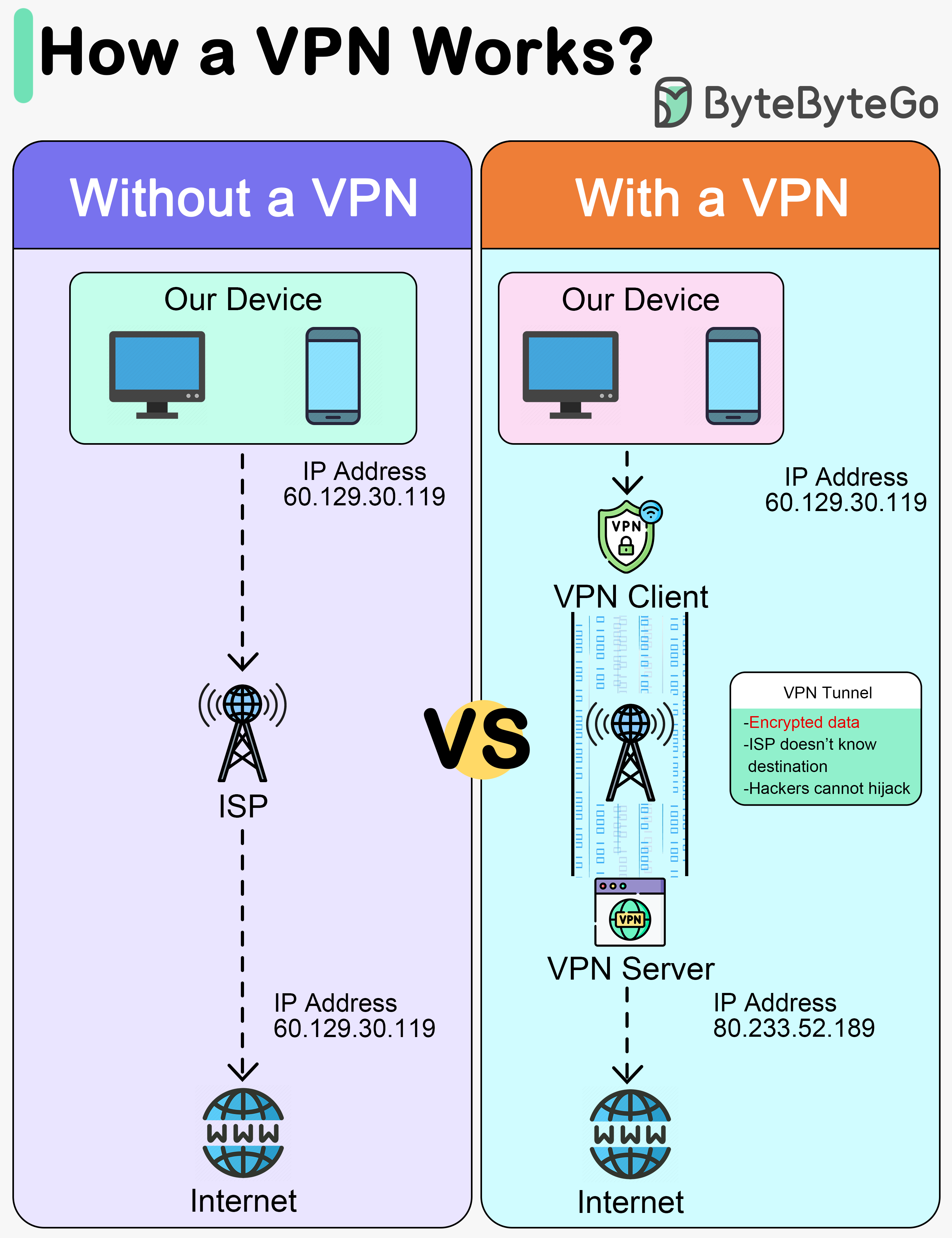
This diagram below shows how we access the internet with and without VPNs.
A VPN, or Virtual Private Network, is a technology that creates a secure, encrypted connection over a less secure network, such as the public internet. The primary purpose of a VPN is to provide privacy and security to data and communications.
A VPN acts as a tunnel through which the encrypted data goes from one location to another. Any external party cannot see the data transferring.
A VPN works in 4 steps:
-
Step 1 - Establish a secure tunnel between our device and the VPN server.
-
Step 2 - Encrypt the data transmitted.
-
Step 3 - Mask our IP address, so it appears as if our internet activity is coming from the VPN server.
-
Step 4 - Our internet traffic is routed through the VPN server.
Advantages of a VPN:
- Privacy
- Anonymity
- Security
- Encryption
- Masking the original IP address
Disadvantages of a VPN:
- VPN blocking
- Slow down connections
- Trust in VPN provider