mirror of
https://github.com/ByteByteGoHq/system-design-101.git
synced 2026-04-01 16:57:23 -04:00
 ee4b7305a2
This PR adds all the guides from [Visual
Guides](https://bytebytego.com/guides/) section on bytebytego to the
repository with proper links.

- [x] Markdown files for guides and categories are placed inside
`data/guides` and `data/categories`
- [x] Guide links in readme are auto-generated using
`scripts/readme.ts`. Everytime you run the script `npm run
update-readme`, it reads the categories and guides from the above
mentioned folders, generate production links for guides and categories
and populate the table of content in the readme. This ensures that any
future guides and categories will automatically get added to the readme.
- [x] Sorting inside the readme matches the actual category and guides
sorting on production
1.7 KiB
1.7 KiB
title, description, image, createdAt, draft, categories, tags
| title | description | image | createdAt | draft | categories | tags | |||
|---|---|---|---|---|---|---|---|---|---|
| How Does a Typical Push Notification System Work? | Explore the architecture of a typical push notification system. | https://assets.bytebytego.com/diagrams/0042-design-a-notification-push-system.png | 2024-02-24 | false |
|
|
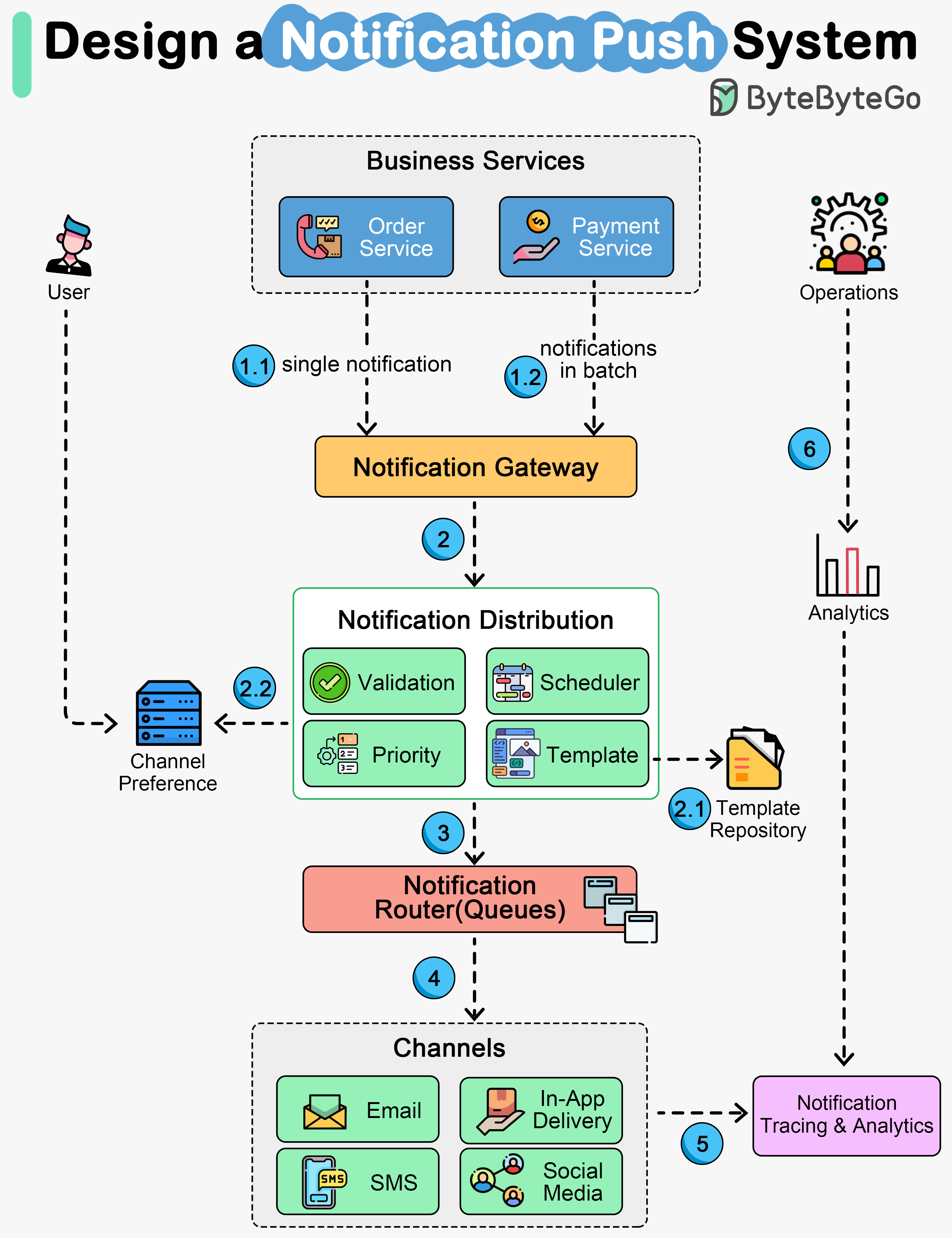
The diagram above shows the architecture of a notification system that covers major notification channels:
- In-App notifications
- Email notifications
- SMS and OTP notifications
- Social media pushes
Let’s walk through the steps.
- Steps 1.1 and 1.2 - The business services send notifications to the notification gateway. The gateway can handle two modes: one mode receives one notification each time, and the other receives notifications in batches.
- Steps 2, 2.1, and 2.2 - The notification gateway forwards the notifications to the distribution service, where the messages are validated, formatted, and scheduled based on settings. The notification template repository allows users to pre-define the message format. The channel preference repository allows users to pre-define the preferred delivery channels.
- Step 3 - The notifications are then sent to the routers, normally message queues.
- Step 4 - The channel services communicate with various internal and external delivery channels, including in-app notifications, email delivery, SMS delivery, and social media apps.
- Steps 5 and 6 - The delivery metrics are captured by the notification tracking and analytics service, where the operations team can view the analytical reports and improve user experiences.