 ee4b7305a2
This PR adds all the guides from [Visual
Guides](https://bytebytego.com/guides/) section on bytebytego to the
repository with proper links.

- [x] Markdown files for guides and categories are placed inside
`data/guides` and `data/categories`
- [x] Guide links in readme are auto-generated using
`scripts/readme.ts`. Everytime you run the script `npm run
update-readme`, it reads the categories and guides from the above
mentioned folders, generate production links for guides and categories
and populate the table of content in the readme. This ensures that any
future guides and categories will automatically get added to the readme.
- [x] Sorting inside the readme matches the actual category and guides
sorting on production
2.7 KiB
title, description, image, createdAt, draft, categories, tags
| title | description | image | createdAt | draft | categories | tags | |||
|---|---|---|---|---|---|---|---|---|---|
| How do we Perform Pagination in API Design? | Learn about API pagination techniques for efficient data retrieval. | https://assets.bytebytego.com/diagrams/0076-api-pagination-101.png | 2024-03-04 | false |
|
|
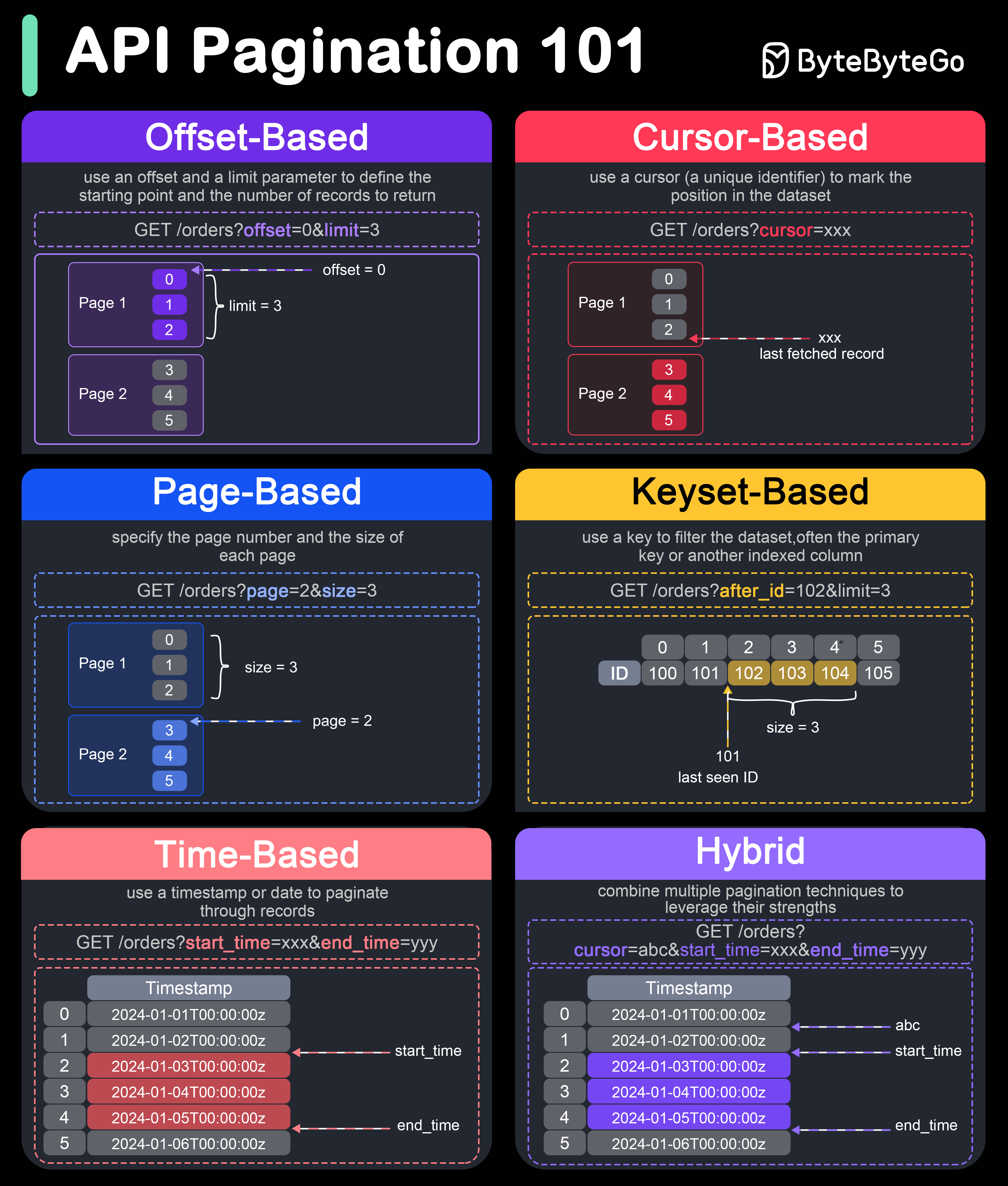
Pagination is crucial in API design to handle large datasets efficiently and improve performance. Here are six popular pagination techniques:
-
Offset-based Pagination:
This technique uses an offset and a limit parameter to define the starting point and the number of records to return.
- Example: GET /orders?offset=0&limit=3
- Pros: Simple to implement and understand.
- Cons: Can become inefficient for large offsets, as it requires scanning and skipping rows.
-
Cursor-based Pagination:
This technique uses a cursor (a unique identifier) to mark the position in the dataset. Typically, the cursor is an encoded string that points to a specific record.
- Example: GET /orders?cursor=xxx
- Pros: More efficient for large datasets, as it doesn't require scanning skipped records.
- Cons: Slightly more complex to implement and understand.
-
Page-based Pagination:
This technique specifies the page number and the size of each page.
- Example: GET /items?page=2&size=3
- Pros: Easy to implement and use.
- Cons: Similar performance issues as offset-based pagination for large page numbers.
-
Keyset-based Pagination:
This technique uses a key to filter the dataset, often the primary key or another indexed column.
- Example: GET /items?after_id=102&limit=3
- Pros: Efficient for large datasets and avoids performance issues with large offsets.
- Cons: Requires a unique and indexed key, and can be complex to implement.
-
Time-based Pagination:
This technique uses a timestamp or date to paginate through records.
- Example: GET /items?start_time=xxx&end_time=yyy
- Pros: Useful for datasets ordered by time, ensures no records are missed if new ones are added.
- Cons: Requires a reliable and consistent timestamp.
-
Hybrid Pagination:
This technique combines multiple pagination techniques to leverage their strengths.
- Example: Combining cursor and time-based pagination for efficient scrolling through time-ordered records.
- Example: GET /items?cursor=abc&start_time=xxx&end_time=yyy
- Pros: Can offer the best performance and flexibility for complex datasets.
- Cons: More complex to implement and requires careful design.