 ee4b7305a2
This PR adds all the guides from [Visual
Guides](https://bytebytego.com/guides/) section on bytebytego to the
repository with proper links.

- [x] Markdown files for guides and categories are placed inside
`data/guides` and `data/categories`
- [x] Guide links in readme are auto-generated using
`scripts/readme.ts`. Everytime you run the script `npm run
update-readme`, it reads the categories and guides from the above
mentioned folders, generate production links for guides and categories
and populate the table of content in the readme. This ensures that any
future guides and categories will automatically get added to the readme.
- [x] Sorting inside the readme matches the actual category and guides
sorting on production
2.3 KiB
title, description, image, createdAt, draft, categories, tags
| title | description | image | createdAt | draft | categories | tags | |||
|---|---|---|---|---|---|---|---|---|---|
| How to Design for High Availability | Explore key strategies for designing systems with high availability. | https://assets.bytebytego.com/diagrams/0211-high-availability.jpg | 2024-03-11 | false |
|
|
What does Availability mean when you design a system?
In the famous CAP theorem by computer scientist Eric Brewer, Availability means all (non-failing) nodes are available for queries in a distributed system. When you send out requests to the nodes, a non-failing node will return a reasonable response within a reasonable amount of time (with no error or timeout).
Usually, we design a system for high availability. For example, when we say the design target is 4-9’s, it means the services should be up 99.99% of the time. This also means the services can only be down for 52.5 minutes per year.
Note that availability only guarantees that we will receive a response; it doesn’t guarantee the data is the most up-to-date.
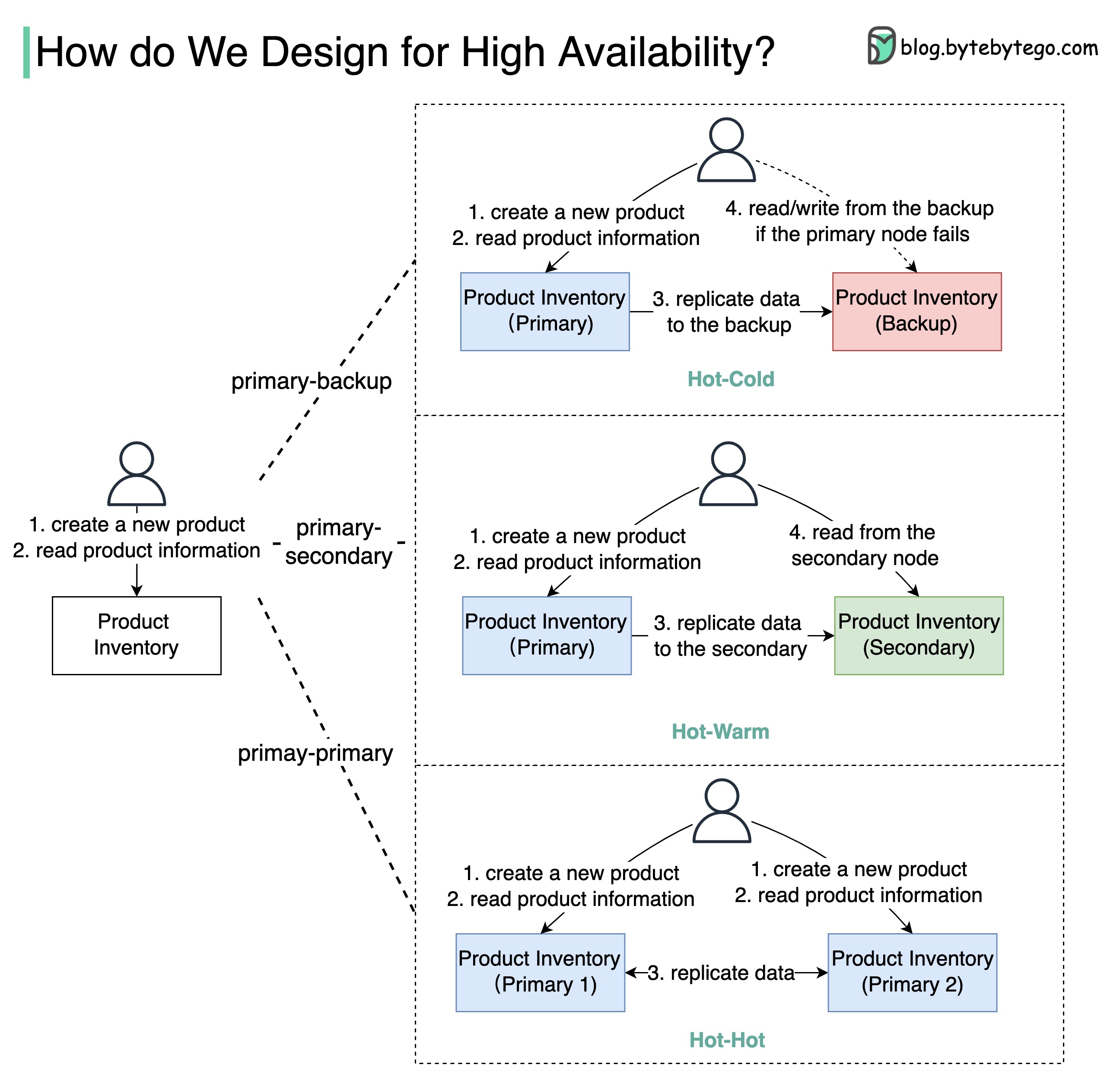
The diagram below shows how we can turn a single-node “Product Inventory” into a double-node architecture with high availability.
High Availability Architectures
-
Primary-Backup: the backup node is just a stand-by, and the data is replicated from primary to backup. When the primary fails, we need to manually switch to the backup node.
The backup node might be a waste of hardware resources.
-
Primary-Secondary: this architecture looks similar to primary-backup architecture, but the secondary node can take read requests to balance the reading load. Due to latency when replicating data from primary to secondary, the data read from the secondary may be inconsistent with the primary.
-
Primary-Primary: both nodes act as primary nodes, both nodes can handle read/write operations, and the data is replicated between the two nodes. This type of architecture increases the throughput, but it has limited use cases. For example, if both nodes need to update the same product, the final state might be unpredictable. Use this architecture with caution!
If we deploy the node on Amazon EC2, which has 90% availability, the double-node architecture will increase availability from 90% to 99%.