 ee4b7305a2
This PR adds all the guides from [Visual
Guides](https://bytebytego.com/guides/) section on bytebytego to the
repository with proper links.

- [x] Markdown files for guides and categories are placed inside
`data/guides` and `data/categories`
- [x] Guide links in readme are auto-generated using
`scripts/readme.ts`. Everytime you run the script `npm run
update-readme`, it reads the categories and guides from the above
mentioned folders, generate production links for guides and categories
and populate the table of content in the readme. This ensures that any
future guides and categories will automatically get added to the readme.
- [x] Sorting inside the readme matches the actual category and guides
sorting on production
1.9 KiB
title, description, image, createdAt, draft, categories, tags
| title | description | image | createdAt | draft | categories | tags | |||
|---|---|---|---|---|---|---|---|---|---|
| How do Apple Pay and Google Pay work? | Explore the mechanics of Apple Pay and Google Pay for secure transactions. | https://assets.bytebytego.com/diagrams/0002-apple-pay.jpg | 2024-03-12 | false |
|
|
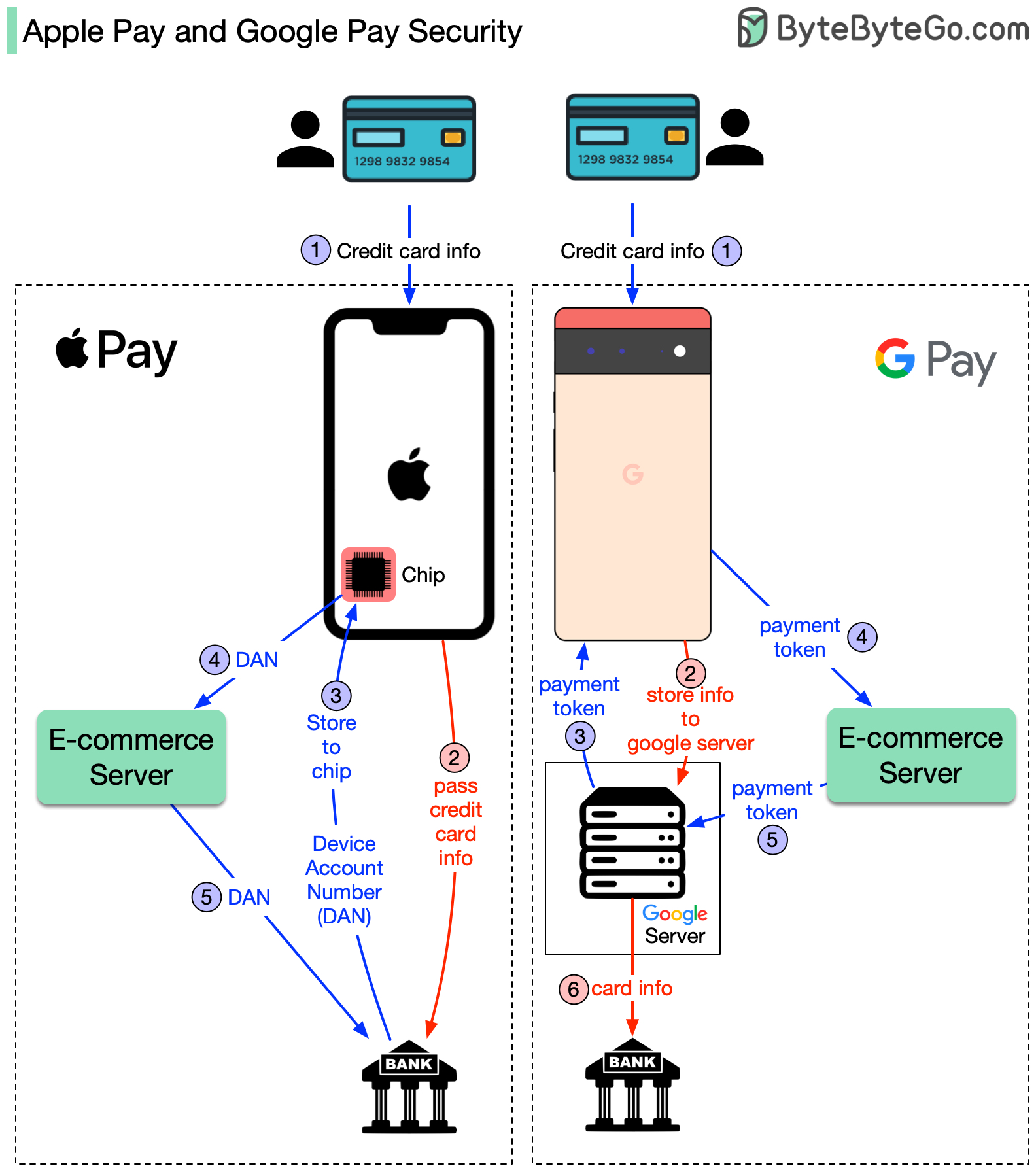
The diagram above shows the differences. Both approaches are very secure, but the implementations are different. To understand the difference, we break down the process into two flows.
Registering your credit card flow
Basic payment flow
- The registration flow is represented by steps 1~3 for both cases. The difference is:
-
Apple Pay: Apple doesn’t store any card info. It passes the card info to the bank. Bank returns a token called DAN (device account number) to the iPhone. iPhone then stores DAN into a special hardware chip.
-
Google Pay: When you register the credit card with Google Pay, the card info is stored in the Google server. Google returns a payment token to the phone.
- When you click the “Pay” button on your phone, the basic payment flow starts. Here are the differences:
-
Apple Pay: For iPhone, the e-commerce server passes the DAN to the bank.
-
Google Pay: In the Google Pay case, the e-commerce server passes the payment token to the Google server. Google server looks up the credit card info and passes it to the bank.
In the diagram, the red arrow means the credit card info is available on the public network, although it is encrypted.
References: