 ee4b7305a2
This PR adds all the guides from [Visual
Guides](https://bytebytego.com/guides/) section on bytebytego to the
repository with proper links.

- [x] Markdown files for guides and categories are placed inside
`data/guides` and `data/categories`
- [x] Guide links in readme are auto-generated using
`scripts/readme.ts`. Everytime you run the script `npm run
update-readme`, it reads the categories and guides from the above
mentioned folders, generate production links for guides and categories
and populate the table of content in the readme. This ensures that any
future guides and categories will automatically get added to the readme.
- [x] Sorting inside the readme matches the actual category and guides
sorting on production
1.8 KiB
title, description, image, createdAt, draft, categories, tags
| title | description | image | createdAt | draft | categories | tags | |||
|---|---|---|---|---|---|---|---|---|---|
| Handling Hotspot Accounts | Learn how to handle hotspot accounts in payment systems effectively. | https://assets.bytebytego.com/diagrams/0212-hotspot-accounts.png | 2024-03-02 | false |
|
|
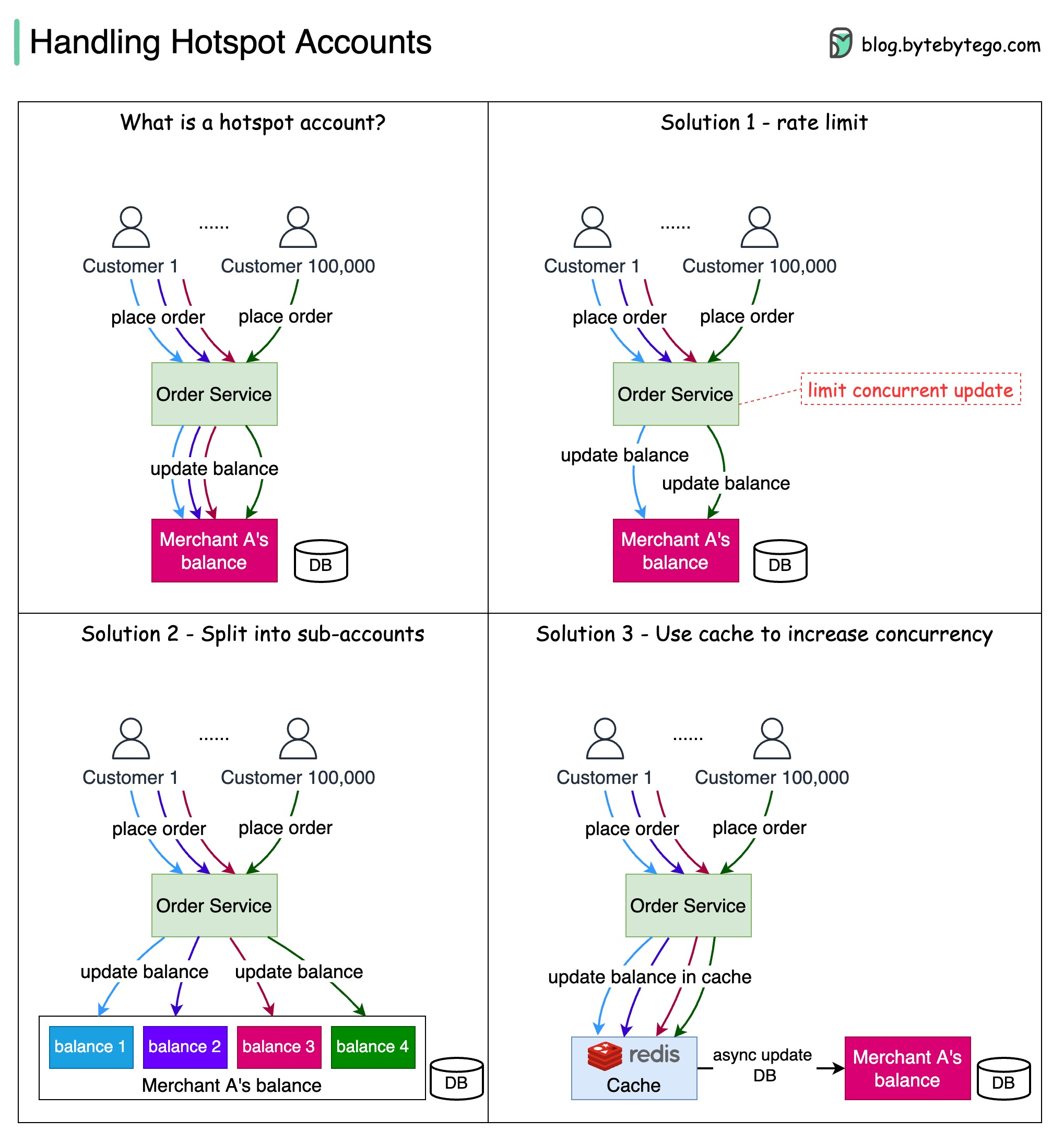
Big accounts, such as Nike, Procter & Gamble & Nintendo, often cause hotspot issues for the payment system.
A hotspot payment account is an account that has a large number of concurrent operations on it.
For example, when merchant A starts a promotion on Amazon Prime day, it receives many concurrent purchasing orders. In this case, the merchant’s account in the database becomes a hotspot account due to frequent updates.
In normal operations, we put a row lock on the merchant’s balance when it gets updated. However, this locking mechanism leads to low throughput and becomes a system bottleneck.
The diagram above shows several optimizations.
Optimizations
-
Rate limit
We can limit the number of requests within a certain period. The remaining requests will be rejected or retried at a later time. It is a simple way to increase the system’s responsiveness for some users, but this can lead to a bad user experience.
-
Split the balance account into sub-accounts
We can set up sub-accounts for the merchant’s account. In this way, one update request only locks one sub-account, and the rest sub-accounts are still available.
-
Use cache to update balance first
We can set up a caching layer to update the merchant’s balance. The detailed statements and balances are updated in the database later asynchronously. The in-memory cache can deal with a much higher throughput than the database.