 ee4b7305a2
This PR adds all the guides from [Visual
Guides](https://bytebytego.com/guides/) section on bytebytego to the
repository with proper links.

- [x] Markdown files for guides and categories are placed inside
`data/guides` and `data/categories`
- [x] Guide links in readme are auto-generated using
`scripts/readme.ts`. Everytime you run the script `npm run
update-readme`, it reads the categories and guides from the above
mentioned folders, generate production links for guides and categories
and populate the table of content in the readme. This ensures that any
future guides and categories will automatically get added to the readme.
- [x] Sorting inside the readme matches the actual category and guides
sorting on production
1.5 KiB
title, description, image, createdAt, draft, categories, tags
| title | description | image | createdAt | draft | categories | tags | |||
|---|---|---|---|---|---|---|---|---|---|
| Git vs GitHub | Explore the differences between Git and GitHub for version control. | https://assets.bytebytego.com/diagrams/0204-git-vs-github.png | 2024-02-27 | false |
|
|
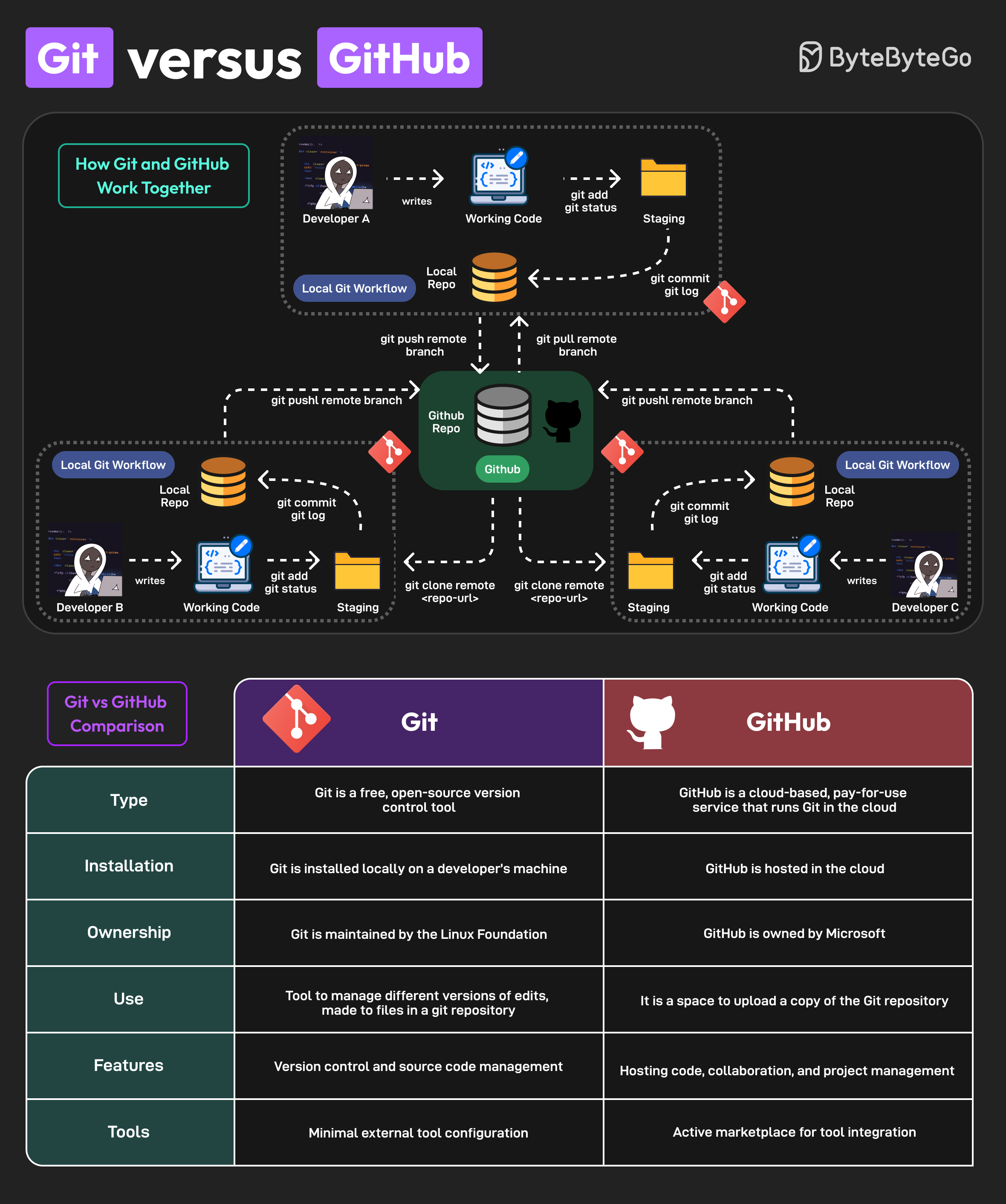
Git and GitHub are popular tools for version control. They work together and complement each other to provide effective source control management.
On a high level, Git is focused on version control and code sharing, whereas GitHub is focused on centralized source code hosting for sharing with other developers.
However, they have some key differences
Key Differences
-
Git is a free, open-source version control tool. GitHub is a cloud-based, pay-for-use service that runs Git in the cloud.
-
Git is installed locally on a developer’s machine. GitHub is hosted in the cloud.
-
The Linux Foundation maintains Git. Microsoft owns GitHub.
-
Git can manage different versions of edits, made to files in a git repository. GitHub is a space to upload a copy of the Git repository.
-
Git supports version control and source code management. GitHub can be used for hosting code, collaboration, and project management.
-
Git has minimal external tool configuration. GitHub provides an active marketplace for tool integration.
Lastly, you can use Git without GitHub but you cannot use GitHub without Git.