mirror of
https://github.com/ByteByteGoHq/system-design-101.git
synced 2026-04-03 01:17:23 -04:00
 ee4b7305a2
This PR adds all the guides from [Visual
Guides](https://bytebytego.com/guides/) section on bytebytego to the
repository with proper links.

- [x] Markdown files for guides and categories are placed inside
`data/guides` and `data/categories`
- [x] Guide links in readme are auto-generated using
`scripts/readme.ts`. Everytime you run the script `npm run
update-readme`, it reads the categories and guides from the above
mentioned folders, generate production links for guides and categories
and populate the table of content in the readme. This ensures that any
future guides and categories will automatically get added to the readme.
- [x] Sorting inside the readme matches the actual category and guides
sorting on production
1.3 KiB
1.3 KiB
title, description, image, createdAt, draft, categories, tags
| title | description | image | createdAt | draft | categories | tags | |||
|---|---|---|---|---|---|---|---|---|---|
| Git Merge vs. Git Rebase | Understand the difference between Git merge and Git rebase commands. | https://assets.bytebytego.com/diagrams/0203-git-merge-git-rebase.jpg | 2024-02-28 | false |
|
|
What are the differences?
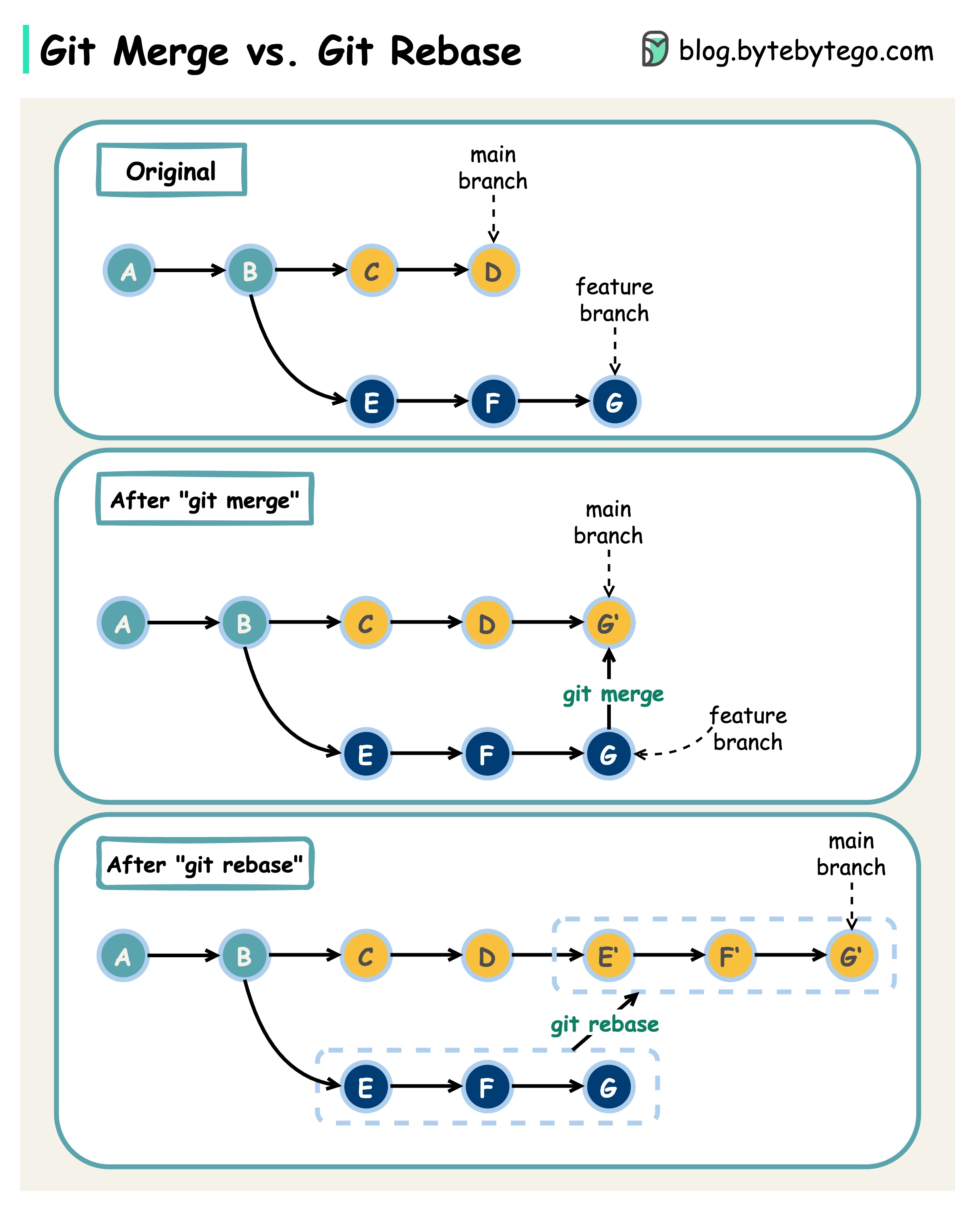
When we 𝐦𝐞𝐫𝐠𝐞 𝐜𝐡𝐚𝐧𝐠𝐞𝐬 from one Git branch to another, we can use ‘git merge’ or ‘git rebase’. The diagram below shows how the two commands work.
Git Merge
This creates a new commit G’ in the main branch. G’ ties the histories of both main and feature branches.
Git merge is 𝐧𝐨𝐧-𝐝𝐞𝐬𝐭𝐫𝐮𝐜𝐭𝐢𝐯𝐞. Neither the main nor the feature branch is changed.
Git Rebase
Git rebase moves the feature branch histories to the head of the main branch. It creates new commits E’, F’, and G’ for each commit in the feature branch.
The benefit of rebase is that it has 𝐥𝐢𝐧𝐞𝐚𝐫 𝐜𝐨𝐦𝐦𝐢𝐭 𝐡𝐢𝐬𝐭𝐨𝐫𝐲.
Rebase can be dangerous if “the golden rule of git rebase” is not followed.
The Golden Rule of Git Rebase
Never use it on public branches!