mirror of
https://github.com/ByteByteGoHq/system-design-101.git
synced 2026-04-05 01:37:24 -04:00
 ee4b7305a2
This PR adds all the guides from [Visual
Guides](https://bytebytego.com/guides/) section on bytebytego to the
repository with proper links.

- [x] Markdown files for guides and categories are placed inside
`data/guides` and `data/categories`
- [x] Guide links in readme are auto-generated using
`scripts/readme.ts`. Everytime you run the script `npm run
update-readme`, it reads the categories and guides from the above
mentioned folders, generate production links for guides and categories
and populate the table of content in the readme. This ensures that any
future guides and categories will automatically get added to the readme.
- [x] Sorting inside the readme matches the actual category and guides
sorting on production
2.2 KiB
2.2 KiB
title, description, image, createdAt, draft, categories, tags
| title | description | image | createdAt | draft | categories | tags | |||
|---|---|---|---|---|---|---|---|---|---|
| Fixing Bugs Automatically at Meta Scale | Meta's approach to automated bug fixing at scale using SapFix. | https://assets.bytebytego.com/diagrams/0193-fixing-bugs-automatically-at-meta-scale.png | 2024-02-16 | false |
|
|
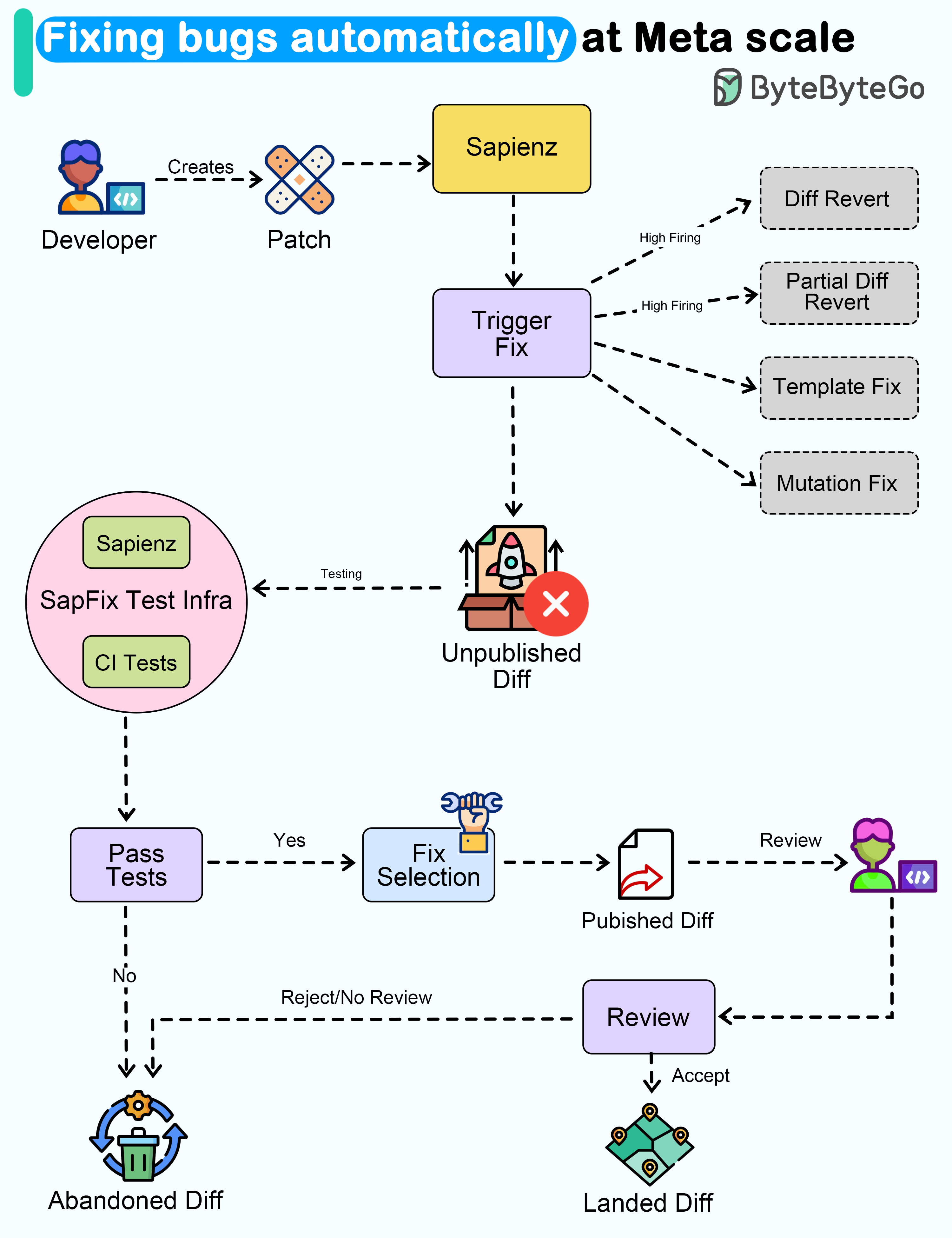
Wouldn't it be nice if a system could automatically detect and fix bugs for us?
Meta released a paper about how they automated end-to-end repair at the Facebook scale. Let's take a closer look.
The goal of a tool called SapFix is to simplify debugging by automatically generating fixes for specific issues.
How successful has SapFix been?
Here are some details that have been made available:
-
Used on six key apps in the Facebook app family (Facebook, Messenger, Instagram, FBLite, Workplace and Workchat). Each app consists of tens of millions of lines of code
-
It generated 165 patches for 57 crashes in a 90-day pilot phase
-
The median time from fault detection to fix sent for human approval was 69 minutes.
Here’s how SapFix actually works:
- Developers submit changes for review using Phabricator (Facebook’s CI system)
- SapFix selects appropriate test cases from Sapienz (Facebook’s automated test case design system) and executes them on the Diff submitted for review
- When SapFix detects a crash due to the Diff, it tries to generate potential fixes. There are 4 types of fixes - template, mutation, full revert and partial revert.
- For generating a fix, SapFix runs tests on the patched builds and checks what works. Think of it like solving a puzzle by trying out different pieces.
- Once the patches are tested, SapFix selects a candidate patch and sends it to a human reviewer for review through Phabricator.
- The primary reviewer is the developer who raised the change that caused the crash. This developer often has the best technical context. Other engineers are also subscribed to the proposed Diff.
- The developer can accept the patch proposed by SapFix. However, the developer can also reject the fix and discard it.