 ee4b7305a2
This PR adds all the guides from [Visual
Guides](https://bytebytego.com/guides/) section on bytebytego to the
repository with proper links.

- [x] Markdown files for guides and categories are placed inside
`data/guides` and `data/categories`
- [x] Guide links in readme are auto-generated using
`scripts/readme.ts`. Everytime you run the script `npm run
update-readme`, it reads the categories and guides from the above
mentioned folders, generate production links for guides and categories
and populate the table of content in the readme. This ensures that any
future guides and categories will automatically get added to the readme.
- [x] Sorting inside the readme matches the actual category and guides
sorting on production
1.3 KiB
title, description, image, createdAt, draft, categories, tags
| title | description | image | createdAt | draft | categories | tags | |||
|---|---|---|---|---|---|---|---|---|---|
| Evolution of the Netflix API Architecture | Explore the evolution of Netflix API architecture through four stages. | https://assets.bytebytego.com/diagrams/0290-netflix-api.png | 2024-03-11 | false |
|
|
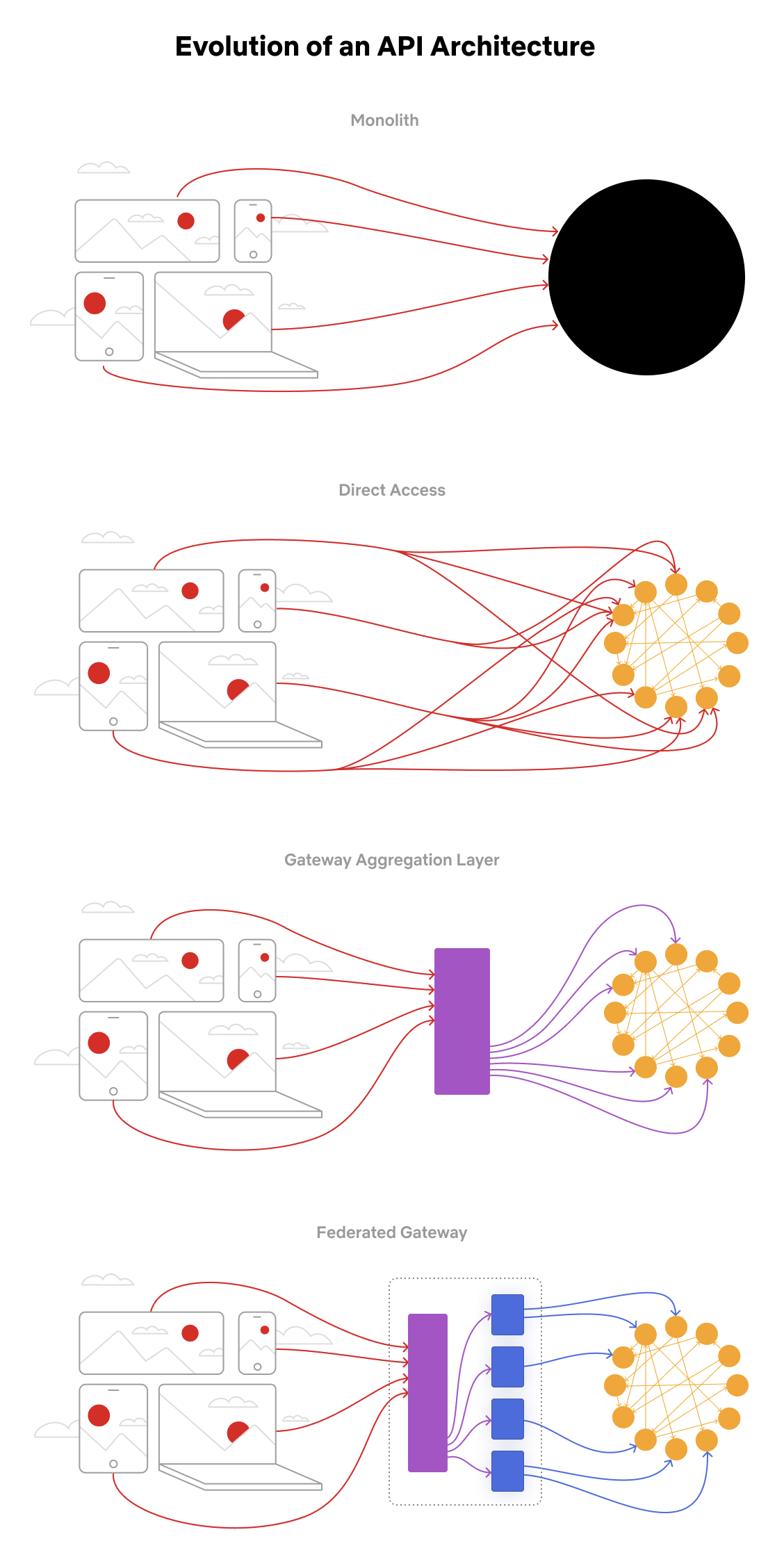
The Netflix API architecture went through 4 main stages.
Monolith. The application is packaged and deployed as a monolith, such as a single Java WAR file, Rails app, etc. Most startups begin with a monolith architecture.
Direct access. In this architecture, a client app can make requests directly to the microservices. With hundreds or even thousands of microservices, exposing all of them to clients is not ideal.
Gateway aggregation layer. Some use cases may span multiple services, we need a gateway aggregation layer. Imagine the Netflix app needs 3 APIs (movie, production, talent) to render the frontend. The gateway aggregation layer makes it possible.
Federated gateway. As the number of developers grew and domain complexity increased, developing the API aggregation layer became increasingly harder. GraphQL federation allows Netflix to set up a single GraphQL gateway that fetches data from all the other APIs.